PowerScale: El sistema de auditoría está inactivo
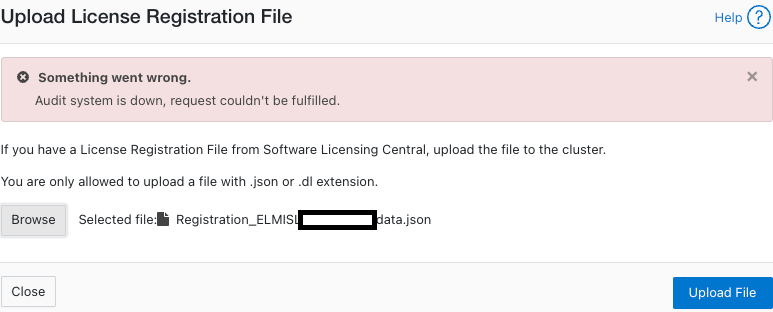
Sammendrag: Aparece el mensaje de error "El sistema de auditoría está inactivo, la solicitud no se pudo cumplir" cuando se intenta activar una licencia (en modo offline o heredado).
Denne artikkelen gjelder for
Denne artikkelen gjelder ikke for
Denne artikkelen er ikke knyttet til noe bestemt produkt.
Det er ikke produktversjonene som identifiseres i denne artikkelen.
Symptomer
Error en los mensajes:
powerscale-3:  2026-06-03T15:34:28.375440-07:00 <3.3> powerscale3(id20) isi_papi_d[64129]: Cannot deliver audit event to the audit daemon. Event payload size (72521) + format length is greater than allowed size (65525)
powerscale-3:  2026-06-03T15:37:33.008372-07:00 <3.3> powerscale-3(id20) isi_papi_d[65089]: Cannot deliver audit event to the audit daemon. Event payload size (72521) + format length is greater than allowed size (65525)
powerscale-3:  2026-06-03T16:18:41.035297-07:00 <3.3> powerscale-3(id20)  isi_papi_d[50492]: STACK Audit system is down, request couldn't be fulfilled.     from --- (---:0):      isi_exception::isi_exception(int, char const*, __va_list_tag*) (OFFSET:134)     api_exception::api_exception(api_error_code, char const*, ...) (OFFSET:146)     uri_manager::execute_request(request&, response&, bool, bool, bool, bool, bool, bool) (OFFSET:2181)
En la interfaz de usuario de, realice lo siguiente:
Årsak
Un defecto en el código en el que el tamaño de la carga útil supera el límite.
Oppløsning
El equipo de ingeniería está al tanto del problema y está trabajando para encontrar una solución.
Solución alternativa:
- Verifique que la auditoría de configuración esté habilitada:
powerscale-3# isi audit settings global view
     Protocol Auditing Enabled: Yes
                 Audited Zones: -
               CEE Server URIs:
                      Hostname:
       Config Auditing Enabled: Yes  <<<<<<<<<<<<<<<<<<<<<<<<<<<
         Config Syslog Enabled: No
         Config Syslog Servers: -
     Config Syslog TLS Enabled: No
  Config Syslog Certificate ID:
       Protocol Syslog Servers: -
   Protocol Syslog TLS Enabled: No
Protocol Syslog Certificate ID:
         System Syslog Enabled: No
         System Syslog Servers: -
     System Syslog TLS Enabled: No
  System Syslog Certificate ID:
          Auto Purging Enabled: No
              Retention Period: 180
       System Auditing Enabled: No
powerscale-3#
Nota: Si esta opción se configura en No, hay un problema diferente. Comuníquese con el soporte de Dell Technologies.
- Establezca la auditoría de configuración en deshabilitada temporalmente:
powerscale-3# isi audit settings global modify --config-auditing-enabled=false
- Vuelva a aplicar la licencia y, a continuación, habilítela:
powerscale-3# isi audit settings global modify --config-auditing-enabled=true
Artikkelegenskaper
Artikkelnummer: 000486487
Artikkeltype: Solution
Sist endret: 08 jul. 2026
Versjon: 1
Få svar på spørsmålene dine fra andre Dell-brukere
Støttetjenester
Sjekk om enheten din er dekket av støttetjenestene.