Avamar:群集配置错误 SQL AG、Exchange DAG 或 Hyper-V
Summary: 本文提供了从 Windows作系统 (OS) 中手动删除 Avamar 群集服务的步骤。
Acest articol se aplică pentru
Acest articol nu se aplică pentru
Acest articol nu este legat de un produs specific.
Acest articol nu acoperă toate versiunile de produs existente.
Symptoms
Avamar 群集配置向导无法安装和卸载 Exchange DAG 或 Hyper-V 群集配置。
av_cluster_config_wizard WARN<0000>:  Unable to retrieve any cluster group agent information for the plug-in associated with pin file: 'windows.pin'.
av_cluster_config_wizard WARN<0000>:  The cluster agent resource does not exist. This is expected if the cluster has not yet been configured.
av_cluster_config_wizard WARN<0000>:  Unable to get Avamar server settings because no Cluster Group Agents were detected. This is expected if the cluster has not yet been configured.
av_cluster_config_wizard WARN<0000>:  The cluster agent resource does not exist. This is expected if the cluster has not yet been configured.
群集配置向导无法安装和卸载 SQL AG。 Exchange DAG 或 Hyper-V 群集。
Cause
Avagent 已在故障切换群集管理器工具中手动删除了 SQL AG、Exchange DAG 或 Hyper-V 群集的群集角色:
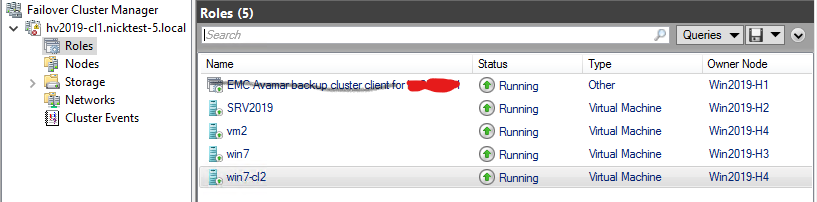
但是, Avagent 群集服务保留在 services.msc 安慰:

Resolution
- 验证 SQL AG、Exchange DAG 或 Hyper-V
Avagent群集服务仍已安装,打开services.mscMicrosoft Windows 中的控制台。复制服务名称字段中的值,然后关闭services.msc控制台(*重要!见下文)。 - 在客户端计算机或服务器上以管理员身份打开 Windows 命令提示符。
- 使用以下命令获取服务配置信息:
sc [<ServerName>] qc [<ServiceDisplayName>]- 获取统计信息
Avagent本地计算机上的群集服务:
sc qc "Avamar Backup Agent for hv2019"- 使用”
sc delete“命令删除服务:sc [<ServerName>] delete [<ServiceName>]
示例:
sc delete "Avamar Backup Agent for hv2019".在具有相同问题的群集节点上重复该过程。
*重要提示!关闭 services.msc 控制台提高了手动删除 Avagent 使用 Windows 命令提示符从 中的群集服务 services.msc 安慰。否则,如果服务删除命令成功,则计划停机时间以重新启动群集节点,但 Avagent 群集服务仍然存在于 services.msc 安慰。
Produse afectate
Avamar, Avamar Plug-in for Exchange VSS, Avamar Plug-in for Hyper-V VSS, Avamar Plug-in for SQLProprietăți articol
Article Number: 000041427
Article Type: Solution
Ultima modificare: 17 Dec 2025
Version: 4
Găsiți răspunsuri la întrebările dvs. de la alți utilizatori Dell
Servicii de asistență
Verificați dacă dispozitivul dvs. este acoperit de serviciile de asistență.