How to subscribe to Dell Technical Advisories (DTAs) and Dell Security Advisories (DSAs)
Summary: How to subscribe or unsubscribe from Dell DTA's or DSA's.
Acest articol se aplică pentru
Acest articol nu se aplică pentru
Acest articol nu este legat de un produs specific.
Acest articol nu acoperă toate versiunile de produs existente.
Instructions
Dell Technologies issues advisories for Dell products in order to notify you about critical issues and potential impacts on their environment. Set up automated email notifications whenever a Dell security or technical advisory is issued or only when an advisory is issued for a specific product.
For steps to remediate an advisory, see Managing security and technical advisories within MyService360. A login is required for MyService360.
1. Log in to https://www.dell.com/support.
2. On the top-right corner, hover over and click Dell Preferences. The Account Settings & Preferences page is displayed.
3. Click the NOTIFICATIONS & ALERTS tab and click the Product Advisories tab.
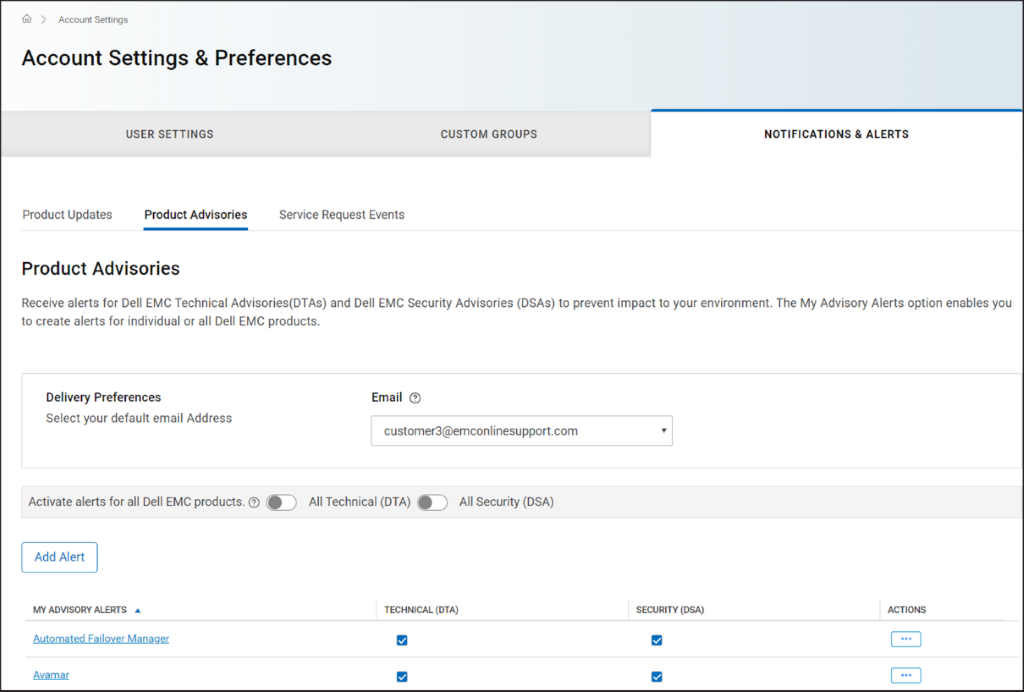
Figure 1 Product Advisories tab
4. In the Delivery Preferences pane, select the email address at which you want to receive the notifications.
5. To receive email notifications whenever an advisory is issued, perform the following:
NOTE: By default, email notifications are sent for both technical and security advisories. Depending on your requirement, you can clear the checkboxes in the TECHNICAL (DTA) or SECURITY (DSA) columns.
For steps to remediate an advisory, see Managing security and technical advisories within MyService360. A login is required for MyService360.
1. Log in to https://www.dell.com/support.
2. On the top-right corner, hover over
and click Dell Preferences. The Account Settings & Preferences page is displayed.
3. Click the NOTIFICATIONS & ALERTS tab and click the Product Advisories tab.
Figure 1 Product Advisories tab
4. In the Delivery Preferences pane, select the email address at which you want to receive the notifications.
5. To receive email notifications whenever an advisory is issued, perform the following:
- For technical advisories, turn on the All Technical (DTA) toggle switch.
- For security advisories, turn on the All Security (DSA) toggle switch.
- Click Add Alert.
- Enter a product name and click Add Product.
- The alert is created and displayed on the Product Advisories page.
Proprietăți articol
Article Number: 000113250
Article Type: How To
Ultima modificare: 18 Apr 2026
Version: 8
Găsiți răspunsuri la întrebările dvs. de la alți utilizatori Dell
Servicii de asistență
Verificați dacă dispozitivul dvs. este acoperit de serviciile de asistență.