PowerEdge: Come installare Windows Server Backup utilizzando PowerShell
Summary: Come installare Windows Server Backup utilizzando PowerShell per Windows Server. Segui questi passaggi per installare e gestire i backup del server in modo efficiente.
Acest articol se aplică pentru
Acest articol nu se aplică pentru
Acest articol nu este legat de un produs specific.
Acest articol nu acoperă toate versiunile de produs existente.
Instructions
- Per avviare Windows PowerShell digitare nella finestra del prompt dei comandi
Start PowerShell - Per installare il tipo di backup di Windows Server , digitare
Install-WindowsFeature Windows-Server-Backup
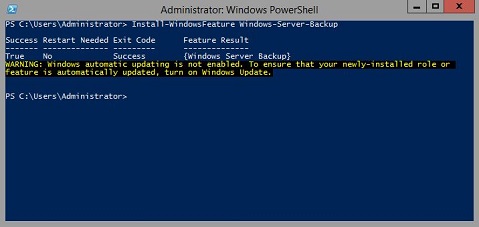
Ulteriori informazioni:
Windows Server Backuphttps://learn.microsoft.com/en-us/previous-versions/windows/it-pro/windows-server-2012-r2-and-2012/jj614621(v=ws.11)

Backup di Windows Server Cmdlet di Windows PowerShellhttps://learn.microsoft.com/en-us/powershell/module/windowsserverbackup/?view=windowsserver2022-ps
Produse afectate
Microsoft Windows 2012 Server, Microsoft Windows 2012 Server R2Produse
C Series, HS Series, Modular Infrastructure, Rack Servers, Tower Servers, XE Servers, XR Servers, OEM Server Solutions, Microsoft Windows Server 2016, Microsoft Windows Server 2019, Microsoft Windows Server 2022, Microsoft Windows 2008 Server R2
, Microsoft Windows 2008 Server Service Pack 2, Microsoft Windows 2012 Server, Microsoft Windows 2012 Server R2
...
Proprietăți articol
Article Number: 000122393
Article Type: How To
Ultima modificare: 05 Sep 2025
Version: 9
Găsiți răspunsuri la întrebările dvs. de la alți utilizatori Dell
Servicii de asistență
Verificați dacă dispozitivul dvs. este acoperit de serviciile de asistență.