PowerEdge:如何使用 PowerShell 安裝 Windows Server Backup
Summary: 如何使用適用於 Windows Server 的 PowerShell 安裝 Windows Server Backup。請遵循這些步驟,以有效地安裝和管理伺服器備份。
Acest articol se aplică pentru
Acest articol nu se aplică pentru
Acest articol nu este legat de un produs specific.
Acest articol nu acoperă toate versiunile de produs existente.
Instructions
- 若要啟動 Windows PowerShell ,請在 命令提示字元 視窗中輸入:
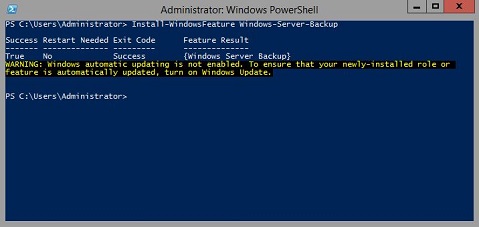
Start PowerShell - 若要安裝 Windows Server 備份 類型
Install-WindowsFeature Windows-Server-Backup
其他資訊:
Windows Server 備份 https://learn.microsoft.com/en-us/previous-versions/windows/it-pro/windows-server-2012-r2-and-2012/jj614621(v=ws.11)

Windows Server 備份 Windows PowerShell Cmdlethttps://learn.microsoft.com/en-us/powershell/module/windowsserverbackup/?view=windowsserver2022-ps
Produse afectate
Microsoft Windows 2012 Server, Microsoft Windows 2012 Server R2Produse
C Series, HS Series, Modular Infrastructure, Rack Servers, Tower Servers, XE Servers, XR Servers, OEM Server Solutions, Microsoft Windows Server 2016, Microsoft Windows Server 2019, Microsoft Windows Server 2022, Microsoft Windows 2008 Server R2
, Microsoft Windows 2008 Server Service Pack 2, Microsoft Windows 2012 Server, Microsoft Windows 2012 Server R2
...
Proprietăți articol
Article Number: 000122393
Article Type: How To
Ultima modificare: 05 Sep 2025
Version: 9
Găsiți răspunsuri la întrebările dvs. de la alți utilizatori Dell
Servicii de asistență
Verificați dacă dispozitivul dvs. este acoperit de serviciile de asistență.