蓝牙省电设置导致连接问题
Summary: 本文介绍如何对在 Windows 11 中间歇性断开连接的蓝牙设备进行故障处理。
Acest articol se aplică pentru
Acest articol nu se aplică pentru
Acest articol nu este legat de un produs specific.
Acest articol nu acoperă toate versiunile de produs existente.
Instructions
蓝牙设备随机断开与 Windows 计算机的连接。
如果您的蓝牙设备随机断开与 Windows 计算机的连接,则可能是因为 Windows 电源管理节省功能所致。
关闭 Windows 电源管理保存功能可能会解决此问题。
更改 Windows 11 中的蓝牙电源管理设置
- 右键单击 Windows 图标并选择设备管理器。
- 单击 蓝牙 左侧的箭头以打开该部分。
- 右键单击蓝牙适配器,然后选择属性(图 1)。
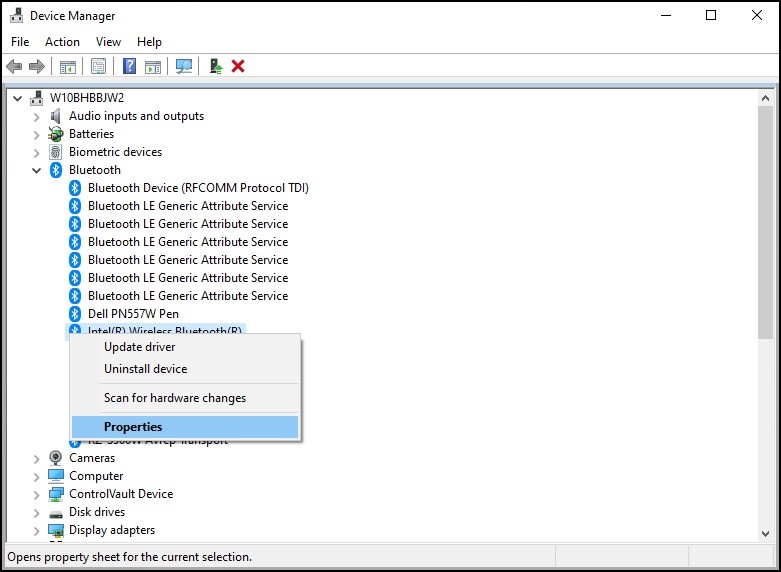
图 1:蓝牙设备窗口 - 此时将打开蓝牙适配器窗口(图 2)。转到 “电源管理 ”选项卡,并确保 清除“允许计算机关闭此设备以节约电源”旁边的复选框。
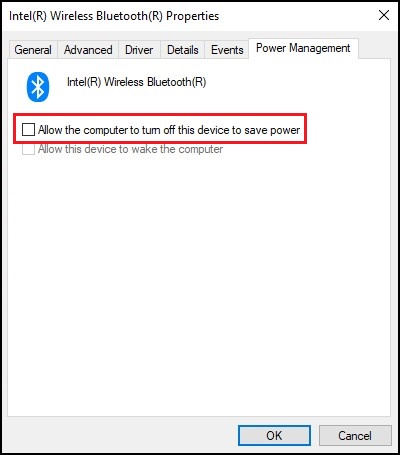
图 2:蓝牙设备属性窗口 - 单击 OK。
如果您的蓝牙设备仍然存在连接问题,请使用 蓝牙无法正常工作?解决配对和检测问题 库页面。
Additional Information
Produse afectate
Alienware, Dell All-in-One, Dell Pro All-in-One, Dell Pro Max Micro, Dell Pro Max Slim, Dell Pro Max Tower, Dell Pro Micro, Dell Pro Slim, Dell Pro Tower, Dell Slim, Dell Tower, Inspiron, Legacy Desktop Models, OptiPlex, Vostro, XPS, G Series
, G Series, Alienware, Dell Plus, Dell Pro, Dell Pro Max, Dell Pro Plus, Dell Pro Premium, Inspiron, Latitude, Dell Pro Rugged, Vostro, XPS, Legacy Laptop Models, Fixed Workstations, Mobile Workstations, Dell Pro Max Micro XE FCM2250, Dell Pro Max Slim XE FCS1250, Dell Pro Max Tower T2 XE FCT2250, Dell Pro Micro Plus XE QBM1250, Dell Pro Slim Plus XE5 QBS1250, Dell Pro Tower Plus XE5 QBT1250
...
Proprietăți articol
Article Number: 000122996
Article Type: How To
Ultima modificare: 13 May 2026
Version: 15
Găsiți răspunsuri la întrebările dvs. de la alți utilizatori Dell
Servicii de asistență
Verificați dacă dispozitivul dvs. este acoperit de serviciile de asistență.