How to Uninstall Dell Endpoint Security Suite Enterprise for Mac
Summary: Learn how to uninstall Dell Endpoint Security Suite for Mac by following these instructions.
Acest articol se aplică pentru
Acest articol nu se aplică pentru
Acest articol nu este legat de un produs specific.
Acest articol nu acoperă toate versiunile de produs existente.
Instructions
Note:
- As of May 2022, Dell Endpoint Security Suite Enterprise has reached End of Maintenance. This product and its articles are no longer updated by Dell. For more information, reference Product Life Cycle (End of Support and End of Life) Policy for Dell Data Security. If you have any questions on alternative articles, either reach out to your sales team or contact endpointsecurity@dell.com.
- Reference Endpoint Security for additional information about current products.
Dell Endpoint Security Suite Enterprise for Mac may be uninstalled for:
- Troubleshooting
- Product incompatibility
- Third-party product conflicts
Affected Products:
- Dell Endpoint Security Suite Enterprise for Mac
Affected Operating Systems:
- Mac
Click the appropriate product versioning of either v1401 and Later or v1391 for the uninstall process. For versioning information, reference How to Identify the Dell Endpoint Security Suite Enterprise Version.
v1401 and Later
- Double-click the Endpoint Security Suite Enterprise-[VERSION]-Release.dmg to mount the installer.
 Note: [VERSION] represents the installer version variable.
 - Double-click Utilities.

- Double-click Uninstall Endpoint Security Suite Enterprise.

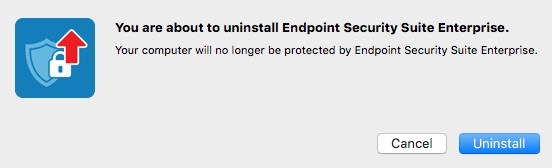
- Click Uninstall.
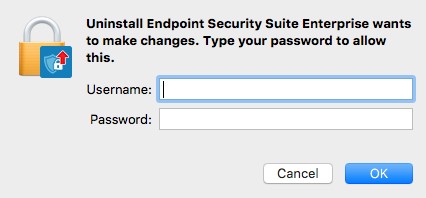
- To confirm uninstall, populate the Username and Password of a local administrator. Once populated, click OK.
- Click OK.
 Note: If a failure is encountered during uninstall, reference How to Collect Logs for Dell Endpoint Security Suite Enterprise.
v1391
- Search using Spotlight for Uninstall DellAdvancedThreatProtection.

- Double-click Uninstall DellAdvancedThreatProtection.

- Click Yes to confirm uninstall of DellAdvancedThreatProtection.

- To confirm uninstall, populate the Username and Password of a local administrator. Once populated click OK.
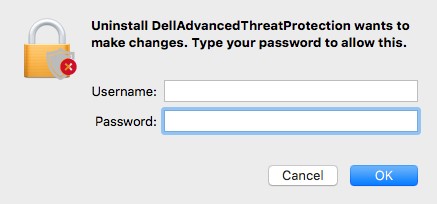
- Uninstall is complete. No restart is required.
Note: If a failure is encountered during uninstall, reference How to Collect Logs for Dell Endpoint Security Suite Enterprise.
Produse afectate
Dell Endpoint Security Suite EnterpriseProprietăți articol
Article Number: 000125465
Article Type: How To
Ultima modificare: 10 Aug 2026
Version: 20
Găsiți răspunsuri la întrebările dvs. de la alți utilizatori Dell
Servicii de asistență
Verificați dacă dispozitivul dvs. este acoperit de serviciile de asistență.