How to Collect Logs for Absolute
Summary: Learn step-by-step instructions to collect logs for Absolute running on a Windows operating system by following these instructions.
Acest articol se aplică pentru
Acest articol nu se aplică pentru
Acest articol nu este legat de un produs specific.
Acest articol nu acoperă toate versiunile de produs existente.
Instructions
This article describes how to collect logs for Absolute. It is highly recommended to collect logs for Absolute before troubleshooting or contacting Dell Data Security ProSupport. For more information, reference Dell Data Security International Support Phone Numbers.
Affected Products:
- Absolute
Affected Operating Systems:
- Windows
Install Logs and Agent Logs may be manually captured when troubleshooting Absolute. Select the appropriate section below for the steps to gather logs.
Install Logs
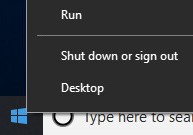
- Right-click the Windows start menu and then click Run.
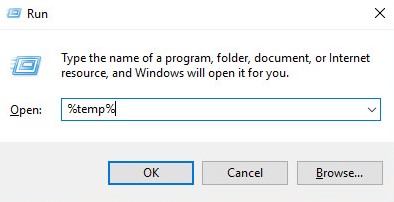
- In the Run UI, type
%temp%and then click OK.
 Note:
Note:%temp%is the Windows variable forC:\Users\<USERNAME>\AppData\Local\Temp. - Capture the MSI logs named
MSIXXXXX.LOG.
 Note: The
XXXXXis randomly generated letters and numbers.
Agent Logs
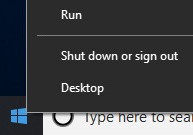
- Right-click the Windows start menu and then click Run.
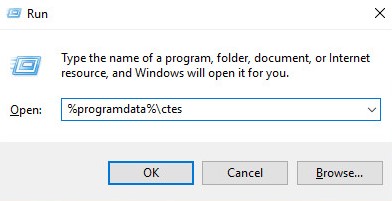
- In the Run UI, type
%programdata%\ctesand then click OK.
 Note:
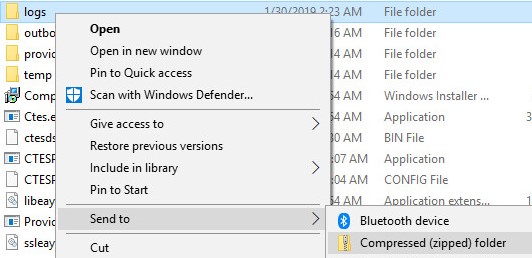
Note:%programdata%is the Windows variable for theprogramdatadirectory. - Right-click the logs folder, select Send to, and then click Compressed (zipped) folder.
To contact support, reference Dell Data Security International Support Phone Numbers.
Go to TechDirect to generate a technical support request online.
For additional insights and resources, join the Dell Security Community Forum.
Produse afectate
AbsoluteProprietăți articol
Article Number: 000129351
Article Type: How To
Ultima modificare: 19 Apr 2026
Version: 10
Găsiți răspunsuri la întrebările dvs. de la alți utilizatori Dell
Servicii de asistență
Verificați dacă dispozitivul dvs. este acoperit de serviciile de asistență.