VPLEX: "show-use-hierarchy" CLI 명령 오류: "이름이 <장치 이름>인 장치가 없습니다."
Summary: 이 문서에서는 레그가 미러에 다시 연결될 때 show-use-hierarchy 명령이 해당 이름의 디바이스가 없다고 보고하는 문제에 대해 설명합니다.
Acest articol se aplică pentru
Acest articol nu se aplică pentru
Acest articol nu este legat de un produs specific.
Acest articol nu acoperă toate versiunile de produs existente.
Symptoms
"show-use-hierarchy" 명령이 레그가 동일한 이름으로 다시 연결된 후 디바이스의 세부 정보를 가져오지 못합니다.
동일한 미러 레그를 다시 연결한 후 "show-use-hierarchy" 명령이 실패하고 다음 오류가 발생합니다.
No device with the name <device name>".
이 오류의 예:
VPlexcli:/> show-use-hierarchy distributed-storage/distributed-devices/device_EAST_UNITY_NONPROD_255
show-use-hierarchy:  Evaluation of <<show-use-hierarchy distributed-storage/distributed-devices/device_EAST_UNITY_NONPROD_255>> failed.
cause:               Cannot get value of attribute 'used-by'.
cause:               Firmware command error.
cause:               No device with the name <device name>.
Cause
N/A
Resolution
-
디바이스 보고 오류를 나열하고 정상 상태인지 확인합니다.
예:
VPlexcli:/> ll /distributed-storage/distributed-devices/device_EAST_UNITY_NONPROD_255

Attributes:
Name                    Value
----------------------  ---------------------------------
application-consistent  false
auto-resume             true
block-count             1342177280
block-size              4K
capacity                5T
clusters-involved       [cluster-1, cluster-2]
geometry                raid-1
health-indications      []
health-state            ok
locality                distributed
operational-status      ok
rebuild-allowed         true
rebuild-eta             -
rebuild-progress        -
rebuild-status          done
rebuild-type            full
rule-set-name           cluster-2-detaches
service-status          running
stripe-depth            -
system-id               device_EAST_UNITY_NONPROD_255
thin-capable            false
transfer-size           2M
virtual-volume          device_EAST_UNITY_NONPROD_255_vol
-
UI에서 디바이스 계층 구조가 표시되는지 확인합니다.
다음 단계에 따라 UI에서 확인합니다.
- Provision storage -- Distributed -- Distributed Devices로 이동합니다.
- 분산 디바이스 이름을 선택하고 DD 이름을 마우스 오른쪽 버튼으로 클릭한 다음 아래와 같이 "View map" 옵션을 클릭합니다.
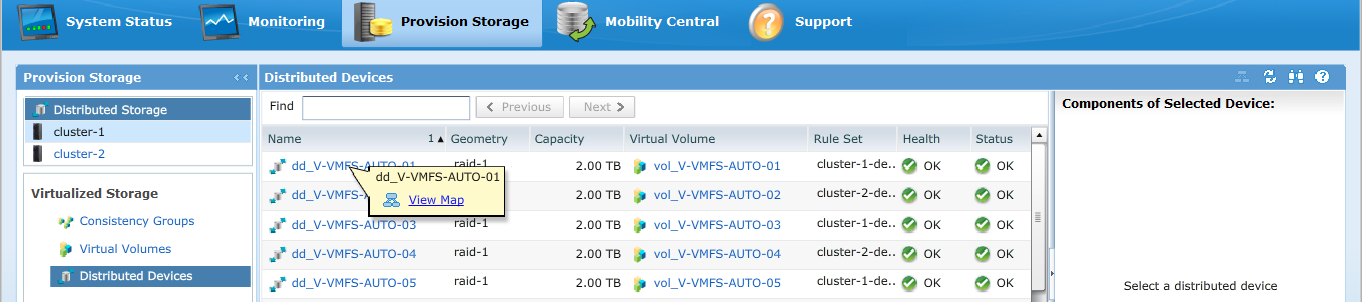
UI 맵 보기의 예: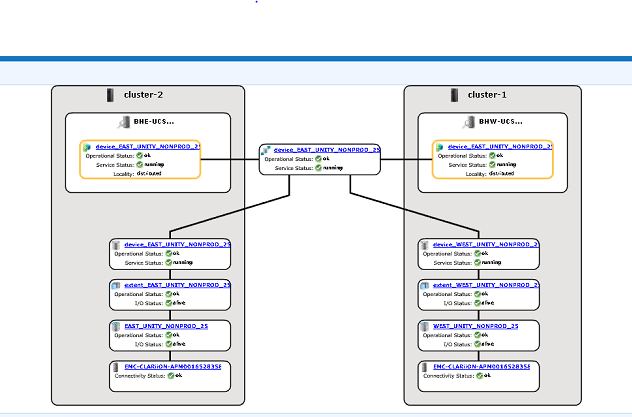
-
맵 보기에 디바이스가 표시되는 경우 아래 해결 방법을 따릅니다.
- 아래 명령을 사용하여 관리 콘솔을 재시작합니다.
service@managementserver:~> sudo /etc/init.d/VPlexManagementConsole restart
Restarting EMC VPlex Management Console...                     done
- 또는 관리 콘솔을 재시작하는 방법은 아래 나열된 문서를 참조하십시오.
000040517: VPLEX: VPlexManagementConsole을 재시작하여 VPLEX CLI 또는 UI를 새로 고치는 방법
- 아래 명령을 사용하여 관리 콘솔을 재시작합니다.
UI에서 디바이스 맵을 볼 수 없거나 VPLEX 관리 콘솔로 문제가 해결되지 않은 경우 VPLEX 지원 팀과 라이브 채팅을 진행하십시오.
참고: 지원 팀과 채팅을 열려면 지원 페이지에서 검은색 메뉴 표시줄이 표시되어야 https://www.dell.com/support/ 메뉴 표시줄의 맨 오른쪽에 있는 "지원 문의"를 클릭하면 "연락처 정보" 페이지로 이동합니다. 화면 오른쪽에 "Dell EMC 관리 채팅"이 있습니다. 이 선택 항목을 클릭하면 라이브 채팅 페이지로 이동합니다. 첫 번째 단계로 "채팅 주제 선택" 필드에서 오른쪽의 드롭다운 화살표를 클릭한 다음 채팅과 관련된 주제를 선택합니다. 그런 다음 요청한 대로 나머지 단계를 수행하고 각 질문/선택에 필요한 정보를 제공합니다.
Additional Information
이 콘텐츠는 다음과 같은 기타 언어로 번역되어 있습니다.
| https://downloads.dell.com/TranslatedPDF/AR-SA_533945.pdf |
| https://downloads.dell.com/TranslatedPDF/DE_533945.pdf |
| https://downloads.dell.com/TranslatedPDF/ES_533945.pdf |
| https://downloads.dell.com/TranslatedPDF/ES-XL_533945.pdf |
| https://downloads.dell.com/TranslatedPDF/FR_533945.pdf |
| https://downloads.dell.com/TranslatedPDF/IT_533945.pdf |
| https://downloads.dell.com/TranslatedPDF/JA_533945.pdf |
| https://downloads.dell.com/TranslatedPDF/KO_533945.pdf |
| https://downloads.dell.com/TranslatedPDF/NL_533945.pdf |
| https://downloads.dell.com/TranslatedPDF/PT_533945.pdf |
| https://downloads.dell.com/TranslatedPDF/PT-BR_533945.pdf |
| https://downloads.dell.com/TranslatedPDF/RU_533945.pdf |
| https://downloads.dell.com/TranslatedPDF/SV_533945.pdf |
| https://downloads.dell.com/TranslatedPDF/ZH-CN_533945.pdf |
| https://downloads.dell.com/TranslatedPDF/ZH-TW_533945.pdf |
Produse afectate
VPLEX SeriesProduse
VPLEX Series, VPLEX VS1, VPLEX VS6Proprietăți articol
Article Number: 000168361
Article Type: Solution
Ultima modificare: 05 Feb 2026
Version: 5
Găsiți răspunsuri la întrebările dvs. de la alți utilizatori Dell
Servicii de asistență
Verificați dacă dispozitivul dvs. este acoperit de serviciile de asistență.