如何取得 Dell Command Update 的 MSI 安裝程式套件
Summary: 了解有關從 Dell Command 檢索 MSI 安裝程式包的更多資訊 |更新 (DCU) 可執行檔。
Acest articol se aplică pentru
Acest articol nu se aplică pentru
Acest articol nu este legat de un produs specific.
Acest articol nu acoperă toate versiunile de produs existente.
Instructions
MSI 安裝程式套裝
以下步驟可用於取得 MSI 安裝程式包:
-
前往 Dell Command |更新 產品頁面。
-
下載 可用的最新版本。
注意:此表中的連結會自動識別電腦。如果這不是首選,請轉到 安裝部分 以安裝首選選項。適用於配備 Intel 或 AMD 處理器的電腦的 DCU 5.7 (2026 年 4 月發佈) 適用於 配備 ARM 處理器的 電腦的 DCU 5.6 (2025 年 11 月發佈) -
以滑鼠右鍵按一下 Windows 開始功能表圖示 ,然後選取執行。
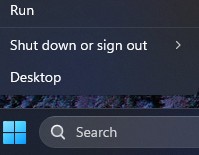
-
在「執行」方塊中,輸入
CMD然後按 按Ctrl + 轉移 + 輸入 鍵同時運行提升的命令提示符。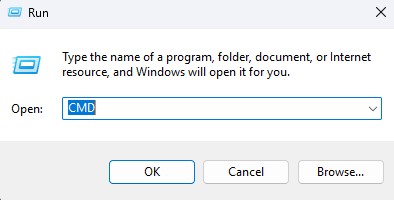
-
如果系統提示您進行使用者帳戶控制 (UAC),請按一下 是 以繼續。
-
瀏覽至下載的可執行檔的資料夾位置。
-
輸入下列命令,然後按下 Enter 鍵:
注意:切換值區分大小寫。Dell-Command-Update-Application_[VERSION].exe /passthrough /X /B”[EXTRACTION PATH]” Example: C:\Dell>Dell-Command-Update-Application_5CR1Y_WIN64_5.6.0_A00.exe /passthrough /X /B”C:\Dell\DCU_Extracted”
-
如果系統提示您解除安裝,請按一下 否 。
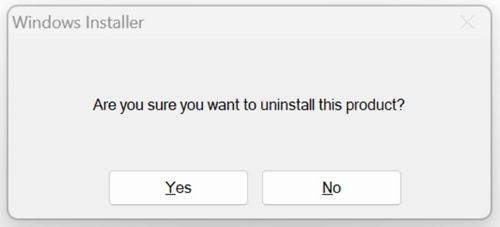
-
在 Windows 檔案總管中,前往
[EXTRACTION PATH],然後找到 MSI 安裝程式包。
Additional Information
建議的文章
以下是一些與本主題相關的建議文章,您可能會感興趣。
Produse afectate
Dell Command | UpdateProprietăți articol
Article Number: 000177292
Article Type: How To
Ultima modificare: 08 May 2026
Version: 17
Găsiți răspunsuri la întrebările dvs. de la alți utilizatori Dell
Servicii de asistență
Verificați dacă dispozitivul dvs. este acoperit de serviciile de asistență.