Avamar BMR:Avamarベア メタル リカバリー ウィザードでデバッグを有効にする
Summary: この記事では、Windowsクライアントのベア メタル リストア(BMR)中にデバッグを有効にする方法について説明します。
Acest articol se aplică pentru
Acest articol nu se aplică pentru
Acest articol nu este legat de un produs specific.
Acest articol nu acoperă toate versiunile de produs existente.
Instructions
BMR中にデバッグを有効にするには、Avamarベア メタル リカバリー ウィザードで「--debug」フラグを2回追加します。
#1 [Select Server]で[Options]をクリックし、「--debug」と入力します(これでavtarの「debug」が有効になります)
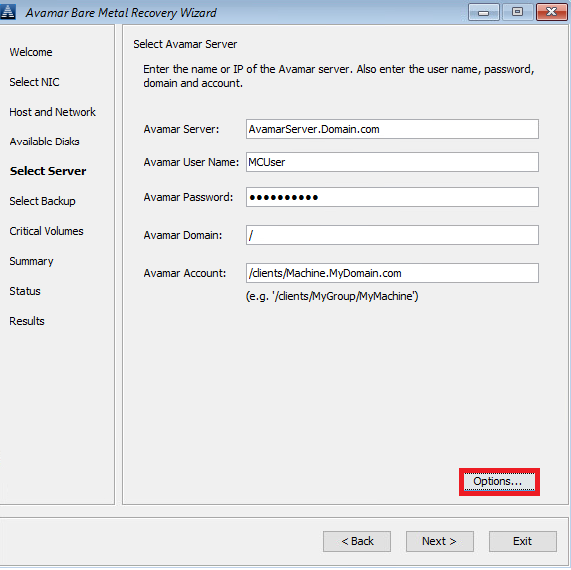
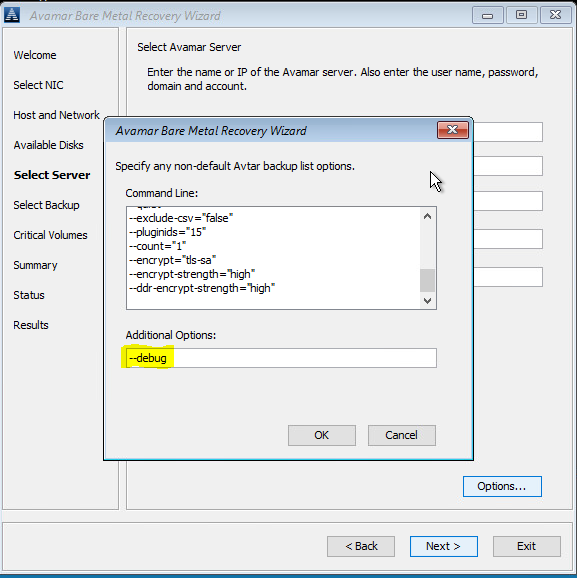
#2 [Summary]で、[Options]をクリックし、「--debug」と入力します(これでavvssの「debug」が有効になります)。


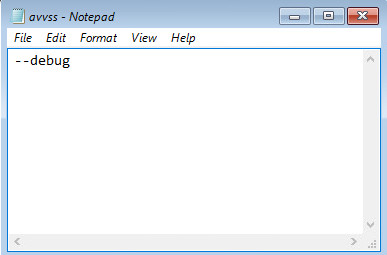
または、コマンド ライン(Avamar BMRウィザードの背後にある「cmd」ウィンドウをクリック)を使用して、 X:\Program Files\avs\varフォルダーにavtar.cmdおよびavvss.cmdファイルを作成します。

notepad avtar.cmd
--debugフラグを追加してファイルを保存します。

notepad avvss.cmd
--debugフラグを追加してファイルを保存します。
#1 [Select Server]で[Options]をクリックし、「--debug」と入力します(これでavtarの「debug」が有効になります)
#2 [Summary]で、[Options]をクリックし、「--debug」と入力します(これでavvssの「debug」が有効になります)。
または、コマンド ライン(Avamar BMRウィザードの背後にある「cmd」ウィンドウをクリック)を使用して、 X:\Program Files\avs\varフォルダーにavtar.cmdおよびavvss.cmdファイルを作成します。
notepad avtar.cmd
--debugフラグを追加してファイルを保存します。
notepad avvss.cmd
--debugフラグを追加してファイルを保存します。
Produse afectate
AvamarProduse
Avamar Client for WindowsProprietăți articol
Article Number: 000197689
Article Type: How To
Ultima modificare: 27 May 2026
Version: 7
Găsiți răspunsuri la întrebările dvs. de la alți utilizatori Dell
Servicii de asistență
Verificați dacă dispozitivul dvs. este acoperit de serviciile de asistență.