PowerEdge:Lifecycle Controllerのリパーパス プロセスを使用してNVRAMをクリアする方法
Summary: Lifecycle Controllerをリモートで使用し、廃棄および転用プロセスでNVRAMをクリアする手順。
Acest articol se aplică pentru
Acest articol nu se aplică pentru
Acest articol nu este legat de un produs specific.
Acest articol nu acoperă toate versiunile de produs existente.
Instructions
LifeCycle Controllerを使用してNVRAMをクリアする方法
物理的なアクセス権がない場合、またはNVRAMジャンパーを使用するためにシステムを停止できない場合は、次の手順に従って、廃棄または転用プロセスを使用してLCCからクリアを実行します。
•起動中にF10キーを使用してLifecycle Controllerを起動します。
• LCC で、左側の [Hardware Configuration ] を選択し、[ Repurpose or Retire System] を選択します。
![LCCハードウェア構成からの[Repurpose or Retire System]オプション](https://supportkb.dell.com/img/ka0Do000000y1fvIAA/ka0Do000000y1fvIAA_ja_1.jpeg)
• [Select Components]画面で、[BIOS](デフォルトにリセットしてNVRAMをクリアする)のボックスのみを選択します
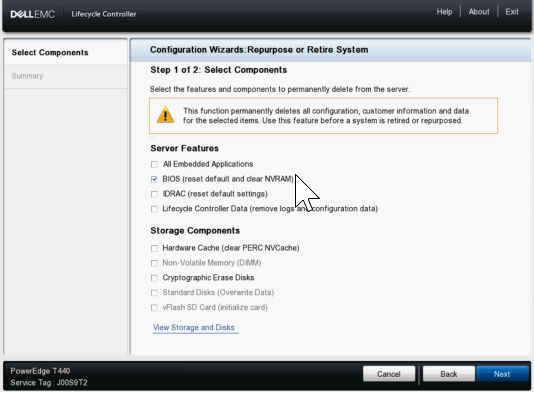
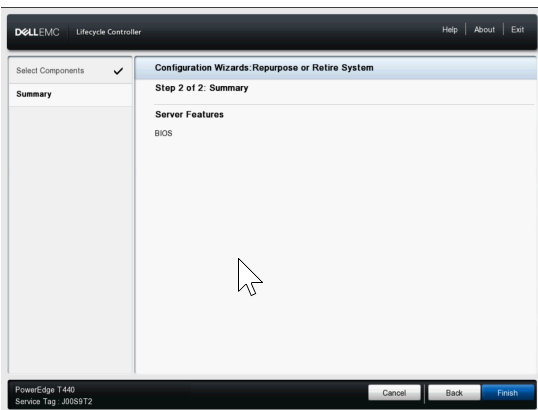
•次に、[Next]をクリックし、次のページにBIOSのみが表示されることを確認してから、[Finish]をクリックします。
• [Yes ] を選択して、System Erase プロセスを続行します。
![システム消去警告で[Yes]を選択するように求められる](https://supportkb.dell.com/img/ka0Do000000y1fvIAA/ka0Do000000y1fvIAA_ja_4.jpeg)
• その後、サーバは再起動して NVRAM クリア設定を有効にし、再起動してクリアを行い、最後に電源がオフになります
•次に、LCCでの起動時に電源を入れ直してNVRAM設定を通常に戻し、完了すると再びシャットダウンします。
• この時点で、サーバの電源を手動でオンにする必要があります。iDRACのライフサイクル ログを確認すると、エントリーが表示されていることを確認できます System Erase job completed successfully.
Produse afectate
C Series, Modular Infrastructure, Rack Servers, XE Servers, XR Servers, OEM Server Solutions, PowerEdge T130, PowerEdge T140, PowerEdge T150, PowerEdge T160, PowerEdge T330, PowerEdge T340, PowerEdge T350, PowerEdge T360, PowerEdge T430
, PowerEdge T440, PowerEdge T550, PowerEdge T560, PowerEdge T630, PowerEdge T640
...
Produse
PowerFlex appliance R650, PowerFlex appliance R6525, PowerFlex appliance R660, PowerFlex appliance R6625, Powerflex appliance R750, PowerFlex appliance R760, PowerFlex appliance R7625, PowerFlex appliance R640, PowerFlex appliance R740XD
, PowerFlex appliance R7525, PowerFlex appliance R840
...
Proprietăți articol
Article Number: 000198446
Article Type: How To
Ultima modificare: 13 May 2026
Version: 5
Găsiți răspunsuri la întrebările dvs. de la alți utilizatori Dell
Servicii de asistență
Verificați dacă dispozitivul dvs. este acoperit de serviciile de asistență.