PowerEdge: De VMNic-uplink toevoegen en verwijderen in ESXI
Summary: VMNICS toevoegen aan en verwijderen van de VSS (Standard Switch) en VDS (Distributed Switch)
Acest articol se aplică pentru
Acest articol nu se aplică pentru
Acest articol nu este legat de un produs specific.
Acest articol nu acoperă toate versiunile de produs existente.
Instructions
- Bekijk de huidige
vSwitchconfiguratie envmkernelInterfaceconfiguratie met deze opdrachten:esxcli network vswitch standard list # list current vswitch configuration esxcli network vswitch dvs vmware list # list Distributed Switch configuration esxcli network ip interface list # list vmkernel interfaces and their configuration esxcli network nic list # display listing of physical adapters and their link state
- Voeg netwerkkaarten (ook wel vmnic's genoemd) toe aan of van een standaard vSwitch met behulp van deze opdrachten:
esxcli network vswitch standard uplink remove --uplink-name=vmnic --vswitch-name=vSwitch # unlink an uplink
esxcli network vswitch standard uplink add --uplink-name=vmnic --vswitch-name=vSwitch # add an uplink
- Voeg netwerkkaarten (ook wel vmnic's genoemd) toe aan of van een vNetwork Distributed Switch (vDS) met behulp van deze opdrachten:
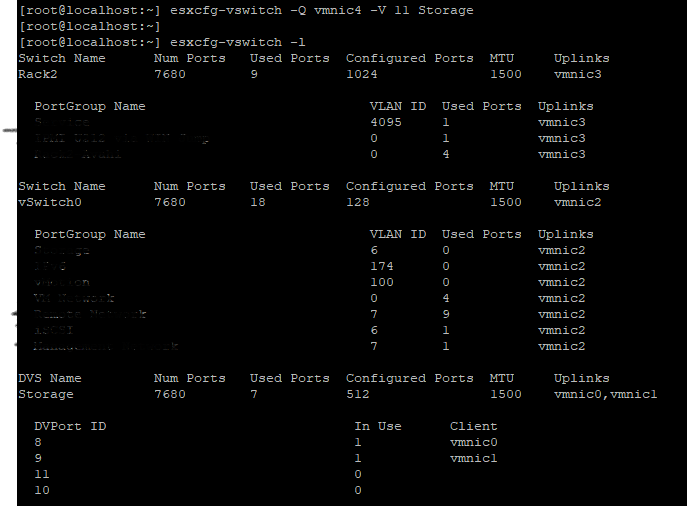
esxcfg-vswitch -Q vmnic -V dvPort_ID_of_vmnic dvSwitch # unlink/remove a vDS uplink
esxcfg-vswitch -P vmnic -V unused_dvPort_ID dvSwitch # add a vDS uplink
Opmerking: Als de connectiviteit wegvalt bij het migreren van beheernetwerken naar een gedistribueerde switch, kan het nodig zijn om de bestaande VMkernel-beheerinterface te verwijderen of uit te schakelen en opnieuw te maken in een standaard vSwitch-poortgroep met dezelfde IP-configuratie.
Voorbeeld:-
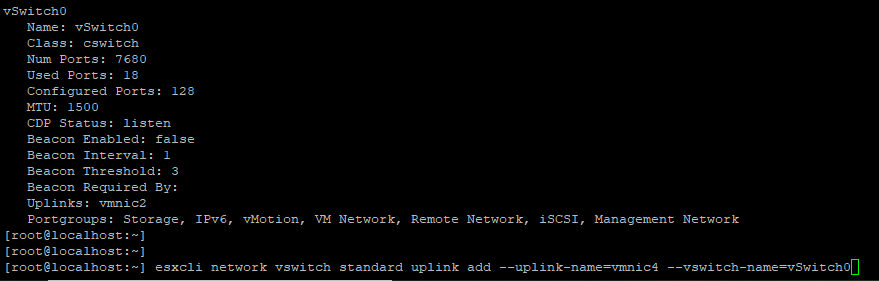
Vmnci4 toevoegen aan
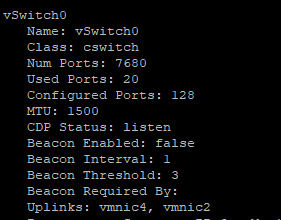
Controleer de
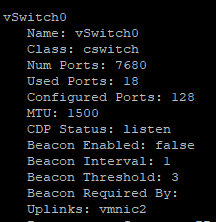
De VMNIC uit uplink verwijderen

0 Toevoegen
Voordat u de uplinkpoort toevoegt, moet u ervoor zorgen dat de DVS-naam en
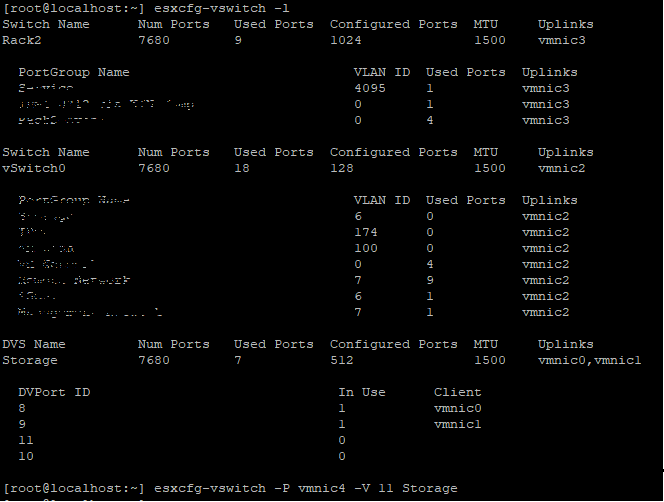
Controleren of VMNIC is toegevoegd aan

Verwijderen
Vmnci4 toevoegen aan
vSwitch (Standaard)
Controleer de
vswitch Nu is de vmnic 4 is toevoegen aan uplink.
De VMNIC uit uplink verwijderen
vSwitch 0 Toevoegen
VMNIC4 uplink naar VDS (Distributed Switch), Voordat u de uplinkpoort toevoegt, moet u ervoor zorgen dat de DVS-naam en
DVPort ID moet vrije poort zijn, in dit voorbeeld was poort nr. 11 niet in gebruik.
Controleren of VMNIC is toegevoegd aan
DVS Uplink.
Verwijderen
VMNIC Uplink van VDS,
Produse afectate
VMware ESXi 6.7.X, VMware ESXi 6.x, VMware ESXi 7.xProprietăți articol
Article Number: 000198710
Article Type: How To
Ultima modificare: 02 Apr 2025
Version: 2
Găsiți răspunsuri la întrebările dvs. de la alți utilizatori Dell
Servicii de asistență
Verificați dacă dispozitivul dvs. este acoperit de serviciile de asistență.