PowerEdge: Legge til og ta ut VMNic-kommunikasjonsforbindelsen i ESXI
Summary: Legge til og fjerne VMNICS i VSS (standardsvitsj) og VDS (distribuert svitsj)
Acest articol se aplică pentru
Acest articol nu se aplică pentru
Acest articol nu este legat de un produs specific.
Acest articol nu acoperă toate versiunile de produs existente.
Instructions
- Vis gjeldende
vSwitchkonfigurasjon ogvmkernelgrensesnittkonfigurasjon ved hjelp av disse kommandoene:esxcli network vswitch standard list # list current vswitch configuration esxcli network vswitch dvs vmware list # list Distributed Switch configuration esxcli network ip interface list # list vmkernel interfaces and their configuration esxcli network nic list # display listing of physical adapters and their link state
- Legg til eller fjern nettverkskort (kjent som vmnics) til eller fra en standard vSwitch ved hjelp av disse kommandoene:
esxcli network vswitch standard uplink remove --uplink-name=vmnic --vswitch-name=vSwitch # unlink an uplink
esxcli network vswitch standard uplink add --uplink-name=vmnic --vswitch-name=vSwitch # add an uplink
- Legg til eller fjern nettverkskort (kjent som vmnics) til eller fra en vNetwork Distributed Switch (vDS) ved hjelp av disse kommandoene:
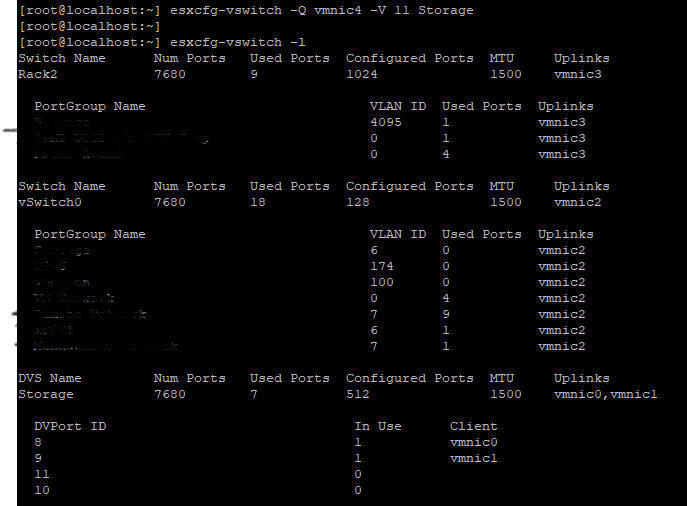
esxcfg-vswitch -Q vmnic -V dvPort_ID_of_vmnic dvSwitch # unlink/remove a vDS uplink
esxcfg-vswitch -P vmnic -V unused_dvPort_ID dvSwitch # add a vDS uplink
Merk: Hvis tilkoblingen går tapt når du migrerer administrasjonsnettverket til en distribuert svitsj, kan det bli nødvendig å fjerne eller deaktivere det eksisterende grensesnittet for VMkernel for administrering og opprette det på nytt i en standard vSwitch-portgruppe med samme IP-konfigurasjon.
Eksempel:-
Legge til vmnci4 til
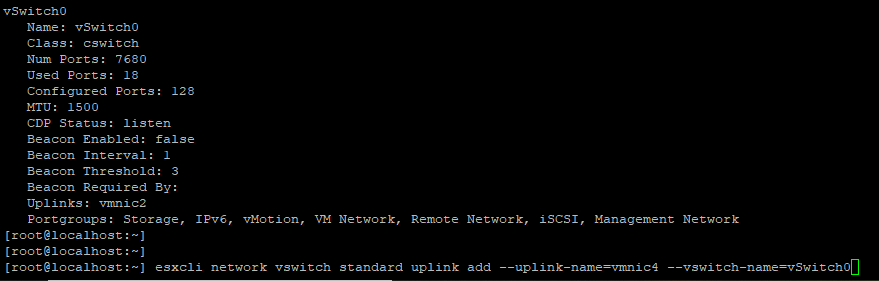
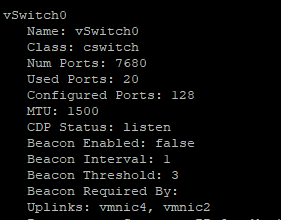
Kontroller at
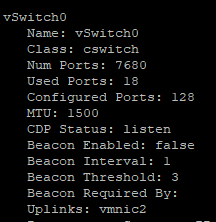
Fjerne VMNIC fra kommunikasjonsforbindelsen

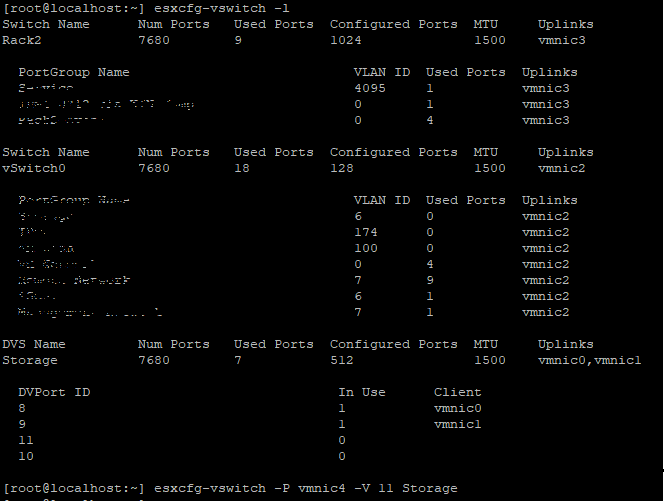
0 Legge til
Før du legger til uplink-porten, må du kontrollere DVS-navnet og
Bekreft om VMNIC er lagt til i

Fjern
Legge til vmnci4 til
vSwitch (Standard)
Kontroller at
vswitch Nå er vmnic 4 er legge til uplink.
Fjerne VMNIC fra kommunikasjonsforbindelsen
vSwitch 0 Legge til
VMNIC4 uplink til VDS (Distributed Switch), Før du legger til uplink-porten, må du kontrollere DVS-navnet og
DVPort ID skal være friporter i dette eksemplet port nr. 11 var ikke i bruk.
Bekreft om VMNIC er lagt til i
DVS Uplink.
Fjern
VMNIC Oppkobling fra VDS,
Produse afectate
VMware ESXi 6.7.X, VMware ESXi 6.x, VMware ESXi 7.xProprietăți articol
Article Number: 000198710
Article Type: How To
Ultima modificare: 02 Apr 2025
Version: 2
Găsiți răspunsuri la întrebările dvs. de la alți utilizatori Dell
Servicii de asistență
Verificați dacă dispozitivul dvs. este acoperit de serviciile de asistență.