PowerEdge: Adicionando e removendo o uplink VMNic no ESXI
Summary: Adicionando e removendo VMNICS no VSS (Standard Switch) e no VDS (Distributed Switch)
Acest articol se aplică pentru
Acest articol nu se aplică pentru
Acest articol nu este legat de un produs specific.
Acest articol nu acoperă toate versiunile de produs existente.
Instructions
- Exibir a versão atual
vSwitchConfiguração evmkernelConfiguração da interface usando estes comandos:esxcli network vswitch standard list # list current vswitch configuration esxcli network vswitch dvs vmware list # list Distributed Switch configuration esxcli network ip interface list # list vmkernel interfaces and their configuration esxcli network nic list # display listing of physical adapters and their link state
- Adicione ou remova placas de rede (conhecidas como vmnics) de ou para um vSwitch padrão usando estes comandos:
esxcli network vswitch standard uplink remove --uplink-name=vmnic --vswitch-name=vSwitch # unlink an uplink
esxcli network vswitch standard uplink add --uplink-name=vmnic --vswitch-name=vSwitch # add an uplink
- Adicione ou remova placas de rede (conhecidas como vmnics) de ou para um vNetwork Distributed Switch (vDS) usando estes comandos:
esxcfg-vswitch -Q vmnic -V dvPort_ID_of_vmnic dvSwitch # unlink/remove a vDS uplink
esxcfg-vswitch -P vmnic -V unused_dvPort_ID dvSwitch # add a vDS uplink
Nota: Se a conectividade for perdida ao migrar a rede de gerenciamento para um switch distribuído, pode ser necessário remover ou desativar a interface VMkernel de gerenciamento existente e recriá-la em um grupo de portas vSwitch padrão com a mesma configuração de IP.
Exemplo: adicionando
vmnci4 a
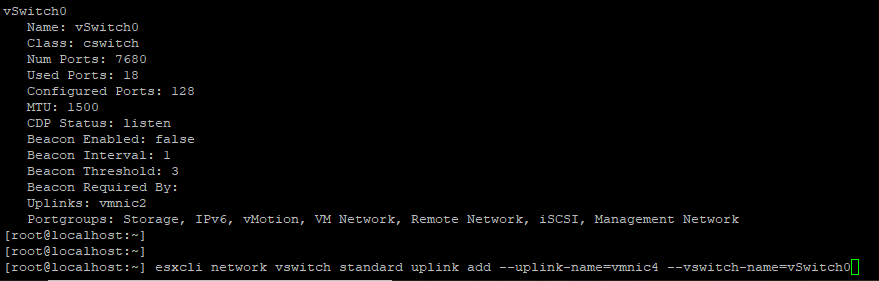
Verifique o
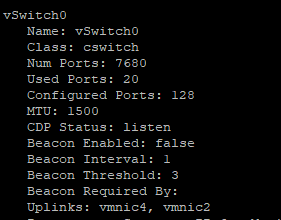
Como remover a VMNIC do uplink


0 Adicionando
antes de adicionar a porta de uplink, certifique-se de que o nome do DVS e
Verifique se a VMNIC é adicionada a

Remover
vmnci4 a
vSwitch (Padrão)
Verifique o
vswitch agora o vmnic 4 é add to uplink.
Como remover a VMNIC do uplink
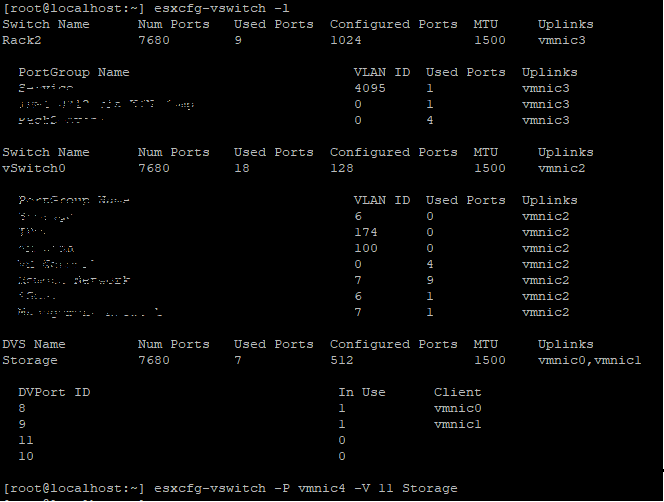
vSwitch 0 Adicionando
VMNIC4 uplink para VDS (Distributed Switch), antes de adicionar a porta de uplink, certifique-se de que o nome do DVS e
DVPort O ID deve ser uma porta livre. Neste exemplo, a porta nº 11 não estava em uso.
Verifique se a VMNIC é adicionada a
DVS Uplink.
Remover
VMNIC Uplink de VDS,

Produse afectate
VMware ESXi 6.7.X, VMware ESXi 6.x, VMware ESXi 7.xProprietăți articol
Article Number: 000198710
Article Type: How To
Ultima modificare: 02 Apr 2025
Version: 2
Găsiți răspunsuri la întrebările dvs. de la alți utilizatori Dell
Servicii de asistență
Verificați dacă dispozitivul dvs. este acoperit de serviciile de asistență.