Dell Azure Stack HCI Yakınsanmamış Ağ Yapılandırması
Summary: Dell EMC Çözümleri Microsoft Azure Stack HCI küme ana bilgisayarı için Yakınsanmamış bir ağı yapılandırma örneği. Bu örnek, Kullanıcı Rehberi'nde belgelendiği gibi bir yedekleme ağı veya ağ şekillendirme yapılandırması içermez. Bu makaleyle ilgili bilgiler, "Microsoft Azure Stack HCI için Dell EMC Çözümleri – Ağ Entegrasyonu ve Ana Bilgisayar Ağ Yapılandırma Seçenekleri" Başvuru Kılavuzundan alınmıştır. ...
Acest articol se aplică pentru
Acest articol nu se aplică pentru
Acest articol nu este legat de un produs specific.
Acest articol nu acoperă toate versiunile de produs existente.
Instructions
Aşağıdaki ekran görüntüsü, Yönetim ağı iletişimi için bir SET ağ ekibi kullanarak Azure Stack HCI Yakınsanmamış bir ağı yapılandırmaya yönelik bir donanım diyagramı görünümüdür:
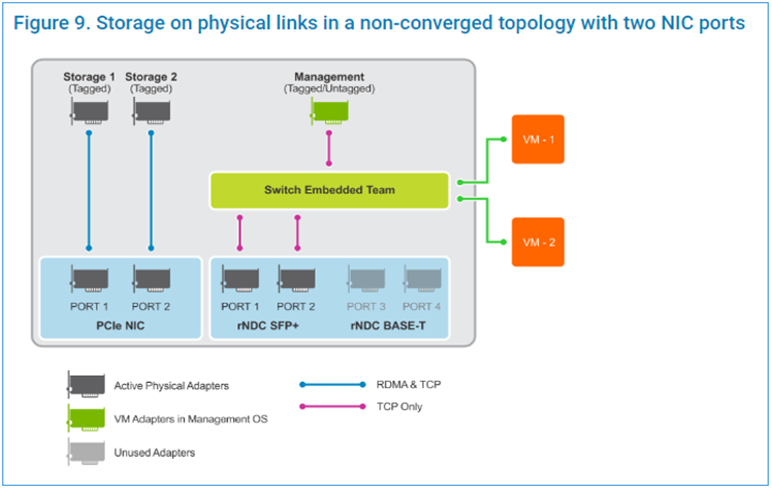
Aşağıdaki betik adımları bir Administrative PowerShell penceresinde çalıştırılır:
Aşağıdaki betik adımları bir Administrative PowerShell penceresinde çalıştırılır:
$ErrorActionPreference = 'Stop'

#region Variables for the scenario

## Management Adapter
$ManagementSwitchName = 'Management'
$ManagementNetAdapterName = @('NIC1','NIC2')
$ManagementAdapterName = 'Management'

# VLAN ID for host management traffic; if no VLAN is preferred set this to 0
$ManagementVlanId = 102

# Management Gateway address
$ManagementGateway = '10.0.0.1'

# DNS Server Address
$ManagementDns = '10.0.0.15'

# Set this to a string 'DHCP' for a dynamic IP address
$ManagementIPAddress = '10.0.0.51'

# Management address prefix (24 translates to subnet mask 255.255.255.0)
$ManagementAddressPrefix = 24

## Storage Adapters
### You must specify 2 or 4 network adapter port names
$StorageNetAdapterName = @('SLOT 2 PORT 1', 'SLOT 2 PORT 2')

### You must specify 1 or 2 or 4 VLANIDs
### Specify 0 if you want the network not tagged with any VLAN
$StorageVlanId = @(103, 104)

### You must specify 2 or 4 IP Addresses
### DHCP as a value is accepted if you want dynamically assigned IP addresses
$StorageIPAddress = @('172.16.101.1', '172.16.102.1')

### You can specify 1 or 2 or 4 prefix length values (24 translates to subnet mask
255.255.255.0)
$StorageAddressPrefix = @(24)
#endregion

## Create a VM switch for management
$null = New-VMSwitch -Name $ManagementSwitchName -AllowManagementOS 0 -NetAdapterName
$ManagementNetAdapterName -MinimumBandwidthMode Weight -Verbose

## Add VM Network Adapters and configure VLANs and IP addresses as needed
### Configure Management Adapter
$managementAdapter = Add-VMNetworkAdapter -SwitchName $ManagementSwitchName
-ManagementOS -Passthru -Name $ManagementAdapterName -Verbose
if ($ManagementVlanId -and ($ManagementVlanId -ne 0))
{
# Set VM Network adapter VLAN only if the VLAN ID specified is other than 0
Set-VMNetworkAdapterVlan -VMNetworkAdapter $managementAdapter -Access -VlanId
$ManagementVlanId -Verbose
Start-Sleep -Seconds 5
}
if ($ManagementIPAddress -ne 'DHCP')
{
$null = New-NetIPAddress -InterfaceAlias "vEthernet ($ManagementAdapterName)"
-IPAddress $ManagementIPAddress -DefaultGateway $ManagementGateway -PrefixLength
$ManagementAddressPrefix -Verbose
Set-DnsClientServerAddress -InterfaceAlias "vEthernet ($ManagementAdapterName)"
-ServerAddresses $ManagementDns -Verbose
}
{
# if there is a single VLAN for storage use the first and only element
if ($storageVlanId.Count -eq 1)
{
$storageVlan = $storageVlanId[0]
}
else
{
# else use the right index to get the VLAN ID
$storageVlan = $storageVlanId[$i]
}
# Check if only one prefix is provided
if ($StorageAddressPrefix.Count -eq 1)
{
$StoragePrefix = $StorageAddressPrefix[0]
}
else
{
# if more than one, use the right index to get the address prefix
$StoragePrefix = $StorageAddressPrefix[$i]
}
if ($storageVlan -and ($storageVlan -ne 0))
{
# Set VM Network adapter VLAN only if the VLAN ID specified is other than 0
Set-NetAdapterAdvancedProperty -Name $StorageNetAdapterName[$i] -DisplayName
'VLAN ID' -DisplayValue $storageVlan -Verbose
Start-Sleep -Seconds 5
}
if ($StorageIPAddress[$i] -ne 'DHCP')
{
$null = New-NetIPAddress -InterfaceAlias $StorageNetAdapterName[$i] -IPAddress
$StorageIPAddress[$i] -PrefixLength $StoragePrefix -Verbose
}
}
Videos
Produse afectate
Dell EMC Cloud For Microsoft Azure Stack, Enterprise Hybrid CloudProduse
Enterprise Hybrid CloudProprietăți articol
Article Number: 000200052
Article Type: How To
Ultima modificare: 05 Sep 2025
Version: 10
Găsiți răspunsuri la întrebările dvs. de la alți utilizatori Dell
Servicii de asistență
Verificați dacă dispozitivul dvs. este acoperit de serviciile de asistență.