戴尔 Azure Stack HCI 非聚合网络配置
Summary: 如何为 Dell EMC 解决方案 Microsoft Azure Stack HCI 群集主机配置非融合网络的示例。此示例不包括用户指南中所述的备份网络或网络整形配置。 本文的信息取自《适用于 Microsoft Azure Stack HCI 的 Dell EMC 解决方案 — 网络集成和主机网络配置选项参考指南》。
Acest articol se aplică pentru
Acest articol nu se aplică pentru
Acest articol nu este legat de un produs specific.
Acest articol nu acoperă toate versiunile de produs existente.
Instructions
下面的屏幕截图是使用 SET 网络组进行管理网络通信来配置 Azure Stack HCI 非融合网络的硬件图表视图:
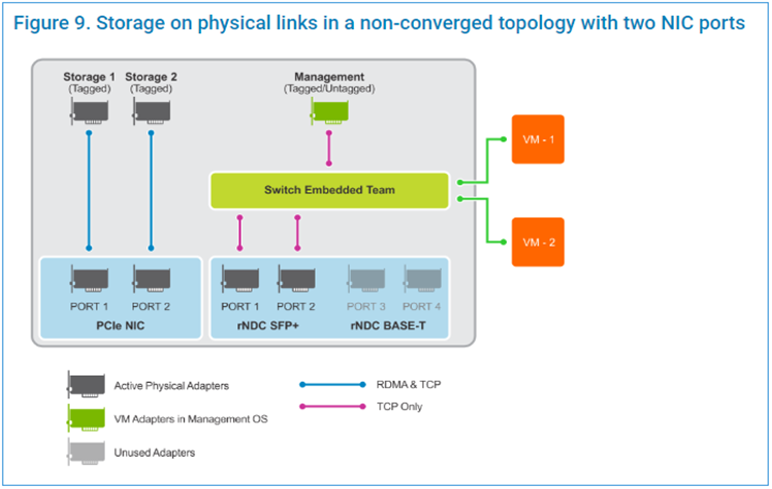
在管理 PowerShell 窗口中运行以下脚本步骤:
在管理 PowerShell 窗口中运行以下脚本步骤:
$ErrorActionPreference = 'Stop'

#region Variables for the scenario

## Management Adapter
$ManagementSwitchName = 'Management'
$ManagementNetAdapterName = @('NIC1','NIC2')
$ManagementAdapterName = 'Management'

# VLAN ID for host management traffic; if no VLAN is preferred set this to 0
$ManagementVlanId = 102

# Management Gateway address
$ManagementGateway = '10.0.0.1'

# DNS Server Address
$ManagementDns = '10.0.0.15'

# Set this to a string 'DHCP' for a dynamic IP address
$ManagementIPAddress = '10.0.0.51'

# Management address prefix (24 translates to subnet mask 255.255.255.0)
$ManagementAddressPrefix = 24

## Storage Adapters
### You must specify 2 or 4 network adapter port names
$StorageNetAdapterName = @('SLOT 2 PORT 1', 'SLOT 2 PORT 2')

### You must specify 1 or 2 or 4 VLANIDs
### Specify 0 if you want the network not tagged with any VLAN
$StorageVlanId = @(103, 104)

### You must specify 2 or 4 IP Addresses
### DHCP as a value is accepted if you want dynamically assigned IP addresses
$StorageIPAddress = @('172.16.101.1', '172.16.102.1')

### You can specify 1 or 2 or 4 prefix length values (24 translates to subnet mask
255.255.255.0)
$StorageAddressPrefix = @(24)
#endregion

## Create a VM switch for management
$null = New-VMSwitch -Name $ManagementSwitchName -AllowManagementOS 0 -NetAdapterName
$ManagementNetAdapterName -MinimumBandwidthMode Weight -Verbose

## Add VM Network Adapters and configure VLANs and IP addresses as needed
### Configure Management Adapter
$managementAdapter = Add-VMNetworkAdapter -SwitchName $ManagementSwitchName
-ManagementOS -Passthru -Name $ManagementAdapterName -Verbose
if ($ManagementVlanId -and ($ManagementVlanId -ne 0))
{
# Set VM Network adapter VLAN only if the VLAN ID specified is other than 0
Set-VMNetworkAdapterVlan -VMNetworkAdapter $managementAdapter -Access -VlanId
$ManagementVlanId -Verbose
Start-Sleep -Seconds 5
}
if ($ManagementIPAddress -ne 'DHCP')
{
$null = New-NetIPAddress -InterfaceAlias "vEthernet ($ManagementAdapterName)"
-IPAddress $ManagementIPAddress -DefaultGateway $ManagementGateway -PrefixLength
$ManagementAddressPrefix -Verbose
Set-DnsClientServerAddress -InterfaceAlias "vEthernet ($ManagementAdapterName)"
-ServerAddresses $ManagementDns -Verbose
}
{
# if there is a single VLAN for storage use the first and only element
if ($storageVlanId.Count -eq 1)
{
$storageVlan = $storageVlanId[0]
}
else
{
# else use the right index to get the VLAN ID
$storageVlan = $storageVlanId[$i]
}
# Check if only one prefix is provided
if ($StorageAddressPrefix.Count -eq 1)
{
$StoragePrefix = $StorageAddressPrefix[0]
}
else
{
# if more than one, use the right index to get the address prefix
$StoragePrefix = $StorageAddressPrefix[$i]
}
if ($storageVlan -and ($storageVlan -ne 0))
{
# Set VM Network adapter VLAN only if the VLAN ID specified is other than 0
Set-NetAdapterAdvancedProperty -Name $StorageNetAdapterName[$i] -DisplayName
'VLAN ID' -DisplayValue $storageVlan -Verbose
Start-Sleep -Seconds 5
}
if ($StorageIPAddress[$i] -ne 'DHCP')
{
$null = New-NetIPAddress -InterfaceAlias $StorageNetAdapterName[$i] -IPAddress
$StorageIPAddress[$i] -PrefixLength $StoragePrefix -Verbose
}
}
Videos
Produse afectate
Dell EMC Cloud For Microsoft Azure Stack, Enterprise Hybrid CloudProduse
Enterprise Hybrid CloudProprietăți articol
Article Number: 000200052
Article Type: How To
Ultima modificare: 05 Sep 2025
Version: 10
Găsiți răspunsuri la întrebările dvs. de la alți utilizatori Dell
Servicii de asistență
Verificați dacă dispozitivul dvs. este acoperit de serviciile de asistență.