Dell Management Server Virtual Core Server 不存在通知
Summary: 在部署或升级 Dell Management Server Virtual 至 v11.4 并启用电子邮件通知时,电子邮件通知的收件人每小时会收到错误通知。
Acest articol se aplică pentru
Acest articol nu se aplică pentru
Acest articol nu este legat de un produs specific.
Acest articol nu acoperă toate versiunile de produs existente.
Symptoms
受影响的产品:
- Dell Management Server 虚拟
受影响的版本:
- v11.4
受影响的操作系统:
- Linux
收到的电子邮件示例:
Automatically generated alert from Dell Security Management Server Virtual – Service: Dell Core Server - HTTP / Event: Does not exist
Action: restart
Host: Server Hostname
Description: process is not running
Service: Dell Core Server - HTTP
Event: Does not exist
Cause
检查 Dell Management Server 虚拟组件状态的服务无法将核心服务器检测为侦听,因为 netstat未安装网络工具包的一部分。
Resolution
- 登录 到 Dell Management Server 虚拟管理控制台。
提醒:
- Dell Security Management Server Virtual 的默认凭据为:
- 用户名:
delluser - 密码:
delluser
- 用户名:
- 管理员可以更改产品的虚拟设备菜单中的默认密码。
- 从主菜单中,选择 Launch Shell ,然后按 Enter 键。
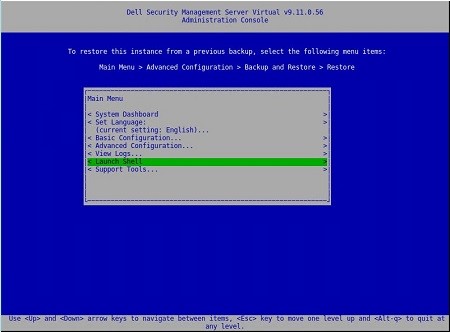
图 1:(仅限英文)启动 Shell
- 使用 命令将用户更改为
dellsupportsu dellsupport

图 2:(仅限英文)运行命令 su dellsupport
提醒:
- Dell Security Management Server Virtual 的默认凭据为:
- 用户名:
dellsupport - 密码:
dellsupport
- 用户名:
- 管理员可以更改产品的虚拟设备菜单中的默认密码。
- 确认
dellsupport用户的密码。

图 3:(仅限英文)确认密码
- 使用 命令
netstat --version检查 的netstat状态。 - 如果
netstat未安装,您将看到以下错误。

图 4:(仅限英文)错误(如果netstat 未安装)
- 运行 命令
sudo apt install net-tools以安装网络工具。 - 再次运行
netstat --version以验证是否netstat已安装。

图 5:(仅限英文)运行 netstat --version
- 键入
exit并按 Enter 键以注销dellsupport。

图 6:(仅限英文)键入 exit
- 键
exit入并按 Enter 键以从 shell 注销到主菜单。

图 7:(仅限英文)键入 exit
Produse afectate
Dell EncryptionProprietăți articol
Article Number: 000202891
Article Type: Solution
Ultima modificare: 02 Aug 2023
Version: 2
Găsiți răspunsuri la întrebările dvs. de la alți utilizatori Dell
Servicii de asistență
Verificați dacă dispozitivul dvs. este acoperit de serviciile de asistență.