PowerFlex: How to Sanitize NVDIMM and SDPM - Video
Summary: PowerFlex/PowerEdge: How to Sanitize NVDIMM - Video
Acest articol se aplică pentru
Acest articol nu se aplică pentru
Acest articol nu este legat de un produs specific.
Acest articol nu acoperă toate versiunile de produs existente.
Instructions
Caution:
Sanitize operations on NVDIMM or SDPM permanently erase persistent memory data.
Before sanitizing NVDIMM\SDPM, All Flex and DAX devices must be removed from the SDS node.
- Steps from iDRAC for 16G and above generations only
- Go to Configuration > BIOS Settings > Memory Settings > scroll down to Persistent Memory
- From iDRAC web interface, change Current Value to Enabled from the drop-down list
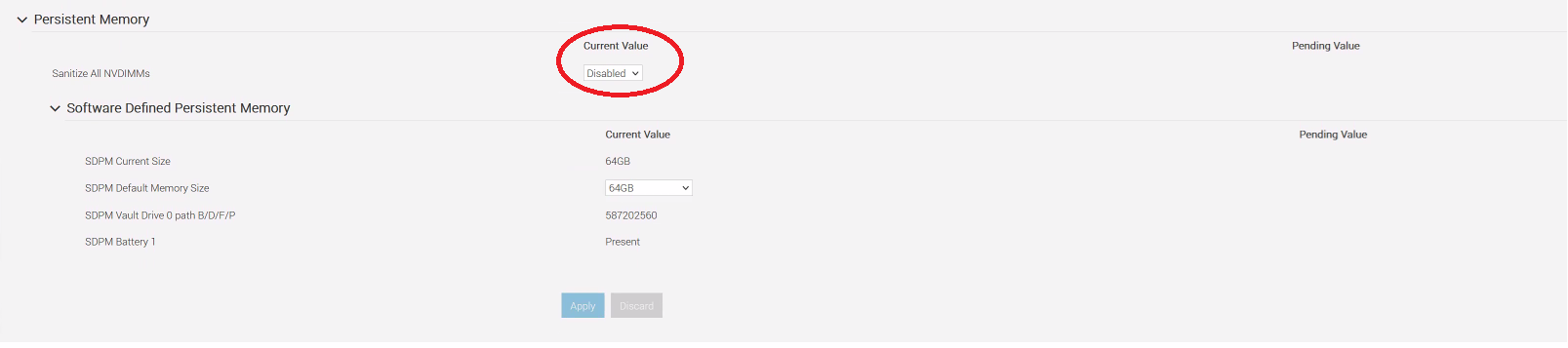
Before sanitizing NVDIMMs, All Flex and DAX devices must be removed from the SDS node.
- Steps from the System Setup page for 14G and 15G (it also applies to higher generations)
-
- 14G PowerEdge: Allows sanitizing individual NVDIMMs or all NVDIMMs.
- 15G PowerEdge: Only supports sanitizing all NVDIMMs at once.
- While the Server is booting press F2 to enter System Setup
- Go to System BIOS > Memory Settings. The current system BIOS memory settings are displayed.
- Click Persistent Memory and select Enabled beside Sanitize All NVDIMMs
- 14G PowerEdge you can sanitize an individual NVDIMM , for detailed steps See article PowerFlex: How to sanitize NVDIMM after firmware downgrade
- 15G PowerEdge you can only sanitize all NVDIMMs
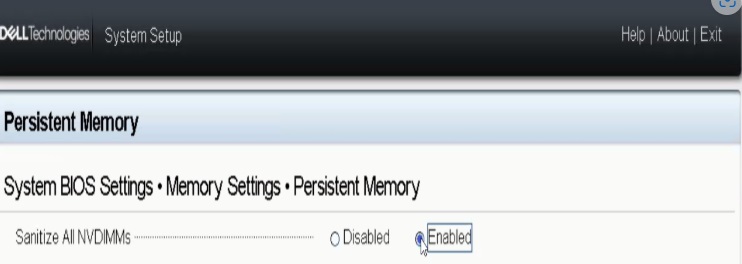
Before sanitizing NVDIMMs, All Flex and DAX devices must be removed from the SDS node.
Produse afectate
PowerFlex rack, ScaleIO, VxRack Flex-PowerEdge 14GProprietăți articol
Article Number: 000221219
Article Type: How To
Ultima modificare: 05 Jun 2026
Version: 10
Găsiți răspunsuri la întrebările dvs. de la alți utilizatori Dell
Servicii de asistență
Verificați dacă dispozitivul dvs. este acoperit de serviciile de asistență.