The Intel 5G Solution 5000 Network Cards Disable Power-Saving Option does Not Work
Summary: The following article provides information about there being no way to disable power saving on the Intel 5G Solution 5000 Network card.
Acest articol se aplică pentru
Acest articol nu se aplică pentru
Acest articol nu este legat de un produs specific.
Acest articol nu acoperă toate versiunile de produs existente.
Symptoms
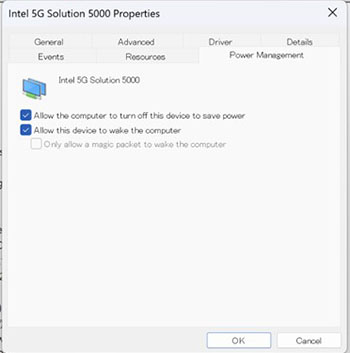
You cannot disable power saving on Intel 5G Solution 5000 network cards (DW5931e)
Owners of Latitude 5x40, 7x40, and 7x50 laptops with an Intel 5G Solution 5000 network card may think there is an issue with the network card. You may contact your IT department or Dell Technical Support to advise that you cannot disable the power-saving mode on the network card. (DW5931e)
This is because when you disable (clear) the power-saving option and restart your laptop, it resumes with the option enabled (checked) again.
Cause
This is because Intel has removed the option to disable power saving. They want to ensure that the laptops power consumption meets Intel's guidelines.
Resolution
Note: The laptop and network card are both working as designed. This is the expected behavior under these circumstances.
The laptop and the network card are both working as they should. Intel has removed the option to turn this function off as part of its design.
Produse afectate
Latitude 5340, Latitude 7340, Latitude 7350, Latitude 5440, Latitude 7440, Latitude 7450, Latitude 5540, Latitude 7640, Latitude 7650Proprietăți articol
Article Number: 000226246
Article Type: Solution
Ultima modificare: 21 May 2026
Version: 3
Găsiți răspunsuri la întrebările dvs. de la alți utilizatori Dell
Servicii de asistență
Verificați dacă dispozitivul dvs. este acoperit de serviciile de asistență.