セキュア コネクト ゲートウェイ仮想エディション: 管理者パスワードのリセット
Summary: この手順では、忘れたセキュア コネクト ゲートウェイ仮想エディションの管理者パスワードをリセットする方法について説明しますが、rootパスワードを知っている必要があります。
Acest articol se aplică pentru
Acest articol nu se aplică pentru
Acest articol nu este legat de un produs specific.
Acest articol nu acoperă toate versiunile de produs existente.
Instructions
手順:
注:回避策を適用する前に、VMのスナップショットを作成します。
- SSHとroot認証情報(ユーザー名とパスワード)を使用してセキュア コネクト ゲートウェイ アプライアンス システムに接続します。
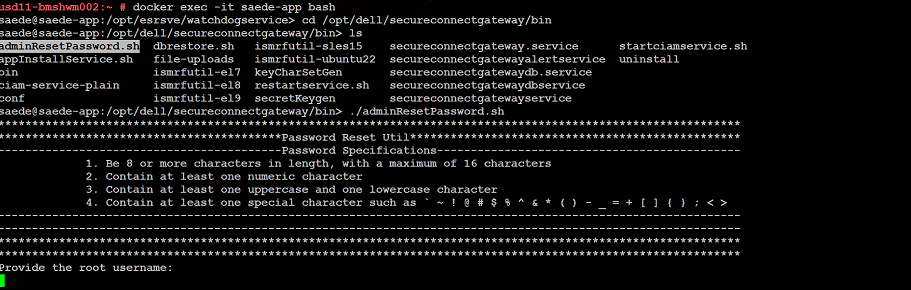
- 正常にログインした後、次のコマンドを実行します。
➢ docker exec -it saede-app bash
➢ cd /opt/dell/secureconnectgateway/bin
➢ ls
➢ ./adminResetPassword.sh
パスワード要件:
パスワードは次のとおりである必要があります。
- 8文字以上(最大16文字)
- 数字を1文字以上含むこと
- 大文字と小文字をそれぞれ1文字以上含むこと
- 次のような特殊文字を1文字以上含むこと
' ~ ! @ # $ % ^ & * ( ) - _ + = { } [ ] ; < >
rootのユーザー名とパスワードを入力します。
新しい管理者パスワードを入力します。
Additional Information
パスワードを変更するコマンドのスクリーンショット:
Produse afectate
Secure Connect Gateway - Virtual EditionProprietăți articol
Article Number: 000250890
Article Type: How To
Ultima modificare: 29 Dec 2025
Version: 2
Găsiți răspunsuri la întrebările dvs. de la alți utilizatori Dell
Servicii de asistență
Verificați dacă dispozitivul dvs. este acoperit de serviciile de asistență.