如何验证安全组件验证(在设备上)证书
Summary: 了解如何使用平台证书和验证器平台验证设备上的安全组件验证来验证设备的完整性。
Acest articol se aplică pentru
Acest articol nu se aplică pentru
Acest articol nu este legat de un produs specific.
Acest articol nu acoperă toate versiunile de produs existente.
Instructions
提醒:以下步骤仅用于执行您自己的验证,而不是使用 Dell Technologies 的服务。要使用 Dell Technologies 的服务,请参阅 《安全组件验证指南(云上)》。
可以使用平台证书和验证程序平台验证戴尔计算机的完整性和真实性。当随设备一起订购安全组件验证(在设备上)时,可以实现此功能。美国国防部 (DoD) 开发了验证器平台。验证程序平台称为运行时和启动时主机完整性 (HIRS) 工具。HIRS 工具由两个组件组成:证明证书颁发机构 (ACA) 门户和 HIRS 预配程序。必须为 HIRS 资源调配程序设置以下各项以验证结果:
- HIRS 工具
- 运行 Windows 10 或 Windows 11 的端点设备
- 已配置 HIRS 调配程序
- ACA 门户
- 已上传到 ACA 的签名和平台证书
- ACA 中设置的策略,用于指定应验证设备和证书的哪些部分
验证设备完整性要求您 安装 HIRS ACA 门户, 收集证书, 将证书上传到 ACA 门户, 设置 ACA 策略, 下载并安装 HIRS Provisioner, 运行 Provisioner,然后 验证结果。
安装 HIRS ACA 门户
提醒:这需要 Docker Desktop 许可证和具有互联网或内部网连接的受测系统。有关 Docker Desktop 的更多信息,请参阅 Docker Desktop 。
。
。
在受测系统上安装 HIRS ACA 门户意味着您正在本地运行证明。此方法可能是最简单的部署模型,但不是最安全的。要使用更安全的方法,请在远程设备或服务器上安装 HIRS ACA 门户。
- 在受测系统或服务器上下载并安装 Docker Desktop。
提醒:在受测系统上运行 ACA 验证程序称为本地验证,与在联网服务器上运行 ACA 是不同的威胁模型。
- 搜索 Windows PowerShell,右键单击它,选择以 管理员身份运行,键入以下命令,然后按 Enter 键。
docker pull ghcr.io/nsacyber/hirs/aca:616fc06 - 在 Docker 中,要确认 HIRS ACA 映像已创建,请键入以下命令,然后按 Enter 键。
docker images
- 在 PowerShell 中,要验证存储库,请在 存储库 下检查
repository gchr.io/nsacyber/hirs/aca。
- 在 PowerShell 中,键入以下命令,然后按 Enter 键。
docker run --name=aca -p 8443:8443 ghcr.io/nsacyber/hirs/aca:616fc06 - 在 Docker 中,若要确认服务器映像正在容器内运行,请键入以下命令,然后按 Enter。
docker container ls -a - 验证
aca显示在 NAMES 类别下。
- 打开浏览器并转至 ACA 门户,以验证 Docker 映像是否正常工作。如果运行本地验证,请使用本地主机 IP 地址 127.0.0.1。
 提醒:
提醒:- 如果运行本地验证,请转至 https://127.0.0.1:8443/HIRS_AttestationCAPortal/
- 门户网站可能需要几分钟才能联机。
- 门户网站联机后,您可能会收到“您的连接不是私人连接”消息。这是运行本地验证时的预期行为。
- 如果运行本地验证,请转至 https://127.0.0.1:8443/HIRS_AttestationCAPortal/
收集证书
- 收集 SCV 平台属性证书。SCV(在设备上)将证书存储在硬盘的 UEFI 分区上。
- 搜索命令提示符,右键单击它,然后选择以 管理员身份运行。
- 键入以下命令,然后按 Enter 键。
mountvol o: /S - 键入以下命令,然后按 Enter 键。
copy o:\EFI\tcg\cert\platform\*.cer c:\dell\platcert}提醒:如果购买了 SCV(云上),则证书位于戴尔可信设备中,无法在本地使用 HIRS ACA 进行验证。
- 收集戴尔中级 CA 签名证书。
- 在工厂中,属性证书和签名证书在 SCV 平台证书中连接,必须先分离,然后才能上传到 HIRS ACA 门户。从 PowerShell 运行以下命令,然后按 Enter 键。
PowerShell :> $i=0; Get-Content c:\dell\platcert\*.cer -ReadCount 3 | %{$i++; $_ | Out-File out_$i.crt} - 收集文件名
out_1.crt和out _2.crt。
- 在工厂中,属性证书和签名证书在 SCV 平台证书中连接,必须先分离,然后才能上传到 HIRS ACA 门户。从 PowerShell 运行以下命令,然后按 Enter 键。
- 通过转至 受信任设备的支持 |驱动程序和下载 以及下载安全组件验证程序。
- 从以下来源收集环境中 TPM 型号的 TPM 根签名证书和中间签名证书:
- STMicro: https://www.st.com/resource/en/technical_note/tn1330-st-trusted-platform-module-tpm-endorsement-key-ek-certificates-stmicroelectronics.pdf
- Nuvoton: https://www.nuvoton.com/export/sites/nuvoton/files/security/Nuvoton_TPM_EK_Certificate_Chain.pdf提醒:管理员可能没有环境中使用的 TPM 型号的记录。如果发生这种情况,管理员可以下载所提供的 STMicro 和 Nuvoton 文档中的所有 TPM 根和中间签名证书。
- STMicro: https://www.st.com/resource/en/technical_note/tn1330-st-trusted-platform-module-tpm-endorsement-key-ek-certificates-stmicroelectronics.pdf
将证书上传到 ACA 门户
- 加载戴尔 SCV 平台属性证书 (
c:\dell\platcert\out_1.crt) 通过单击“Platform Certificates”选项卡上的 + 号,进入 ACA 门户。
- 加载戴尔工厂中间 CA 签名证书 (
c:\dell\platcert\out_2.crt)、CA 签名根证书 (PROD-CSG-SCV-Root.cer)和 TPM 根证书签名证书,方法是单击信任链管理选项卡上信任链 CA 证书旁边的+号。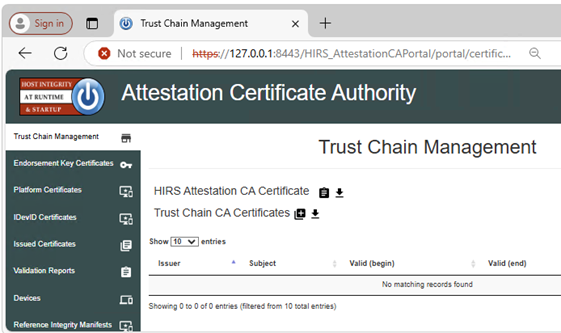
设置 ACA 策略
- 转至 策略 选项卡。
- 单击铅笔图标并将以下各项设置为 Enabled:
- 认可和凭证验证
- 平台凭据验证
- 平台属性凭据验证
 提醒:如果运行本地验证,请转至 https://127.0.0.1:8443/HIRS_AttestationCAPortal/portal/policy
下载并安装 HIRS Provisioner
必须在每个包含证书的系统上执行此步骤。
- 从 HIRS Provisioner 版本下载并安装最新版本的
- 从 Windows 资源管理器中,转至
c:\Program Files(x86)\HIRS_Provisioner.NET\plugins\scripts\windows。 - 右键单击
allcomponents.ps1,然后选择 “在记事本中编辑”,然后通过添加#符号。提醒:例如:#$NVME_SCRIPT="$APP_HOME/nvme.ps1" # For NVMe。 - 注释掉第 30 行,添加
#符号。提醒:例如:#. $NVME_SCRIPT。 - 替换所有”
### Gather HDD details“(第 669-744 行)和以下文本:### Gather HDD details Write-Progress -Id 1 -Activity "Gathering component details" -PercentComplete 70 Write-Progress -Id 2 -ParentId 1 -Activity "Gathering HDD information" -CurrentOperation "Querying" -PercentComplete 0 function parseHddData() { $RS=(Get-CimInstance -ClassName CIM_DiskDrive | select serialnumber,mediatype,pnpdeviceid,manufacturer,model | where mediatype -eq "Fixed hard disk media") $component="" $replaceable=(jsonFieldReplaceable "true") $numRows=1 if ($RS.Count -gt 1) { $numRows=($RS.Count)} for($i=0;$i -lt $numRows;$i++) { Write-Progress -Id 2 -ParentId 1 -Activity "Gathering Hard Disk information" -CurrentOperation ("Cleaning output for HDD " + ($i+1)) -PercentComplete ((($i+1) / $numRows) * 100) $hddClass=(jsonComponentClass "$COMPCLASS_REGISTRY_TCG" "$COMPCLASS_HDD") $pnpDevID="" if(isIDE($RS[$i].PNPDeviceID)) { $pnpDevID=(ideDiskParse $RS[$i].PNPDeviceID) } elseif(isSCSI($RS[$i].PNPDeviceID)) { $pnpDevID=(scsiDiskParse $RS[$i].PNPDeviceID) } else {Continue } if(($pnpDevID -eq $null) -or (($pnpDevID -eq "(Standard disk drives)") -and ($pnpDevID.product -eq $null))) { $regex="^.{,16}$" $pnpDevID=[pscustomobject]@{ product=($RS[$i].model -replace '^(.{0,16}).*$','$1') # Strange behavior for this case, will return } } $tmpManufacturer=$pnpDevID.vendor # PCI Vendor ID $tmpModel=$pnpDevID.product # PCI Device Hardware ID $tmpSerial=$RS[$i].serialnumber $tmpRevision=$pnpDevID.revision if ([string]::IsNullOrEmpty($tmpManufacturer) -or ($tmpManufacturer.Trim().Length -eq 0)) { $tmpManufacturer="$NOT_SPECIFIED" } $tmpManufacturer=$(jsonManufacturer "$tmpManufacturer".Trim()) if ([string]::IsNullOrEmpty($tmpModel) -or ($tmpModel.Trim().Length -eq 0)) { $tmpModel="$NOT_SPECIFIED" } $tmpModel=$(jsonModel "$tmpModel".Trim()) if (![string]::IsNullOrEmpty($tmpSerial) -and ($tmpSerial.Trim().Length -ne 0)) { $tmpSerial=(jsonSerial "$tmpSerial".Trim()) } else { $tmpSerial="" } if (![string]::IsNullOrEmpty($tmpRevision) -and ($tmpRevision.Trim().Length -ne 0)) { $tmpRevision=(jsonRevision "$tmpRevision".Trim()) } else { $tmpRevision="" } $tmpComponent=(jsonComponent $hddClass $tmpManufacturer $tmpModel $replaceable $tmpSerial $tmpRevision) $component+="$tmpComponent," } Write-Progress -Id 2 -ParentId 1 -Activity "Gathering Hard Disk information" -CurrentOperation "Done" -PercentComplete 100 return "$component".Trim(",") }
运行资源调配程序
右键单击 Provisioner,然后在包含证书的系统上选择 Run as administrator 。
提醒:Provisioner 可从
c:\Program Files(x86)\HIRS_Provisioner.NET\tpm_aca_provision.exe。
验证结果
检查 验证报告 ACA 门户页面是否有及格结果。
Produse afectate
Dell Trusted DeviceProprietăți articol
Article Number: 000293241
Article Type: How To
Ultima modificare: 24 Mar 2025
Version: 5
Găsiți răspunsuri la întrebările dvs. de la alți utilizatori Dell
Servicii de asistență
Verificați dacă dispozitivul dvs. este acoperit de serviciile de asistență.