Dellクライアント デバイス マネージャーを抽出する方法
Summary: この記事では、Dell Client Device Manager(DCDM)を抽出する方法について説明します。
Acest articol se aplică pentru
Acest articol nu se aplică pentru
Acest articol nu este legat de un produs specific.
Acest articol nu acoperă toate versiunile de produs existente.
Instructions
.cabファイルからコンテンツを抽出するには、いくつかのオプションがあります。Windowsエクスプローラー、コマンド ライン、または.cab ファイルをサポートするサード パーティー製アーカイブ アプリケーション。
注:サード パーティー製アプリケーションは幅広く利用できるため、例は提供されていません。
Windowsエクスプローラーを使用する場合:
- Dell Client Device Managerをダウンロードしたフォルダーでcabファイルを右クリックし、[Open With > Windows Explorer]を選択します。
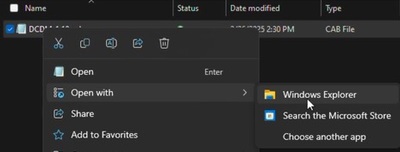 注:Dellクライアント デバイス マネージャーのダウンロードの詳細については、「 Dellクライアント デバイス マネージャーのダウンロード方法」を参照してください。
 - すべてのファイルを選択して右クリックし、[ 展開]をクリックします。
![すべてのファイルを選択して右クリックし、[展開]をクリックします。](https://supportkb.dell.com/img/ka0Do0000002ksUIAQ/ka0Do0000002ksUIAQ_ja_2.jpeg)
- [Select a Destination]ウィンドウを使用してコンテンツを抽出する場所に移動し、[ Extract ]ボタンをクリックします。
![[抽出] ボタンをクリックします。](https://supportkb.dell.com/img/ka0Do0000002ksUIAQ/ka0Do0000002ksUIAQ_ja_3.jpeg) 注:Windowsエクスプローラーを使用してキャビネット ファイルを抽出すると、フォルダー構造が失われ、DCDM_Deployment.ps1スクリプトが設計どおりに機能しません。用意されているPowerShellスクリプトを使用してDCDMを導入する場合は、 Installers という名前の新しいフォルダーを作成し、Dell.Core.Services.Installer_64bit.msi、DellCommandUpdateApp_Setup.exe、TrustedDevice-64Bit.msiをそのフォルダーに移動する必要があります。
注:Windowsエクスプローラーを使用してキャビネット ファイルを抽出すると、フォルダー構造が失われ、DCDM_Deployment.ps1スクリプトが設計どおりに機能しません。用意されているPowerShellスクリプトを使用してDCDMを導入する場合は、 Installers という名前の新しいフォルダーを作成し、Dell.Core.Services.Installer_64bit.msi、DellCommandUpdateApp_Setup.exe、TrustedDevice-64Bit.msiをそのフォルダーに移動する必要があります。
コマンド ラインを使用する場合:
- コマンド プロンプトを開き、cabファイルをダウンロードしたフォルダーにディレクトリー フォーカスを設定します。
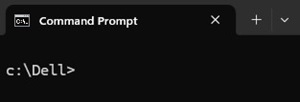 注:Dellクライアント デバイス マネージャーのダウンロードの詳細については、「 Dellクライアント デバイス マネージャーのダウンロード方法」を参照してください。
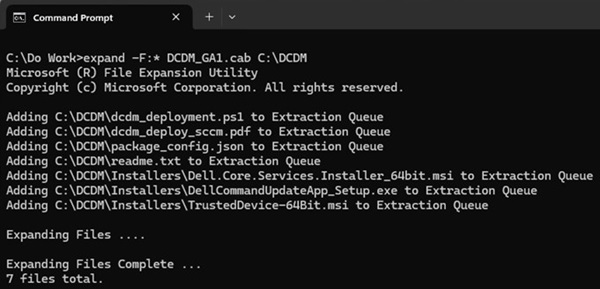
 - 次のコマンドを入力します。
expand -F:* cabfile_path existing_destination_folder
cabfile_pathはDell Client Device Manager cabファイルの名前で、existing_destination_folderはコンテンツを展開するフォルダーのフル パスです。
Produse afectate
Dell Client Device ManagerProprietăți articol
Article Number: 000299313
Article Type: How To
Ultima modificare: 22 May 2026
Version: 2
Găsiți răspunsuri la întrebările dvs. de la alți utilizatori Dell
Servicii de asistență
Verificați dacă dispozitivul dvs. este acoperit de serviciile de asistență.