PowerFlex 4.6 여러 포드가 계속 재시작됨
Summary: SO(Storage Only) 및 CO(Compute Only) RG(Resource Group)를 새로 배포하거나 4.6.1로 업그레이드하는 동안과 그 후에 여러 포드가 계속 재시작됩니다.
Acest articol se aplică pentru
Acest articol nu se aplică pentru
Acest articol nu este legat de un produs specific.
Acest articol nu acoperă toate versiunile de produs existente.
Symptoms
PowerFlex Manager 4.6.1 신규 배포 또는 200+ SO 및 CO 노드
노드를 포함한 4.6.1로 업그레이드재부팅 중 화면에 메모리가 부족하다고 표시됩니다. 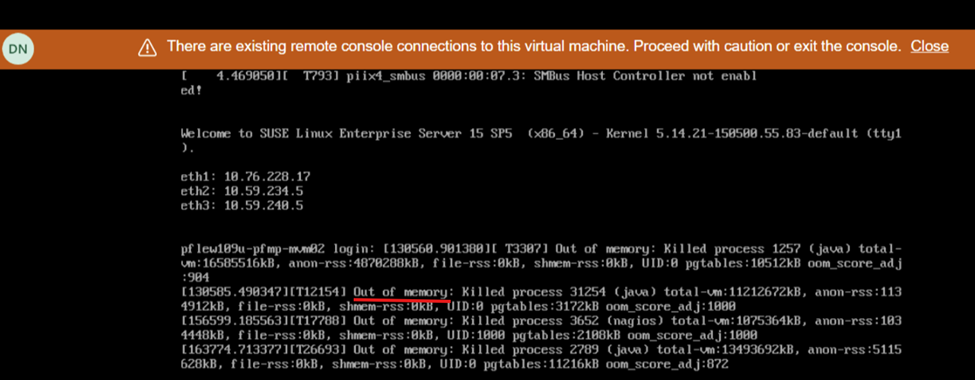
영향
- 불안정한 시스템 상태 및 UI가 응답하지 않음/사용할 수 없음
Cause
PFMP(PowerFlex Manager Platform) 버전 4.6.1 이상의 소프트웨어 문제로 인해 200개 이상의 노드(SO 및 CO 모두)가 있는 시스템에는 이전에 광고한 것보다 더 많은 컴퓨팅 리소스가 필요합니다. 28개의 CPU 코어 및 64GB 메모리.
Resolution
전원 끄기 절차
- MVM에 로그인하고 다음 명령을 실행하여 데이터베이스를 중지합니다.
- 데이터베이스 상태를 확인합니다.
kubectl config set-context default --namespace=$(kubectl get pods -A | grep -m 1 -E 'platform|pgo|helmrepo|docker' | cut -d' ' -f1) echo $(kubectl get pods -l="postgres-operator.crunchydata.com/control-plane=pgo" --no-headers -o name && kubectl get pods -l="postgres-operator.crunchydata.com/instance" --no-headers -o name) | xargs kubectl get -o wide kubectl -n powerflex patch $(kubectl -n powerflex get postgrescluster -o name) --type merge --patch '{"spec":{"shutdown":true}}' - 데이터베이스가 종료되었는지 확인합니다.
echo $(kubectl get pods -l="postgres-operator.crunchydata.com/control-plane=pgo" --no-headers -o name && kubectl get pods -l="postgres-operator.crunchydata.com/instance" --no-headers -o name) | xargs kubectl get -o wide
- 데이터베이스 상태를 확인합니다.
- MVM 전원 끄기
MVM 리소스 업데이트
새로 배포하거나 4.6.1로 업그레이드하려면 MVM 노드가 추가 메모리 및 CPU 요구 사항을 충족해야 합니다.
- CPU - 28코어
- 메모리 - 64GB
리소스 추가에 대한 전체 절차는 공급업체에 문의하십시오.
전원 켜기 절차
- 모든 MVM의 전원을 켭니다.
- 각 MVM에서 다음 명령을 실행하여 rke2-server 서비스의 상태를 확인합니다.
kubectl get nodesrke2-server 상태에 따라 다음을 수행합니다.rke2-server의 상태
다음과 같이 하십시오.
Active
다음 단계로 이동
활성화
명령을 반복하여 활성 상태가 될 때까지 rke2-server 상태를 확인합니다.
Failed
다음 명령을 실행하여 서비스를 시작합니다.
systemctl start rke2-server - rke2-server 가 모든 MVM에서 활성화되면 모든 노드가 준비 상태인지 확인합니다.
kubectl get nodes - 노드가 준비되면 다음 단계로 이동합니다. 오류 메시지가 나타나면 몇 분 정도 기다렸다가 다시 시도하십시오.
- CMO(Cluster Monitoring Operator) 데이터베이스를 복원합니다.
kubectl config set-context default --namespace=$(kubectl get pods -A | grep -m 1 -E 'platform|pgo|helmrepo|docker' | cut -d' ' -f1) kubectl -n powerflex patch $(kubectl -n powerflex get postgrescluster -o name) --type merge --patch '{"spec":{"shutdown": false}}' - CMO 데이터베이스를 확인합니다.
echo $(kubectl get pods -l="postgres-operator.crunchydata.com/control-plane=pgo" --no-headers -o name && kubectl get pods -l="postgres-operator.crunchydata.com/instance" --no-headers -o name) | xargs kubectl get -o wide
- CMO(Cluster Monitoring Operator) 데이터베이스를 복원합니다.
- PowerFlex 관리 플랫폼 상태를 모니터링합니다.
- 다음 명령을 실행하여 PowerFlex 관리 플랫폼 모니터 유틸리티의 포트 번호를 식별합니다.
kubectl get services monitor-app -n powerflex -o jsonpath="{.spec.ports[0].nodePort}{\"\n\"}" - 20-30분 정도 기다린 후 PowerFlex 관리 플랫폼의 전반적인 상태를 확인합니다.
- 다음 명령을 실행하여 PowerFlex 관리 플랫폼 모니터 유틸리티의 포트 번호를 식별합니다.
- http://< node IP>:p ort/로 이동합니다. 여기서 노드 IP 주소는 MVM에 구성된 관리 IP 주소(Ingress 또는 PowerFlex Manager IP 주소가 아님)입니다.
- PFMP 상태를 클릭하고 모든 항목이 녹색으로 바뀔 때까지 기다립니다.
- 이제 PFMP 기본 UI에 액세스할 수 있습니다(경우에 따라 20-30분 정도 대기할 수 있음).
영향을 받는 버전
PFMP 4.6.1 (영문)
수정된 버전
PFMP 4.8 시리즈
Produse afectate
PowerFlex appliance R650, Powerflex appliance R750Produse
PowerFlex rack, PowerFlex appliance connectivity, PowerFlex appliance R760, PowerFlex custom nodeProprietăți articol
Article Number: 000321671
Article Type: Solution
Ultima modificare: 31 Jul 2025
Version: 5
Găsiți răspunsuri la întrebările dvs. de la alți utilizatori Dell
Servicii de asistență
Verificați dacă dispozitivul dvs. este acoperit de serviciile de asistență.