How to Install the Dell Device Management Agent on a Host Computer
Summary: This article provides information about how to install the Dell Device Management Agent (DDMA) on to a host computer.
Acest articol se aplică pentru
Acest articol nu se aplică pentru
Acest articol nu este legat de un produs specific.
Acest articol nu acoperă toate versiunile de produs existente.
Instructions
Affected Products:
- Dell Device Management Console
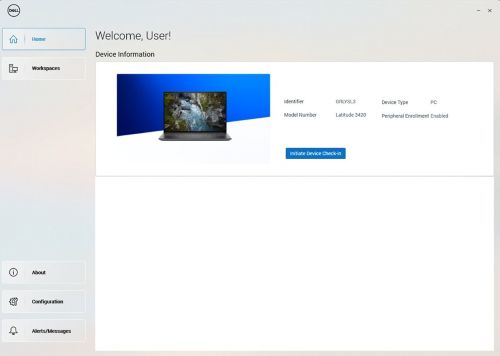
Note: After successful installation of the DDMA, when launching the agent icon in the system tray should have all the access to the host computer information.
Example of a successful Dell Device Manager Agent UI installed.
Steps to install DDMA:
- From the host computer, log in to the Dell Device Manager Console (DDMC).
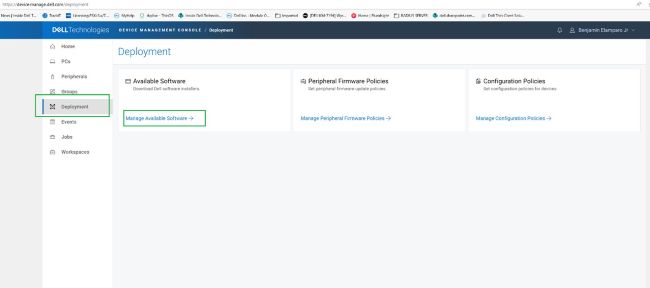
https://device.manage.dell.com/ - From the DDMC go to the Deployment Tab and select Manage Available Software.
- Download the DDMA.
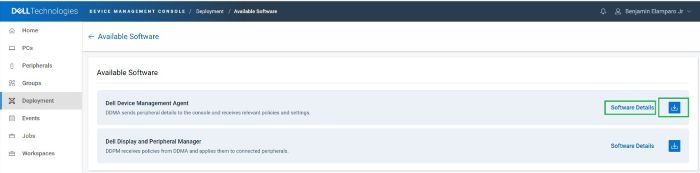
- Click Software Details and then copy the Group Token.
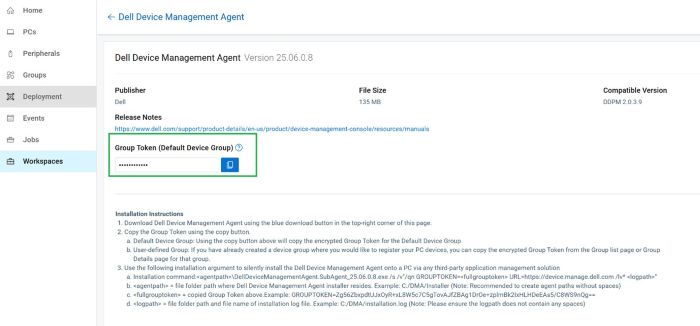
- Deploy the DDMA using the Group Token with the installation arguments for the server URL.
- Installation steps:
- Place the downloaded DDMA agent in the host at
C:\temp. - Open the command prompt with administrative privileges.
- From the command prompt, change the directory to
C:\temp. - Run the following command syntax, including the GROUPTOKEN:
DellDeviceManagementAgent.SubAgent_25.06.0.8.exe /s /v"/qn GROUPTOKEN=xxxxxxxx URL=https://device.manage.dell.com:443 /lv* c:\dma_installer.log"
Note: To ensure that the BIOS TPM is enabled.
- Place the downloaded DDMA agent in the host at
- Installation steps:
- Reboot the host computer and check the DMA agent in the system tray. It should appear as expected.
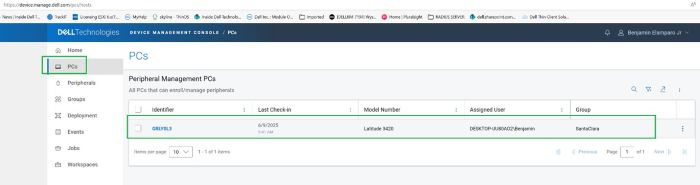
The host computer is now registered in the Dell Device Management Console.
Produse afectate
Dell Device Management Console | Peripheral Management, Dell Device Management ConsoleProprietăți articol
Article Number: 000348644
Article Type: How To
Ultima modificare: 30 Jun 2026
Version: 4
Găsiți răspunsuri la întrebările dvs. de la alți utilizatori Dell
Servicii de asistență
Verificați dacă dispozitivul dvs. este acoperit de serviciile de asistență.