Dell Pro 桌上型電腦的「HYPERVISOR_ERROR」藍色畫面
Summary: 瞭解如果 Dell Pro Micro QCM1255、Dell Pro Slim QCS1255 或 Dell Pro Tower QCT1255 出現「HYPERVISOR_ERROR」藍色畫面時該怎麼做。
Acest articol se aplică pentru
Acest articol nu se aplică pentru
Acest articol nu este legat de un produs specific.
Acest articol nu acoperă toate versiunile de produs existente.
Symptoms
配備 AMD Ryzen 5 8500G CPU 的 Dell Pro 桌上型電腦可能會出現「HYPERVISOR_ERROR」藍色畫面。錯誤顯示:「您的設備遇到問題,需要重新啟動。我們只是收集一些錯誤資訊,然後我們將為您重新啟動。
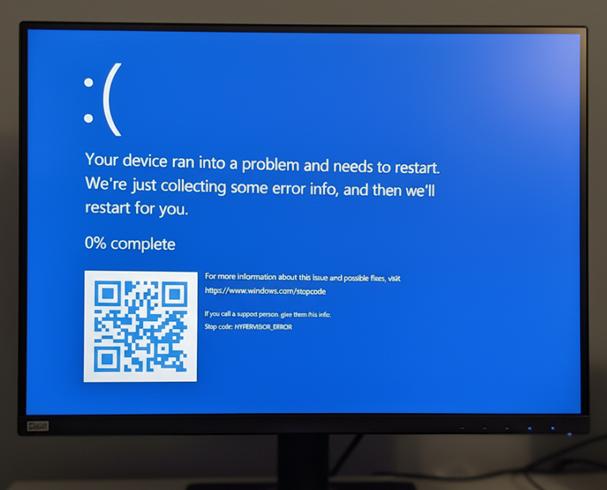
使用電腦時,也可能會發生垃圾顯示問題。
受影響的平台:
- Dell Pro 微型QCM1255
- Dell Pro 薄型QCS1255
- Dell Pro 立式QCT1255
受影響的 BIOS 版本:
- 1.0.5 版
- 1.1.3 版
- 1.2.1 版
- v1.3.2
- v1.4.1
- 1.4.2 版
- v1.5.0
Cause
AMD 處理器電源管理缺陷會導致此問題。
Resolution
將電腦更新至 BIOS 1.6.2 版或更新版本可解決問題。若要下載和安裝 BIOS,請參閱 Dell BIOS 與 UEFI 更新下載與安裝指南。
Produse afectate
Dell Pro Micro QCM1255, Dell Pro Slim QCS1255, Dell Pro Tower QCT1255Proprietăți articol
Article Number: 000362072
Article Type: Solution
Ultima modificare: 23 May 2026
Version: 5
Găsiți răspunsuri la întrebările dvs. de la alți utilizatori Dell
Servicii de asistență
Verificați dacă dispozitivul dvs. este acoperit de serviciile de asistență.