Indlæsning af standard i BIOS ændrer ikke tilstanden sikker opstart fra overvågningstilstand til implementeret tilstand
Summary: Få mere at vide om, hvorfor tilstanden Sikker opstart ikke skifter fra overvågningstilstand til implementeret tilstand efter indlæsning af standardtilstanden i BIOS.
Acest articol se aplică pentru
Acest articol nu se aplică pentru
Acest articol nu este legat de un produs specific.
Acest articol nu acoperă toate versiunile de produs existente.
Symptoms
Secure Boot-tilstand ændres muligvis ikke fra overvågningstilstand til implementeret tilstand efter indlæsning af standard i BIOS.
Berørte platforme:
- Alienware m16 R1 AMD
- Alienware m18 R1 AMD
- Inspiron 14 5425
- Inspiron 14 5435
- Inspiron 14 7425 2-i-1
- Inspiron 14 7435 2-i-1
- Inspiron 16 5625
- Inspiron 16 5635
- Inspiron 16 7635 2-i-1
- Inspiron 7415 2-i-1
- Vostro 16 5635
- Vostro 5625
Cause
Denne indstilling er ikke defineret i standardindstillingen for belastning i det oprindelige design.
Resolution
Følg trinene for manuelt at ændre sikker starttilstand fra overvågningstilstand til implementeret tilstand.
- Tryk gentagne gange på F2-tasten, efter at du har tændt computeren for at starte til BIOS-opsætningsmenuen.
- Vælg Sikkerhed.
- Vælg Sikker start.
- Vælg Udrullet tilstand.
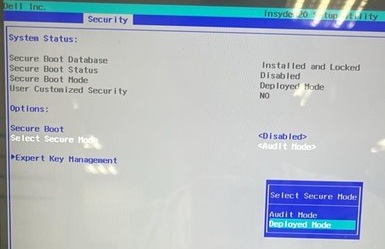
- Bekræft meddelelsen, og vælg Ja.

- Se om det er ændret til Implementeringstilstand.
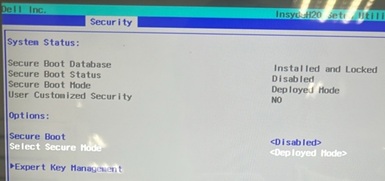
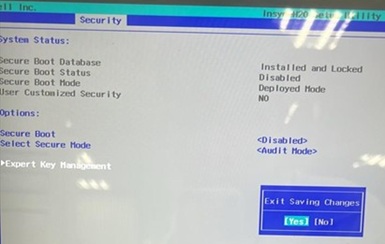
- Tryk på F10. Vælg Ja , når Afslut lagring af ændringer vises.
Produse afectate
Alienware m16 R1 AMD, Alienware m18 R1 AMD, Inspiron 14 5425, Inspiron 14 5435, Inspiron 7415 2-in-1, Inspiron 14 7425 2-in-1, Inspiron 14 7435 2-in-1, Inspiron 16 5625, Inspiron 16 5635, Inspiron 16 7635 2-in-1, Vostro 5625, Vostro 16 5635Proprietăți articol
Article Number: 000388366
Article Type: Solution
Ultima modificare: 24 May 2026
Version: 2
Găsiți răspunsuri la întrebările dvs. de la alți utilizatori Dell
Servicii de asistență
Verificați dacă dispozitivul dvs. este acoperit de serviciile de asistență.