Dell Display Manager 및 Peripheral Manager 미니 설치 프로그램이 실행되지 않음
Summary: 지원되는 새 Dell 디바이스가 연결될 때 DDPM(Dell Display and Peripheral Manager)에서 미니 설치 프로그램 프롬프트를 표시하지 않는 이유에 대해 알아보십시오.
Acest articol se aplică pentru
Acest articol nu se aplică pentru
Acest articol nu este legat de un produs specific.
Acest articol nu acoperă toate versiunile de produs existente.
Symptoms
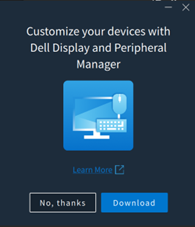
Windows를 실행하는 컴퓨터에서는 지원되는 Dell 디바이스가 연결되어 있을 때 Dell Display 및 Peripheral Manager를 설치하거나 업데이트하라는 팝업 메시지가 표시되지 않습니다.
이 동작은 다음과 같은 상황에서 나타날 수 있습니다.
- 지원되는 Dell 디바이스가 DDPM이 설치되지 않은 시스템에서 처음으로 연결되었습니다.
- 최신 DDPM 버전이 필요한 지원되는 새 디바이스가 연결되었지만 DDPM을 다운로드하거나 업데이트하라는 프롬프트가 나타나지 않습니다.
영향을 받는 소프트웨어:
- Dell Display Manager 및 Peripheral Manager(버전 2.2.1 이상)
영향을 받는 주변 기기:
- Dell Pro 5 키보드 및 마우스 KM526
- Dell Pro 5 마우스 MS526
- Dell Pro 5 유선 지문 인식기 ESS 마우스 MS526C
- Dell Pro 7 사일런트 마우스 MS726
- Dell Pro 7 슬림 키보드 및 마우스 KM726
영향을 받는 운영 체제:
- Windows
Cause
이는 예상된 동작입니다. 이전 미니 설치 관리자 환경이 제거되었으며 지원되는 디바이스가 연결될 때 더 이상 표시되지 않습니다.
Resolution
이는 디자인 변경입니다. 미니 설치 프로그램이 DDPM 버전 2.2.1에서 제거되었습니다.
Produse afectate
Dell Display and Peripheral Manager, Dell Pro 5 Keyboard and Mouse KM526, Dell Pro 7 Slim Keyboard and Mouse KM726, Dell Pro 5 Mouse MS526, Dell Pro 5 Wired Fingerprint ESS Mouse MS526C, Dell Pro 7 Silent Mouse MS726Proprietăți articol
Article Number: 000442074
Article Type: Solution
Ultima modificare: 24 May 2026
Version: 2
Găsiți răspunsuri la întrebările dvs. de la alți utilizatori Dell
Servicii de asistență
Verificați dacă dispozitivul dvs. este acoperit de serviciile de asistență.