Dell Display 和 Peripheral Manager Mini 安裝程式無法啟動
Summary: 瞭解為何在連接新的受支援的 Dell 裝置時,Dell Display and Peripheral Manager (DDPM) 可能不會出現迷你安裝程式提示。
Acest articol se aplică pentru
Acest articol nu se aplică pentru
Acest articol nu este legat de un produs specific.
Acest articol nu acoperă toate versiunile de produs existente.
Symptoms
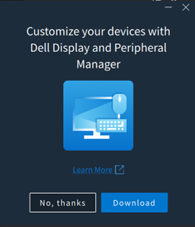
在執行 Windows 的電腦上,當支援的 Dell 裝置連線時,不會出現彈出式訊息,提示安裝或更新 Dell Display and Peripheral Manager。
在下列情況下可能會觀察到此行為:
- 在未安裝 DDPM 的系統上,受支援的 Dell 裝置是首次連接。
- 已連接需要更新 DDPM 版本的新支援裝置,但卻未出現下載或更新 DDPM 的提示。
受影響的軟體:
- Dell Display and Peripheral Manager (版本 2.2.1 及更新版本)
受影響的周邊設備:
- Dell Pro 5 鍵盤與滑鼠 KM526
- Dell Pro 5 滑鼠 MS526
- Dell Pro 5 有線指紋 ESS 滑鼠 MS526C
- Dell Pro 7 無訊息滑鼠 MS726
- Dell Pro 7 薄型鍵盤與滑鼠 KM726
受影響的作業系統:
- Windows
Cause
這是預期中的行為。以前的微型安裝程式體驗已被刪除,並且在連接支持的設備時不再顯示。
Resolution
這是設計變更。已從 DDPM 版本 2.2.1 移除迷你安裝程式。
Produse afectate
Dell Display and Peripheral Manager, Dell Pro 5 Keyboard and Mouse KM526, Dell Pro 7 Slim Keyboard and Mouse KM726, Dell Pro 5 Mouse MS526, Dell Pro 5 Wired Fingerprint ESS Mouse MS526C, Dell Pro 7 Silent Mouse MS726Proprietăți articol
Article Number: 000442074
Article Type: Solution
Ultima modificare: 24 May 2026
Version: 2
Găsiți răspunsuri la întrebările dvs. de la alți utilizatori Dell
Servicii de asistență
Verificați dacă dispozitivul dvs. este acoperit de serviciile de asistență.