PowerFlex 4.X: Resource Group Operation Failure Due To Incorrect SDS IP Role Order - MDM Cluster Degraded
Summary: Resource Group (RG) operations will complete and cause DU when the system has fewer Standby Manager or Tie-Breaker MDMs than expected.
Symptoms
- Storage Only (SO) RG operations
Resource Group Operation Examples
-
- OS conversion on one or more nodes, and the process fails.
- Add\Remove Resource Group
- Add node expansion
- The target node is successfully converted to SLES OS.
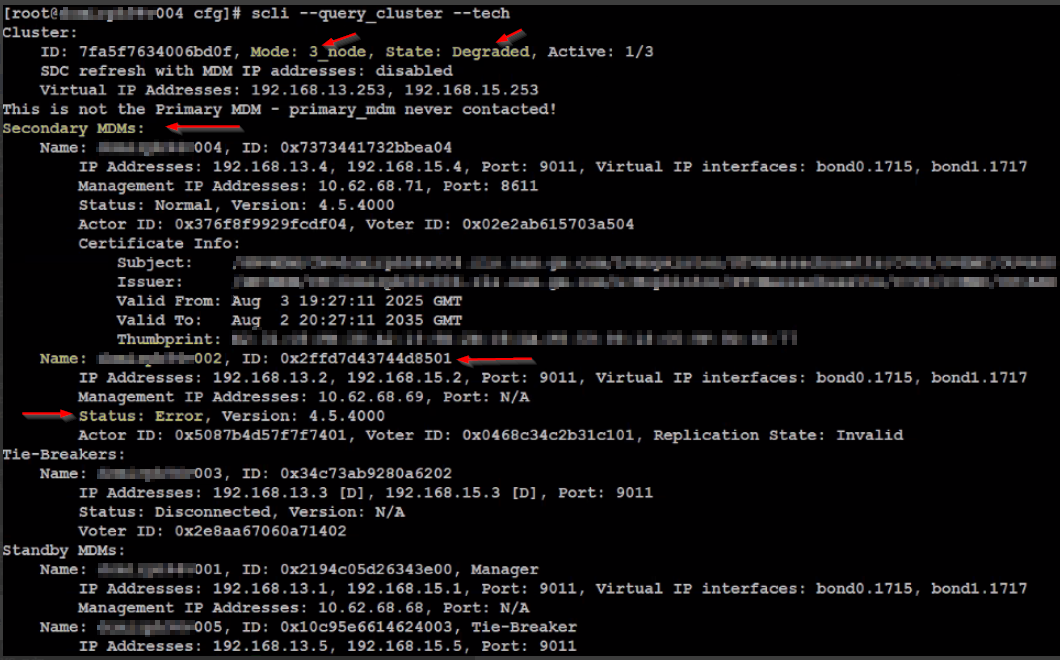
- The MDM cluster has a different configuration Mode after the conversion operation, and the State is showing as Degraded.
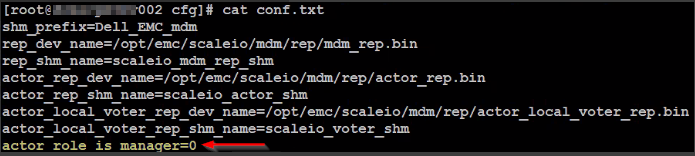
--query_clusteroutput may show nodes that were originally Manager MDMs as a Tie-Breaker and vice versa. The role may not match theactor_rolesetting in the MDM configuration file -/opt/emc/scaleio/mdm/cfg/conf.txt.
Example:
Pre-RG Operation
MDM cluster has a 5_node configuration Mode and a Normal (healthy) State, and node xxx002 is in a Normal Status and a Manager MDM (Primary):
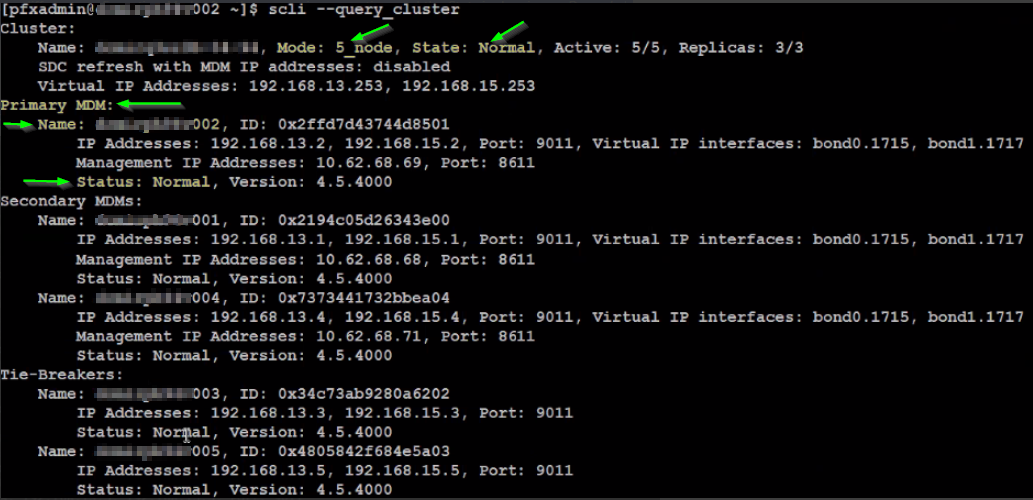
Post-RG Operation
MDM cluster has a 3_node configuration Mode and a Degraded (not healthy) State, and node xxx002 is in an Error Status and a Manager MDM (Secondary):
The configuration file for node xxx002 is set to actor_role_is_manager=0, i.e., Tie-Breaker:
Impact
The MDM cluster is in a failed and unexpected state - possible DU.
Cause
When SDS IP roles are configured, PFMP uses the specified SDS IP addresses to match and identify existing nodes.
During any scenario where the RG automation requires an MDM configuration check, PFMP expects the IPs to be listed with SDC Only IPs first, followed by SDS Only IPs. If this order is not followed, PFMP may misidentify cluster nodes.
This strict requirement for IP roles ordering has been identified as a defect and will be changed to accept any IP role order.
Example of expected IP Role order
- SDC Only, SDC Only, SDS Only, SDS Only
3: ID: 248169c800000002 Name: Sds-003 fdId: 8bb3ba9300000000 fsId: 0000000000000000
IP:  192.168.13.3,192.168.14.3,192.168.15.3,192.168.16.3 Port: 7072
 States: NORMAL UpDown: UP Process: IDLE RefCnt: 7 GenNum: 1  KeepaliveState: NORMAL    IPs:  192.168.15.3 (SDC Only)  192.168.16.3 (SDC Only) 192.168.13.3 (SDS Only) 192.168.14.3 (SDS Only)
Examples of unexpected IP Role order
- SDC Only, SDS Only, SDC Only, SDS Only
0: ID: 248169c800000000 Name: Sds-001 fdId: 8bb3ba9300000000 fsId: 0000000000000000
IP:  192.168.13.1,192.168.14.1,192.168.15.1,192.168.16.1 Port: 7072
States: NORMAL UpDown: UP Process: IDLE RefCnt: 7 GenNum: 1 KeepaliveState: NORMAL IPs: 192.168.13.1 (SDC Only) 192.168.14.1 (SDS Only) 192.168.15.1 (SDC Only) 192.168.16.1 (SDS Only)- SDS Only, SDS Only, SDC Only, SDC Only:
1: ID: 248169c800000001 Name: Sds-002 fdId: 8bb3ba9300000000 fsId: 0000000000000000
IP:  192.168.13.2,192.168.14.2,192.168.15.2,192.168.16.2 Port: 7072
 States: NORMAL UpDown: UP Process: IDLE RefCnt: 7 GenNum: 1  KeepaliveState: NORMAL    IPs:  192.168.13.2 (SDS Only) 192.168.14.2 (SDS Only) 192.168.15.2 (SDC Only)  192.168.16.2 (SDC Only)
Resolution
To avoid a DU, perform the following actions before attempting an RG operation.
1) Confirm the current order of SDS IPs by running the following from the primary MDM
for i in $(scli --query_all_sds | grep ID: | awk {'print $3'}); do scli --query_sds --sds_id $i | grep -E ''$i'|Role'; echo -e; done
2) If the IP order is anything other than SDC-only IPs followed by SDS-only IPs:
It's required to add the SDS via SCLI to ensure the IPs are entered as expected.
PFMP may reorder the IPs in ascending order when using the UI, which will prevent the SDS from being added with the expected IP order.
a. Remove each SDS from the cluster one at a time using the PFMP UI
b. Re-add the SDS to the cluster on the Primary MDM using SCLI with the SDC-only IPs listed first, followed by the SDS-only IPs, comma separated:
scli --add_sds --sds_ip <SDC Only IP #1>,<SDC Only IP #2>,<SDS Only IP #1>,<SDS Only IP #2> --sds_ip_role sdc_only,sdc_only,sds_only,sds_only --protection_domain_name <PD Name> --sds_name <SDS Name> --force_clean --i_am_sure
Impacted Versions
PFMP 4.x
Fixed In Version
PFMP 4.8
Additional Information
Related Articles:
PowerFlex 4.X: OS Conversion Failure Due To Unconfigured Standby MDM
PowerFlex 4.X: OS Conversion Failure Due To Missing Virtual IPs