PowerScale: system audytu nie działa
Summary: Podczas próby aktywacji licencji (w trybie offline lub Legacy) pojawia się komunikat o błędzie "Audit system is down, request couldn't be fulfilled" (Audit system is down, request couldn't be fulfilled). ...
Acest articol se aplică pentru
Acest articol nu se aplică pentru
Acest articol nu este legat de un produs specific.
Acest articol nu acoperă toate versiunile de produs existente.
Symptoms
Błąd w komunikatach:
powerscale-3:  2026-06-03T15:34:28.375440-07:00 <3.3> powerscale3(id20) isi_papi_d[64129]: Cannot deliver audit event to the audit daemon. Event payload size (72521) + format length is greater than allowed size (65525)
powerscale-3:  2026-06-03T15:37:33.008372-07:00 <3.3> powerscale-3(id20) isi_papi_d[65089]: Cannot deliver audit event to the audit daemon. Event payload size (72521) + format length is greater than allowed size (65525)
powerscale-3:  2026-06-03T16:18:41.035297-07:00 <3.3> powerscale-3(id20)  isi_papi_d[50492]: STACK Audit system is down, request couldn't be fulfilled.     from --- (---:0):      isi_exception::isi_exception(int, char const*, __va_list_tag*) (OFFSET:134)     api_exception::api_exception(api_error_code, char const*, ...) (OFFSET:146)     uri_manager::execute_request(request&, response&, bool, bool, bool, bool, bool, bool) (OFFSET:2181)
W interfejsie użytkownika:
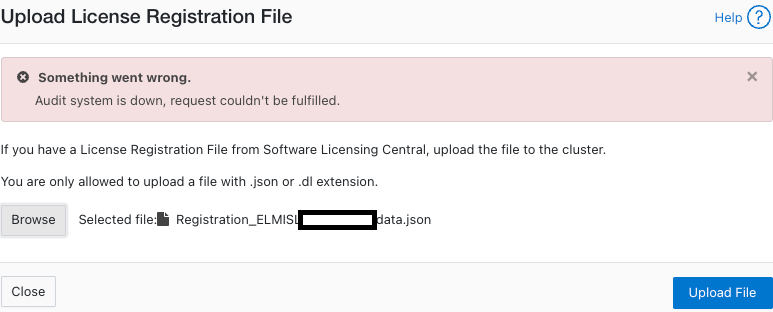
Cause
Wada kodu, w której rozmiar ładunku przekracza limit.
Resolution
Inżynierowie znają ten problem i pracują nad poprawką.
Obejście problemu:
- Sprawdź, czy inspekcja konfiguracji jest włączona:
powerscale-3# isi audit settings global view
     Protocol Auditing Enabled: Yes
                 Audited Zones: -
               CEE Server URIs:
                      Hostname:
       Config Auditing Enabled: Yes  <<<<<<<<<<<<<<<<<<<<<<<<<<<
         Config Syslog Enabled: No
         Config Syslog Servers: -
     Config Syslog TLS Enabled: No
  Config Syslog Certificate ID:
       Protocol Syslog Servers: -
   Protocol Syslog TLS Enabled: No
Protocol Syslog Certificate ID:
         System Syslog Enabled: No
         System Syslog Servers: -
     System Syslog TLS Enabled: No
  System Syslog Certificate ID:
          Auto Purging Enabled: No
              Retention Period: 180
       System Auditing Enabled: No
powerscale-3#
Uwaga: Jeśli ta opcja ma wartość Nie, dotyczy to innego problemu. Skontaktuj się z pomocą techniczną firmy Dell Technologies.
- Ustaw audyt konfiguracji na wyłączony tymczasowo:
powerscale-3# isi audit settings global modify --config-auditing-enabled=false
- Ponownie zastosuj licencję, a następnie włącz ją:
powerscale-3# isi audit settings global modify --config-auditing-enabled=true
Proprietăți articol
Article Number: 000486487
Article Type: Solution
Ultima modificare: 08 Jul 2026
Version: 1
Găsiți răspunsuri la întrebările dvs. de la alți utilizatori Dell
Servicii de asistență
Verificați dacă dispozitivul dvs. este acoperit de serviciile de asistență.