CloudBoost: Custom Asymmetric Encryption Keys
Summary: How to generate and configure custom, asymmetric encryption keys to encrypt data on the CloudBoost appliance.
Instructions
The CloudBoost appliance can be configured with custom, user generated, asymmetric encryption keys to encrypt the appliance backups.
Backups encrypted with asymmetric keys are only recoverable if the correct private key is provided.
To configure CloudBoost to use asymmetric encryption keys,
It is the last option on the appliance configuration page.
Check the box to enable:

To generate the Rivest-Sharmir-Adleman (RSA) key pair:
1. Run the following command:
ssh-keygen -t rsa -f private_key_name
2. Enter a passphrase.
3. Run the following command:
openssl rsa -in private_key_name -pubout -out public_key_name
4. Enter the passphrase from step 2.
5. Retrieve the content of the public key:
cat public_key_name
-
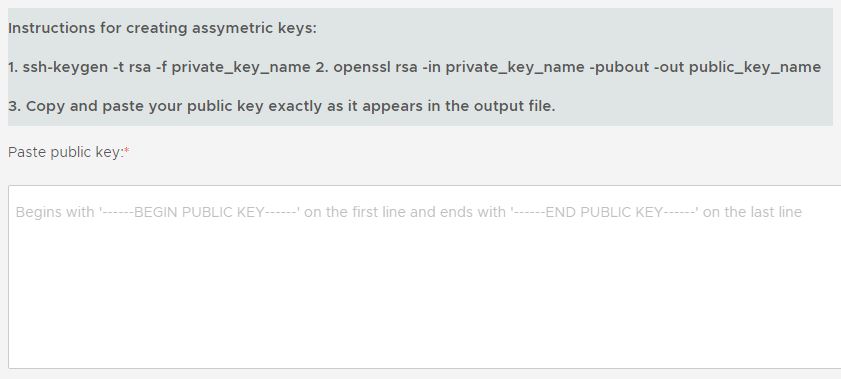
Begins with -----BEGIN PUBLIC KEY----- (first line)
-
Ends with -----END PUBLIC KEY----- (last line)
7. Paste the public key into the box on the configuration page.
Example:
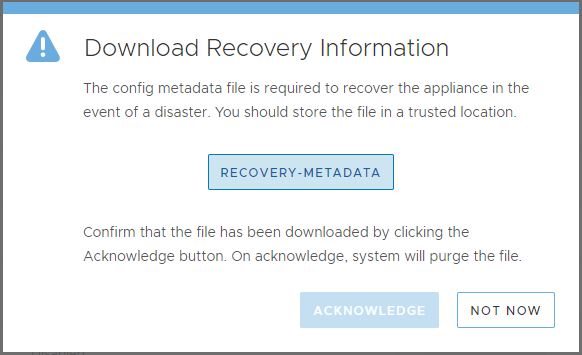
After the configuration is complete, download the recovery.metadata key as prompted from the UI:
Additional Information
Keep these keys in a safe location.
Failure to do so results in a data unavailable (DU) or data loss (DL) situation.