PowerFlex: How to Reset iDRAC 13G and 14G
Summary: PowerFlex: How to soft reset iDRAC 13G &14G
Acest articol se aplică pentru
Acest articol nu se aplică pentru
Acest articol nu este legat de un produs specific.
Acest articol nu acoperă toate versiunile de produs existente.
Instructions
Reset using iDRAC UI (13G)
The Graphical User Interface (UI) of the iDRAC provides an option to perform a soft reset:
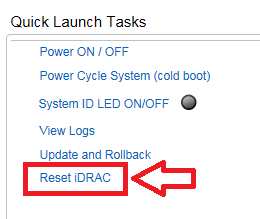
- Connect to the iDRAC
- Log in to the interface by entering the username and password
- In the lower right corner of the overview screen, the Quick Launch Tasks are shown
- Click Reset iDRAC.
- Confirm the action
- The iDRAC will not be reachable for a few minutes, while the system performance is not affected
Reset using iDRAC UI (14G)
The Graphical User Interface (UI) of the iDRAC provides an option to perform a soft reset:
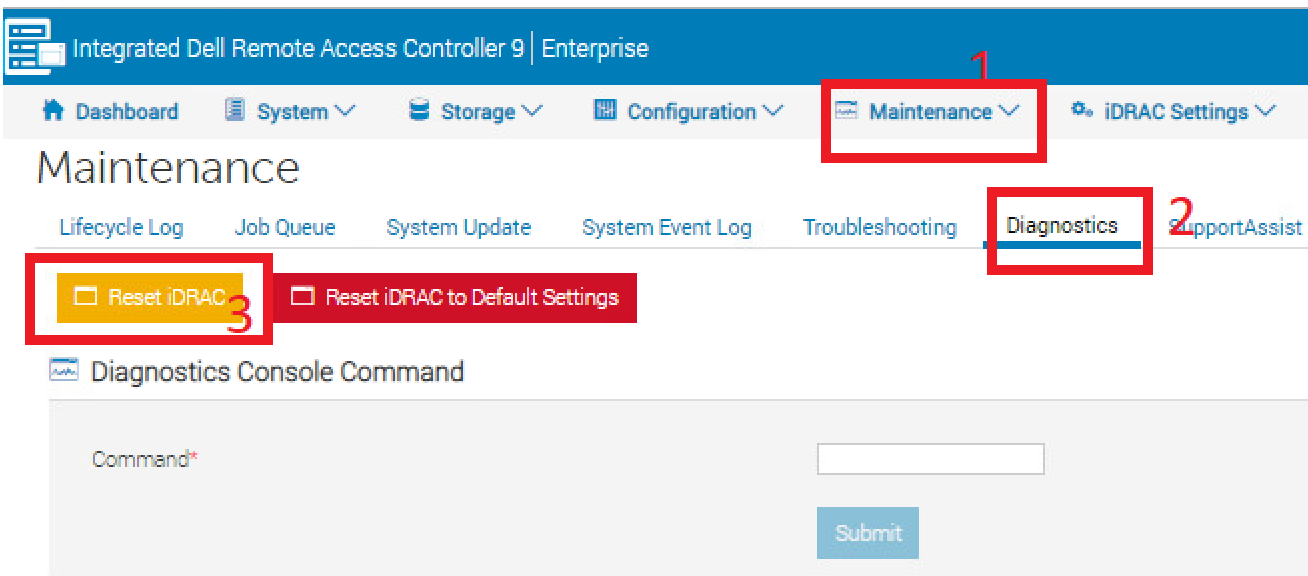
- Connect to the iDRAC
- Log in to the interface by entering the username and password
- Click "Maintenance" tab on top
- Click "Diagnostics" sub-tab
- Click Reset iDRAC.
- Confirm the action
- The iDRAC will not be reachable for a few minutes, while the system performance is not affected
Produse afectate
PowerFlex rack, VxFlex Ready Nodes, PowerFlex appliance Intelligent Catalog Software, PowerFlex Software, PowerFlex appliance R640, PowerFlex appliance R740XD, PowerFlex appliance R840Proprietăți articol
Article Number: 000019789
Article Type: How To
Ultima modificare: 09 ian. 2026
Version: 5
Găsiți răspunsuri la întrebările dvs. de la alți utilizatori Dell
Servicii de asistență
Verificați dacă dispozitivul dvs. este acoperit de serviciile de asistență.