NMC: GST service fails immediately - Internal error: could not create database process.
Summary: NetWorker Management Console (NMC) GST service is not starting on a Windows NMC server.
Acest articol se aplică pentru
Acest articol nu se aplică pentru
Acest articol nu este legat de un produs specific.
Acest articol nu acoperă toate versiunile de produs existente.
Symptoms
- The NetWorker Management Console (NMC) server is installed on a Windows host
- The NMC (
gst) services fail immediately when starting - The following folders exist:
C:\Program Files\EMC NetWorker\Management\nmcdbC:\Program Files\EMC NetWorker\Management\nmcdb\pgdata
NOTE: The above path is the default NetWorker Installation path. If you have installed NetWorker in an alternate location, you must check the
..\Management folder relative to your install drive and path.
- The
C:\Program Files\EMC NetWorker\Management\GST\logs\gstd.rawcontains:
Internal error: could not get database handle.
ERROR generated: file null line #0
Internal error: could not create database process.
The most recently called subfunction returned error 2.
Cause
This can result from issues with Windows permissions on the NMC database volume: Local Service must retain permissions to the nmcdb folder and volume.gstdbinit creates the nmcdb directory and ensure that the Built-In Local Service user has all the required permissions for that directory.
Read, Execute, and List folder permissions are also required for Local Service from the volume root traversing to the nmcdb directory.
If these permissions are compromised, NMC cannot initialize the database and start.
Resolution
Perform the following on the NMC server:
- Open an Administrator Command-Prompt or PowerShell, stop any NMC services that may be running:
net stop gst - Open services.msc on the NMC server. Validate that the "
EMC GST" services are owned by the correct system accounts: NOTE: If the ownership is not correct. Edit the service from the Properties -> Log On tab.
 - Grant Local Service read/write/modify permissions for the volume that
nmcdbresides on recursively - If the NMC database (
nmcdb) already exists with files in it, ensure that Local Service is also the owner of thenmcdbfolder with full control permissions: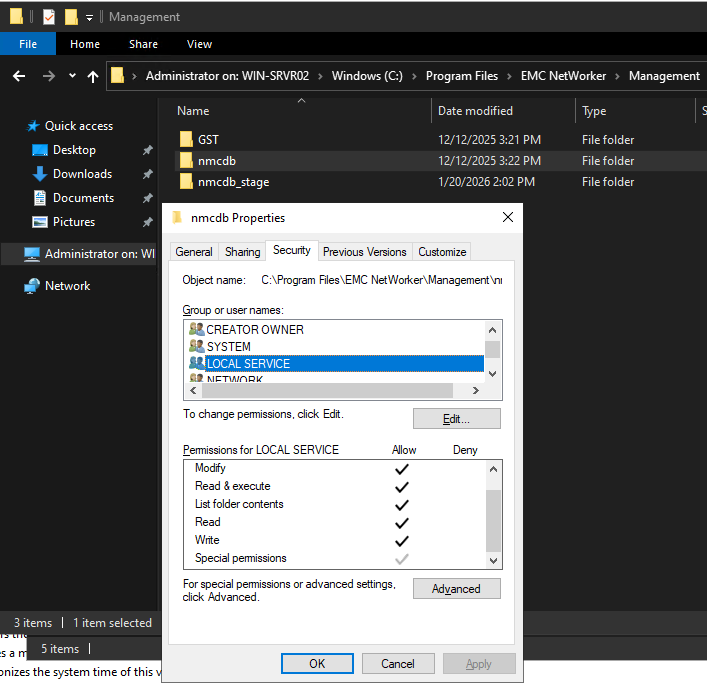
- If the NMC database must be manually created, re-create
nmcdbusing thegstdbinitcommand located in theGST\bindirectory, for example:
.\gstdbinit.exe -D 9 -U "LOCAL SERVICE" -n 5432 "C:\Program Files\EMC NetWorker\Management\nmcdb"
- Restart GST services:
net start gst
Additional Information
Produse afectate
NetWorker, NetWorker Management ConsoleProduse
NetWorker FamilyProprietăți articol
Article Number: 000034519
Article Type: Solution
Ultima modificare: 21 ian. 2026
Version: 4
Găsiți răspunsuri la întrebările dvs. de la alți utilizatori Dell
Servicii de asistență
Verificați dacă dispozitivul dvs. este acoperit de serviciile de asistență.