ECS: NFS externe I/O-fouten; Wijziging van bucketeigenaar voor FS-enabled bucket kan ertoe leiden dat applicaties en/of gebruikers geen toegang hebben tot NFS-bestanden
Summary: Vorige bucketeigenaar is niet toegestaan of beperkt ObjectControllerException: methode updateObjectInternal niet toegestaan voor vorige bucketeigenaar
Acest articol se aplică pentru
Acest articol nu se aplică pentru
Acest articol nu este legat de un produs specific.
Acest articol nu acoperă toate versiunile de produs existente.
Symptoms
Wijziging aangebracht door de gebruiker in de pagina Bucket-eigenaar in de gebruikersinterface:
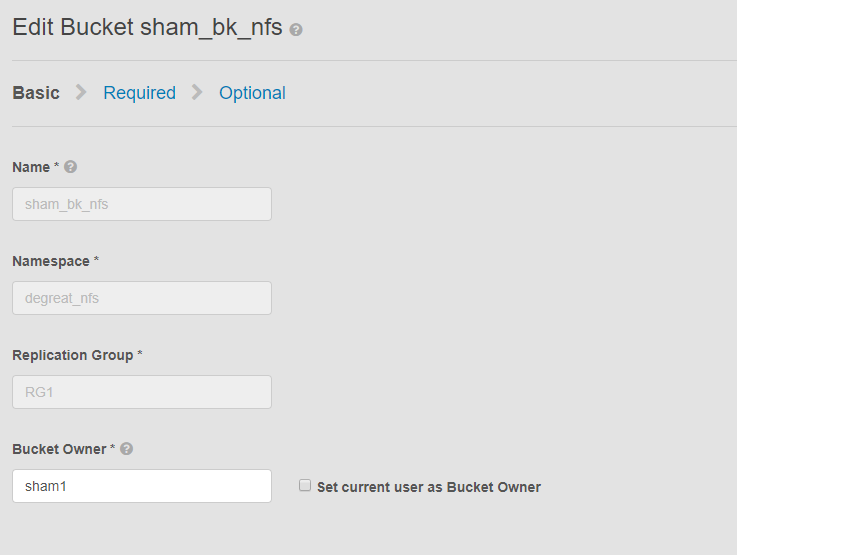
Dit probleem is van toepassing op NFS-buckets en een wijziging van de bucket-eigenaar door de gebruikersinterface. Dit kan ertoe leiden dat toepassingen of gebruikers die zijn aangesloten, geen toegang meer hebben tot de bucket op het Linux-bestandssysteem. Zelfs als we de wijziging terugzetten naar de oorspronkelijke eigenaar, is toegang niet mogelijk, wat leidt tot DU.
In dit voorbeeld:
De eigenaar van de bucket is gewijzigd in "sham2" met behulp van de gebruikersinterface. Vanwege een beperking in ECS, zelfs na het terugzetten van de naam van de bucket-eigenaar naar 'sham1'. Het ECS zal de bucket-eigenaar niet terugzetten naar "sham1" met behulp van de gebruikersinterface. Dit kan voorlopig alleen worden gedaan met de CLI met behulp van een API met payload om de eigenaarsvlag te resetten naar true.
Manieren om het probleem te identificeren, vraag de gebruiker op de Linux-machine om een bestand aan te raken, bijvoorbeeld:
Dit probleem is van toepassing op NFS-buckets en een wijziging van de bucket-eigenaar door de gebruikersinterface. Dit kan ertoe leiden dat toepassingen of gebruikers die zijn aangesloten, geen toegang meer hebben tot de bucket op het Linux-bestandssysteem. Zelfs als we de wijziging terugzetten naar de oorspronkelijke eigenaar, is toegang niet mogelijk, wat leidt tot DU.
In dit voorbeeld:
De eigenaar van de bucket is gewijzigd in "sham2" met behulp van de gebruikersinterface. Vanwege een beperking in ECS, zelfs na het terugzetten van de naam van de bucket-eigenaar naar 'sham1'. Het ECS zal de bucket-eigenaar niet terugzetten naar "sham1" met behulp van de gebruikersinterface. Dit kan voorlopig alleen worden gedaan met de CLI met behulp van een API met payload om de eigenaarsvlag te resetten naar true.
Manieren om het probleem te identificeren, vraag de gebruiker op de Linux-machine om een bestand aan te raken, bijvoorbeeld:
admin@node1~>touch file
touch: setting times of `file': Remote I/O error

se svc_log with the string  "method updateObjectInternal "

Command:
# svc_log -a -sr dataheadsvc | grep "method updateObjectInternal"
Example:
admin@node1~>svc_log -a -sr dataheadsvc | grep "method updateObjectInternal"
svc_log v1.0.22 (svc_tools v1.5.3)                 Started 2019-06-06 10:45:04

Running on nodes:              <All nodes>
Time range:                    2019-06-05 10:45:04 - 2019-06-06 10:45:04
Filter string(s):              <All messages>
Show nodename(s):              True
Search reclaim logs (if any):  False

com.emc.storageos.data.object.exception.ObjectControllerException: method updateObjectInternal not allowed for previous bucket owner sham1
Caused by: com.emc.storageos.data.object.exception.ObjectControllerException: method updateObjectInternal not allowed for previous bucket owner sham1
Cause
Een bucket maken met een specifieke gebruiker als eigenaar, gevolgd door een wijziging van het eigendom van de bucket. Ten slotte mislukt het geven van volledige controle aan de oorspronkelijke eigenaar met behulp van de ACLs-pagina met de ECS-logboekuitzondering:
ObjectControllerException: method updateObjectInternal not allowed for previous bucket owner <ownerid>
This is a known issue currently being evaluated by Dell EMC at this time.
Resolution
De tijdelijke oplossing is om de bucket-eigenaar te wijzigen met behulp van de API via CLI met payload om de vlag van de eigenaar opnieuw in te stellen op true.
1. Bepaal de huidige bucketeigenaar.
2. Maak een eenvoudig xml-bestand met behulp van de vi-editor. In het onderstaande voorbeeld heet dit /tmp/bucket-owner.xml. Dit proces bestaat uit twee stappen. We moeten het tijdelijk op een nieuwe eigenaar van sham2 zetten. Net als in dit voorbeeld hieronder, moet u de uitvoer bevestigen voordat u teruggaat naar sham1 van de oorspronkelijke eigenaar:
. 7. Zodra de configuratiewijziging is voltooid, zouden we dezelfde fout niet meer moeten zien
1. Bepaal de huidige bucketeigenaar.
Het rootwachtwoord van de gebruikersinterface is vereist om het token te genereren. Bijvoorbeeld:
admin@ecsnode1:~> tok=$(curl -iks https://XX.XX.XX.XX:4443/login -u 'root:ChangeMe' | grep X-SDS-AUTH-TOKEN)
Controleer de huidige eigenaar van de bucket (vervang bucket en naamruimte in uw situatie):
admin@node1:~> curl -s -k -X GET -H "$tok" https://XX.XX.XX.XX:4443/object/bucket/sham_bk_nfs/info?namespace=degreat_nfs | xmllint --format - | grep '<owner>'
  <owner>sham2</owner>
Dit bevestigt dat parameter reset_previous_owners moet worden ingesteld op true. De teruggedraaide bucket-eigenaar bevindt zich op de gebruikersinterface, maar de API via CLI bevestigt dat de ECS de bucket-eigenaar nog steeds als 'sham2' ziet.
2. Maak een eenvoudig xml-bestand met behulp van de vi-editor. In het onderstaande voorbeeld heet dit /tmp/bucket-owner.xml. Dit proces bestaat uit twee stappen. We moeten het tijdelijk op een nieuwe eigenaar van sham2 zetten. Net als in dit voorbeeld hieronder, moet u de uitvoer bevestigen voordat u teruggaat naar sham1 van de oorspronkelijke eigenaar:
admin@node1:~ # vi /tmp/bucket-owner.xml

admin@ecsnode1:~ # cat /tmp/bucket-owner.xml
<object_bucket_update_owner>
   <namespace>degreat_nfs</namespace>
   <new_owner>sham2</new_owner>
   <reset_previous_owners>true</reset_previous_owners>
</object_bucket_update_owner>

3. Change the bucket owner to the temporary owner.
De API-syntaxis die nodig is om de bucket-eigenaar te wijzigen in "sham2" via het xml-bestand is als volgt:
admin@ecsnode1:~> curl -v -k -X "POST" "https://xx.xx.xx.xx:4443/object/bucket/sham_bk_nfs/owner" -H "$tok" -H "Content-Type: application/xml" -H "ACCEPT:application/xml" -d @/tmp/bucket-owner.xml -v
* Hostname was NOT found in DNS cache
*   Trying xx.xx.xx.xx...
* Connected to xx.xx.xx.xx (xx.xx.xx.xx) port 4443 (#0)
* successfully set certificate verify locations:
*   CAfile: none
  CApath: /etc/ssl/certs/
* SSLv3, TLS unknown, Certificate Status (22):
* SSLv3, TLS handshake, Client hello (1):
* SSLv3, TLS handshake, Server hello (2):
* SSLv3, TLS handshake, Certificate (11):
* SSLv3, TLS handshake, Server key exchange (12):
* SSLv3, TLS handshake, Server finished (14):
* SSLv3, TLS handshake, Client key exchange (16):
* SSLv3, TLS change cipher, Client hello (1):
* SSLv3, TLS handshake, Finished (20):
* SSLv3, TLS change cipher, Client hello (1):
* SSLv3, TLS handshake, Finished (20):
* SSL connection using TLSv1.2 / ECDHE-RSA-AES256-GCM-SHA384
* Server certificate:
*        subject: CN=localhost
*        start date: 2019-03-25 09:53:41 GMT
*        expire date: 2029-03-22 09:53:41 GMT
*        issuer: CN=localhost
*        SSL certificate verify result: self signed certificate (18), continuing anyway.
> POST /object/bucket/sham_bk_nfs/owner HTTP/1.1
> User-Agent: curl/7.37.0
> Host: xx.xx.xx.xx:4443
> X-SDS-AUTH-TOKEN: BAAcUy9KYlhxTlVYb2M0bnF3bTNscEsvSEdDeWhJPQMAjAQASHVybjpzdG9yYWdlb3M6VmlydHVhbERhdGFDZW50ZXJEYXRhOmJhOGQ3ZTkzLTMyMGYtNDNmNy05Y2FkLWM4YWQzMWFiMzY1MAIADTE1NTk3Mzk3OTA2MDgDAC51cm46VG9rZW46YjQ4NGNiZjEtNTkwNy00YWI3LTgzYTctM2Y3OGRhM2RiY2NiAgAC0A8=
> Content-Type: application/xml
> ACCEPT:application/xml
> Content-Length: 179
>
* upload completely sent off: 179 out of 179 bytes
< HTTP/1.1 200 OK
< Date: Thu, 06 Jun 2019 10:56:08 GMT
< Content-Length: 0
< Connection: keep-alive
<
* Connection #0 to host xx.xx.xx.xx left intact
4. Edit the simple.xml file previously created in step 2 and this time insert original owner of sham1
admin@node1:~ # vi /tmp/bucket-owner.xml

admin@ecsnode1:~ # cat /tmp/bucket-owner.xml
<object_bucket_update_owner>
   <namespace>degreat_nfs</namespace>
   <new_owner>sham1</new_owner>
   <reset_previous_owners>true</reset_previous_owners>
</object_bucket_update_owner>

5. Change the bucket owner back to the original owner
The API syntax required to change the bucket owner back to "sham1" through the xml file is as follows:
admin@ecsnode1:~> curl -v -k -X "POST" "https://xx.xx.xx.xx:4443/object/bucket/sham_bk_nfs/owner" -H "$tok" -H "Content-Type: application/xml" -H "ACCEPT:application/xml" -d @/tmp/bucket-owner.xml -v
* Hostname was NOT found in DNS cache
*   Trying xx.xx.xx.xx...
* Connected to xx.xx.xx.xx (xx.xx.xx.xx) port 4443 (#0)
* successfully set certificate verify locations:
*   CAfile: none
  CApath: /etc/ssl/certs/
* SSLv3, TLS unknown, Certificate Status (22):
* SSLv3, TLS handshake, Client hello (1):
* SSLv3, TLS handshake, Server hello (2):
* SSLv3, TLS handshake, Certificate (11):
* SSLv3, TLS handshake, Server key exchange (12):
* SSLv3, TLS handshake, Server finished (14):
* SSLv3, TLS handshake, Client key exchange (16):
* SSLv3, TLS change cipher, Client hello (1):
* SSLv3, TLS handshake, Finished (20):
* SSLv3, TLS change cipher, Client hello (1):
* SSLv3, TLS handshake, Finished (20):
* SSL connection using TLSv1.2 / ECDHE-RSA-AES256-GCM-SHA384
* Server certificate:
*        subject: CN=localhost
*        start date: 2019-03-25 09:53:41 GMT
*        expire date: 2029-03-22 09:53:41 GMT
*        issuer: CN=localhost
*        SSL certificate verify result: self signed certificate (18), continuing anyway.
> POST /object/bucket/sham_bk_nfs/owner HTTP/1.1
> User-Agent: curl/7.37.0
> Host: xx.xx.xx.xx:4443
> X-SDS-AUTH-TOKEN: BAAcUy9KYlhxTlVYb2M0bnF3bTNscEsvSEdDeWhJPQMAjAQASHVybjpzdG9yYWdlb3M6VmlydHVhbERhdGFDZW50ZXJEYXRhOmJhOGQ3ZTkzLTMyMGYtNDNmNy05Y2FkLWM4YWQzMWFiMzY1MAIADTE1NTk3Mzk3OTA2MDgDAC51cm46VG9rZW46YjQ4NGNiZjEtNTkwNy00YWI3LTgzYTctM2Y3OGRhM2RiY2NiAgAC0A8=
> Content-Type: application/xml
> ACCEPT:application/xml
> Content-Length: 179
>
* upload completely sent off: 179 out of 179 bytes
< HTTP/1.1 200 OK
< Date: Thu, 06 Jun 2019 10:56:08 GMT
< Content-Length: 0
< Connection: keep-alive
<
* Connection #0 to host xx.xx.xx.xx left intact


6.  Confirm the bucket owner change is reflected.
Bevestig dat de verandering van bucket-eigenaar nu "sham1" is.
admin@ecsnode1:~> curl -s -k -X GET -H "$tok" https://XX.XX.XX.XX:4443/object/bucket/sham_bk_nfs/info?namespace=degreat_nfs | xmllint --format - | grep '<owner>'
<owner>sham1</owner>
Zodra de eigenaar van de bucket is teruggezet op de API, controleert u of de host nu toegang heeft tot de bucket op het Linux-bestandssysteem.
. 7. Zodra de configuratiewijziging is voltooid, zouden we dezelfde fout niet meer moeten zien
svc_log -f "method updateObjectInternal not allowed" -start "20 hour ago" -sr all -sh -st hour
svc_log v1.0.22 (svc_tools v1.6.8)                 Started 2020-01-23 09:28:17

Running on nodes:              <All nodes>
Time range:                    2020-01-22 13:28:17 - 2020-01-23 09:28:17
Filter string(s):              'method updateObjectInternal not allowed'
Show nodename(s):              True
Search reclaim logs (if any):  False

Count of message occurrences per hour:

2020-01-22 13:xx - 5066
2020-01-22 14:xx - 9580
2020-01-22 15:xx - 9574
2020-01-22 16:xx - 9580
2020-01-22 17:xx - 9570
2020-01-22 18:xx - 9576
2020-01-22 19:xx - 9564
2020-01-22 20:xx - 9576
2020-01-22 21:xx - 9576
2020-01-22 22:xx - 9572
2020-01-22 23:xx - 9564
2020-01-23 00:xx - 9586
2020-01-23 01:xx - 9574
2020-01-23 02:xx - 9572
2020-01-23 03:xx - 4564
2020-01-23 04:xx - 0
2020-01-23 05:xx - 0
2020-01-23 06:xx - 0
2020-01-23 07:xx - 0
2020-01-23 08:xx - 0
2020-01-23 09:xx - 0


Dell EMC is aware of this issue and are working on a fix in a future release.
Additional Information
Verwante NFS KB:
- ECS: een eenvoudige NFS-export maken en deze op een client koppelen
- ECS: dataheadsvc log streaming error: NFSv3 procedure LINK wordt niet ondersteund in aanvraag ReadLinkRequest
- ECS: NFS-koppeling mislukt met Geen dergelijk bestand, directory of ERROR_OBJECT_NOT_FOUND
- ECS: NFS externe I/O-fouten; Wijziging van bucketeigenaar voor FS-bucket kan ertoe leiden dat applicaties/gebruikers geen toegang hebben tot NFS-bestanden
- ECS: NFS-schrijfbewerking leidt tot I/O-fout na een bepaalde hoeveelheid gegevens.
- ECS: NFS-bestandsshare van ECS met een VMware NFS-datastore gebruiken
- ECS: Best practices for mounting ECS NFS exports
- ECS: NFS-share koppelen op Windows-client
- ECS: NFS kan niet worden gekoppeld na het wijzigen van instellingen voor bestandsexport in de gebruikersinterface
- ECS: Is Oracle WebCenter Content (WCC) compatibel met ECS?
Abonneer u op productupdates.
U kunt zich abonneren op updates door de instructies in het onderstaande Knowledge-artikel te volgen:
DELL EMC: Hoe abonneren op productpagina's - Dell Support?
Produse afectate
Elastic Cloud StorageProduse
ECS Appliance, ECS Appliance Software with Encryption, ECS Appliance Software without Encryption, Elastic Cloud StorageProprietăți articol
Article Number: 000055535
Article Type: Solution
Ultima modificare: 29 iul. 2026
Version: 5
Găsiți răspunsuri la întrebările dvs. de la alți utilizatori Dell
Servicii de asistență
Verificați dacă dispozitivul dvs. este acoperit de serviciile de asistență.