Applications displaying squares and "random" characters instead of text after enabling System Data Encryption
Summary: This article provides information about applications displaying squares and "random" characters instead of text, after enabling System Data Encryption (SDE).
Acest articol se aplică pentru
Acest articol nu se aplică pentru
Acest articol nu este legat de un produs specific.
Acest articol nu acoperă toate versiunile de produs existente.
Symptoms
Affected Products:
- Dell Data Protection | Encryption
Affected Versions:
- v8.12 and 8.13
On-screen text can be displayed as squares or other random characters. This occurs when using a non-Latin script and language, such as Arabic, when System Data Encryption (SDE) is also enabled.
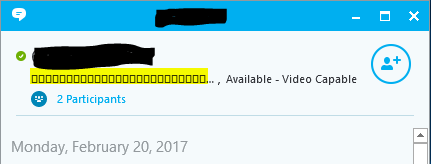
Figure 1: (English Only) On-Screen text appears as squares and other random characters
Cause
Not Applicable
Resolution
Work around:
Reboot the computer.
Resolution:
Upgrade the client to v8.15 or later or apply the following exclusion to the SDE Encryption rules for the affected device:
-^3C:\Windows\Globalization
To contact support, reference Dell Data Security International Support Phone Numbers.
Go to TechDirect to generate a technical support request online.
For additional insights and resources, join the Dell Security Community Forum.
Produse afectate
Dell EncryptionProprietăți articol
Article Number: 000124728
Article Type: Solution
Ultima modificare: 11 apr. 2024
Version: 9
Găsiți răspunsuri la întrebările dvs. de la alți utilizatori Dell
Servicii de asistență
Verificați dacă dispozitivul dvs. este acoperit de serviciile de asistență.