How to Identify the Dell Encryption External Media Version
Summary: Learn about how to identify the version of Dell Encryption External Media and Dell Data Protection External Media Edition.
Acest articol se aplică pentru
Acest articol nu se aplică pentru
Acest articol nu este legat de un produs specific.
Acest articol nu acoperă toate versiunile de produs existente.
Instructions
Note:
- As of February 2021, Dell Encryption Enterprise for Mac has reached End of Maintenance. This product and its articles are no longer updated by Dell. For more information, reference Product Life Cycle (End of Support and End of Life) Policy for Dell Data Security. If you have any questions on alternative articles, either reach out to your sales team or contact endpointsecurity@dell.com.
- Reference Endpoint Security for additional information about current products.
Knowing the version of Dell Encryption External Media (formerly Dell Data Protection External Media Edition) that was used to protect an external storage device helps to:
- Identify known issues.
- Determine UI differences.
- Understand workflow changes.
- Verify system requirements.
Affected Products:
- Dell Encryption External Media
- Dell Data Protection External Media Edition
Affected Operating Systems:
- Windows
- Mac
Windows and Mac binaries are added to any external storage device protected by Dell Encryption External Media. To determine the version, click Windows or Mac for more information.
Windows
- Log in to the Windows computer.
- Go to the location of the protected media.
- Right-click
AccessEncryptedFiles.exe. After-right clicking, select Properties.
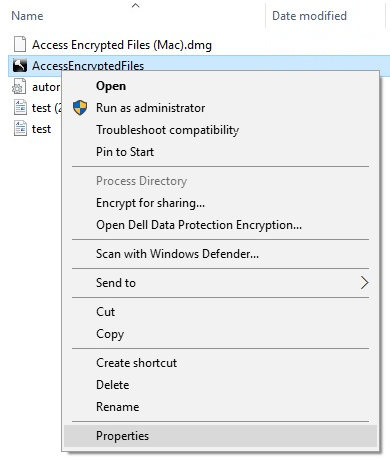
- Click the Details tab.

- Document the Product version.
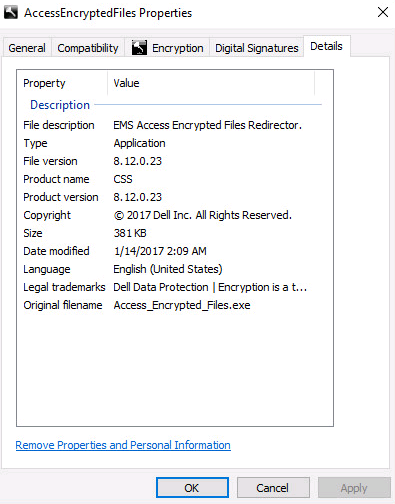 Note:
Note:- The Product version of the client may differ from the above screenshot.
- For information about what Windows operating systems are compatible with Dell Encryption External Media, refer to:
Mac
- Log in to the Mac computer.
- Go to the location of the protected media.
- Double-click
AccessEncryptedFiles.dmg. This mounts the disk image.
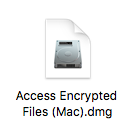
Note: AccessEncryptedFiles.dmg is suppressed if the device has already authenticated through the EMS service. Remount the external media and then cancel the authentication request prompt to resolve this. - Right-click AccessEncryptionExternalMedia and then select Get Info.
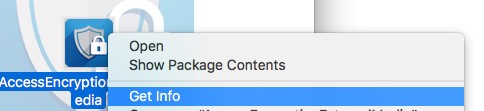 Note: Earlier versions of the product say AccessDellExternalMediaShield instead of AccessEncryptionExternalMedia.
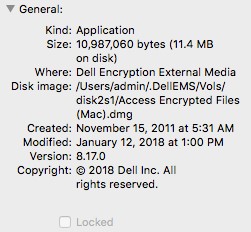
 - Expand General and then document the Version. In the example, 8.17.0 is the Version.
 Note:
Note:- The Version of the client may differ from the above screenshot.
- For information about what Windows operating systems are compatible with Dell Encryption External Media, reference:
Produse afectate
Dell EncryptionProprietăți articol
Article Number: 000124924
Article Type: How To
Ultima modificare: 05 aug. 2026
Version: 18
Găsiți răspunsuri la întrebările dvs. de la alți utilizatori Dell
Servicii de asistență
Verificați dacă dispozitivul dvs. este acoperit de serviciile de asistență.