Dell Encryption 无法根据 UI 分辨率进行缩放
Summary: Dell Encryption(以前称为 Dell Data Protection |在 Windows 10 中将缩放设置为 250% 时,加密)在 4k 显示器上的缩放不正确。
Acest articol se aplică pentru
Acest articol nu se aplică pentru
Acest articol nu este legat de un produs specific.
Acest articol nu acoperă toate versiunile de produs existente.
Symptoms
提醒:
- 从 2022 年 5 月起,Dell Endpoint Security Suite Enterprise 停止维护。有关更多信息,请参阅 Dell Data Security 产品生命周期(结束支持/停售)政策
- 截至 2019 年 1 月,Dell Endpoint Security Suite Pro 已停止服务。有关更多信息,请参阅 Dell Data Security 产品生命周期(结束支持/停售)政策
- 截至 2018 年 2 月,Dell Data Protection |安全工具的服务终止。有关更多信息,请参阅 Dell Data Security 产品生命周期(结束支持/停售)政策
- 请参阅端点安全性,了解有关当前产品的其他信息。
受影响的产品:
- Dell Encryption Enterprise
- Dell Encryption Personal
- Dell Endpoint Security Suite Enterprise
- Dell Data Protection | Enterprise Edition
- Dell Data Protection | Personal Edition
- Dell Endpoint Security Suite Pro
- Dell Data Protection | Security Tools
受影响的版本:
- v8.10 和 8.17
受影响的操作系统:
- Windows 10(RTM、1511、1607、1703)
Cause
不适用
Resolution
提醒:此问题已在 v8.18 中得到解决。
在附带 UHD (4k) 屏幕的某些设备上,如果 Windows 10 中的 UI 缩放比例设置为 250%,则 UI 可能会显示不正确,并且难以在 Dell Data Security Console 应用程序中导航。

通过在 Windows 8 的兼容性模式下 运行 Dell Data Security Console 应用程序,可以暂时解决此问题。
要启用兼容性模式,请执行以下操作:
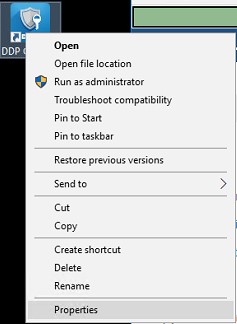
- 右键单击图标,然后选择 属性。
- 选择 Compatibility(兼容性)选项卡。
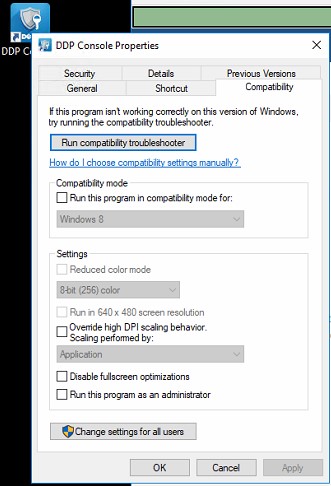
- 选中“兼容模式”复选框是否标记为“ 在兼容模式下运行此程序”:并将设置保留在 Windows 8 上。
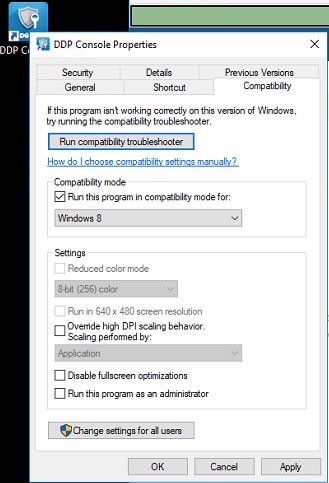
- 依次单击 Apply 和 OK 以强制执行更改。
要联系支持部门,请参阅 Dell Data Security 国际支持电话号码。
转至 TechDirect,在线生成技术支持请求。
要获得更多见解和资源,请加入戴尔安全社区论坛。
Additional Information
Videos
Produse afectate
Dell Encryption, Dell Endpoint Security Suite Pro, Dell Endpoint Security Suite EnterpriseProprietăți articol
Article Number: 000124977
Article Type: Solution
Ultima modificare: 18 iun. 2024
Version: 12
Găsiți răspunsuri la întrebările dvs. de la alți utilizatori Dell
Servicii de asistență
Verificați dacă dispozitivul dvs. este acoperit de serviciile de asistență.