Latitude 3510:鍵盤功能鍵指南
Summary: 下列指南列出 Dell Latitude 3510 筆記本電腦可用的鍵盤快速鍵及其執行的功能。
Acest articol se aplică pentru
Acest articol nu se aplică pentru
Acest articol nu este legat de un produs specific.
Acest articol nu acoperă toate versiunile de produs existente.
Symptoms
鍵盤快速鍵功能
下表列出 Latitude 3510 筆記本電腦可用的快速鍵組合功能
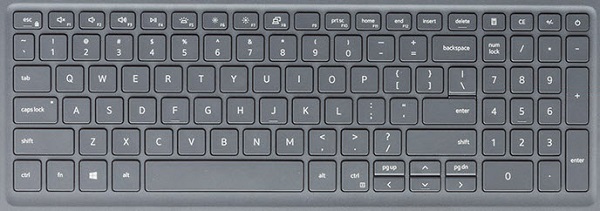
| 按鍵 | 主要行為 | 次要行為 (Fn + 鍵) |
|---|---|---|
| Fn + Esc | Escape |
切換 Fn 鍵鎖定 |
| Fn + F1 |
靜音 |
F1 |
| Fn + F2 |
降低音量 |
F2 |
| Fn + F3 |
提高音量 |
F3 |
| Fn + F4 |
靜音麥克風 |
F4 |
| Fn + F5 |
開啟/關閉鍵盤背光 |
F5 |
| Fn + F6 |
降低亮度 |
F6 |
| Fn + F7 |
增加亮度 |
F7 |
| Fn + F8 |
切換至外部顯示器 |
F8 |
| Fn + F10 |
列印螢幕 |
F10 |
| Fn + F11 |
Home 鍵 |
F11 |
| Fn + F12 |
End 鍵 |
F12 |
| Fn + Ctrl |
開啟應用程式功能表 |
-- |
注意:鍵盤背光功能取決於在筆記本電腦上安裝具備背光功能的鍵盤。
Cause
不適用。
Resolution
 造訪我們的
造訪我們的 如需其他文章和資訊,請造訪我們的
 您也可以在我們的
Produse afectate
Latitude 3510Proprietăți articol
Article Number: 000129906
Article Type: Solution
Ultima modificare: 19 apr. 2026
Version: 8
Găsiți răspunsuri la întrebările dvs. de la alți utilizatori Dell
Servicii de asistență
Verificați dacă dispozitivul dvs. este acoperit de serviciile de asistență.