Precision 7740: Handleiding voor toetsenbordfuncties
Summary: Dit artikel bevat een handleiding voor de sneltoetsfuncties op het Dell Precision 7740 Mobile Workstation
Acest articol se aplică pentru
Acest articol nu se aplică pentru
Acest articol nu este legat de un produs specific.
Acest articol nu acoperă toate versiunile de produs existente.
Symptoms
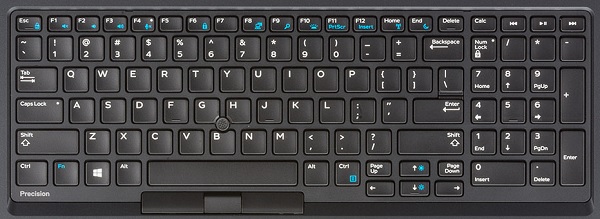
De volgende handleiding bevat de beschikbare sneltoetsen en de functies die ze verrichten op het Dell Precision 7740 Mobile Workstation
Sneltoetsfuncties
De onderstaande tabel bevat een lijst met beschikbare sneltoetsfuncties op het Precision 7740 Mobile Workstation
Cause
| Functietoetsencombinatie | Resultaat |
|---|---|
| Fn + Esc | Functietoetsvergrendeling in-/uitschakelen |
| Fn + F1 | Audio dempen in-/uitschakelen |
| Fn + F2 | Volume verlagen |
| Fn + F3 | Volume verhogen |
| Fn + F4 | Schakelt led microfoon dempen
uit - Microfoon geschikt voor het opnemen van audio-LED aan - Microfoon gedempt en niet in staat om audio op te nemen |
| Fn + F6 | Gebruikt als Scroll Lock-toets |
| Fn + F8 | Video-uitvoer in-/uitschakelen |
| Fn + F10 | Verlichting
toetsenbordverlichting uitschakelen, donker, helder |
| Fn + F11 | Gebruikt als printschermtoets |
| Fn + F12 | Gebruikt als insert-toets |
| Fn + Ctrl-rechts | Gebruikt als contextmenutoets |
| Fn + pijltoets links | Gebruikt als home-toets |
| Fn + rechtercursor | Gebruikt als eindtoets |
| Fn + B | Gebruikt als toets Pauzeren/onderbreken |
| Fn + pijltoets (omhoog) | LCD-helderheid verlagen |
| Fn + pijltoets (omlaag) | LCD-helderheid verhogen |
| Fn + Home | Hiermee schakelt u de WiFi-radio in |
| Fn + End | S3 slaapstand |
Resolution
 Ga naar onze Knowledge Base voor toetsenborden voor meer informatie.
 Meer artikelen en informatie kunt u vinden op onze touchpad supportpagina.
 U kunt ook meer artikelen en informatie vinden op onze Supportpagina voor de muis.
Produse afectate
Precision 7740Proprietăți articol
Article Number: 000134169
Article Type: Solution
Ultima modificare: 29 apr. 2026
Version: 5
Găsiți răspunsuri la întrebările dvs. de la alți utilizatori Dell
Servicii de asistență
Verificați dacă dispozitivul dvs. este acoperit de serviciile de asistență.