Precision 7540: Keyboard Function guide
Summary: This article provides a guide to the keyboard shortcut functions on the Dell Precision 7540 Mobile Workstation
Acest articol se aplică pentru
Acest articol nu se aplică pentru
Acest articol nu este legat de un produs specific.
Acest articol nu acoperă toate versiunile de produs existente.
Symptoms
Keyboard Shortcut Key Functions
The below table is a list of combination short-cut key functions available on the Precision 7540 Mobile Workstation
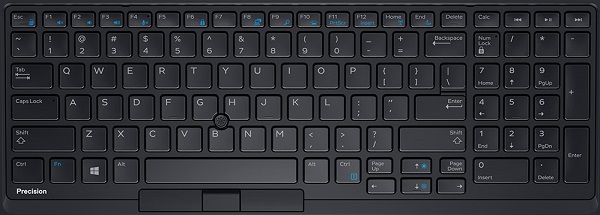
| Function key combo | Result |
|---|---|
| Fn + Esc | Toggle the Fn-Key Lock |
| Fn + F1 | Toggle the Mute Audio |
| Fn + F2 | Decrease Volume |
| Fn + F3 | Increase Volume |
| Fn + F4 | Toggles Microphone Mute
LED Off - Microphone capable of recording audio LED On - Microphone Muted and incapable of recording audio |
| Fn + F6 | Used as Scroll Lock Key |
| Fn + F8 | Toggles Video Output |
| Fn + F9 | Search - Mimics Windows key + F |
| Fn + F10 | Keyboard Backlight Illumination
Disabled, Dim, Bright |
| Fn + F11 | Used as Print Screen Key |
| Fn + F12 | Used as Insert Key |
| Fn + Right Ctrl | Used as Context Menu Key |
| Fn + B | Used as Pause/Break Key |
| Fn + Arrow Key (Up) | LCD Brightness Decrease |
| Fn + Arrow Key (Down) | LCD Brightness Increase |
| Fn + Home | Toggles the WiFi Radio |
| Fn + End | S3 Sleep Mode |
Cause
Not Applicable.
Resolution
 Visit our Keyboard knowledge base for additional resources and information.
 For additional articles and information visit our Touchpad support page.
 Additional articles and information can also be found on our Mouse support page.
Produse afectate
Precision 7540Proprietăți articol
Article Number: 000136648
Article Type: Solution
Ultima modificare: 30 apr. 2026
Version: 6
Găsiți răspunsuri la întrebările dvs. de la alți utilizatori Dell
Servicii de asistență
Verificați dacă dispozitivul dvs. este acoperit de serviciile de asistență.