OptiPlex 7070 Ultra: Visual guide to your computer
Summary: This article is a visual guide to the external ports and features on the various form factors of the Dell OptiPlex 7070 Ultra desktop.
Acest articol se aplică pentru
Acest articol nu se aplică pentru
Acest articol nu este legat de un produs specific.
Acest articol nu acoperă toate versiunile de produs existente.
Symptoms
The following article provides a visual guide to your OptiPlex 7070 Ultra Computer and lists the external ports and features of your PC.
 Note: For a more detailed description of each location, please go to the system manuals at www.dell.com/support
Table of Contents:
Front View

(Figure.1 Front View)
Rear View
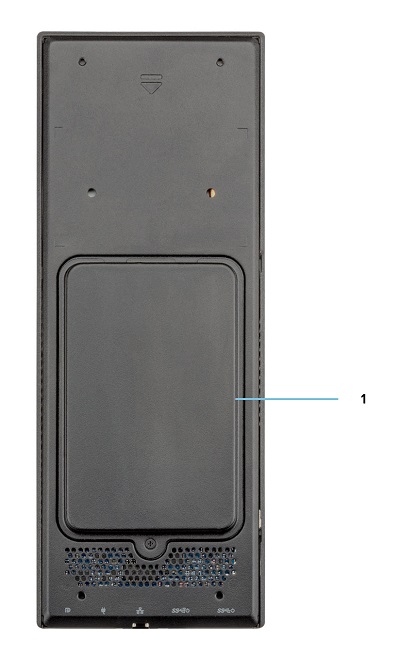
(Figure.2 Rear View)
| 1 | Hard Drive Bay |
Top View
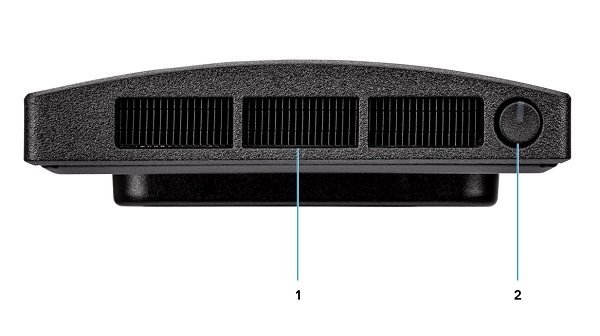
(Figure.3 Top View)
| 1 | Fan Vent | 2 | Power Button and Power LED |
Bottom View

(Figure.4 Bottom View)
| 1 | USB 3.1 Gen1 Type-A Connector w/SmartPower | 2 | USB 3.1 Gen2 Type-A Connector w/SmartPower |
| 3 | Network Ethernet (NIC) Connector | 4 | Power Adapter Connector |
| 5 | USB 3.1 Gen2 Type-C Connector w/DisplayPort Alt Mode/PowerDelivery |
Left-Hand Side View

(Figure.5 Left-Hand Side View)
| 1 | Service Tag Location | 2 | Universal Audio Connector |
| 3 | Vent | 4 | Hard Drive Status LED |
| 5 | USB 3.1 Gen2 Type-C Connector w/DisplayPort Alt Mode | 6 | USB 3.1 Gen2 Type-A w/PowerShare |
Right-Hand Side View
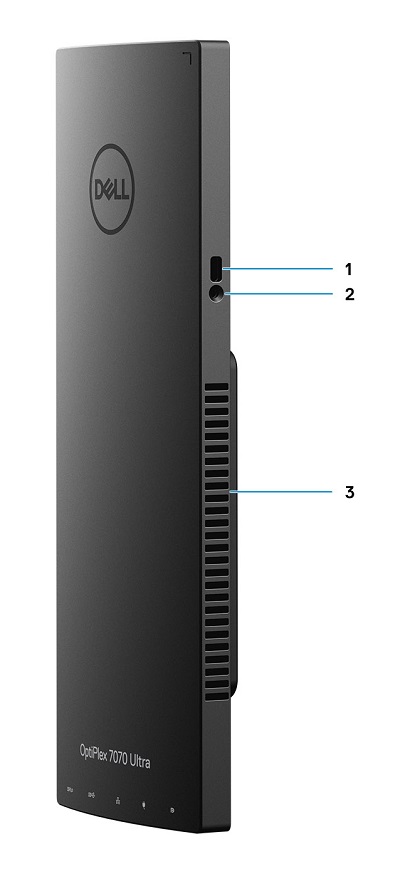
(Figure.6 Right-Hand Side View)
| 1 | Kensington Lock Slot | 2 | Security Screw Hole |
| 3 | Vent |
Additional Info:
- OptiPlex 7070 Ultra Online Manuals and Documents
- OptiPlex 7070 Ultra Customer replaceable unit (CRU) teardown guide
Cause
N/A
Resolution
N/A
Produse afectate
OptiPlex 7070 UltraProprietăți articol
Article Number: 000138519
Article Type: Solution
Ultima modificare: 29 sept. 2023
Version: 7
Găsiți răspunsuri la întrebările dvs. de la alți utilizatori Dell
Servicii de asistență
Verificați dacă dispozitivul dvs. este acoperit de serviciile de asistență.