CloudLink: A CloudLink node is stuck in emergency mode
Summary: A CloudLink node is stuck in emergency mode.
Acest articol se aplică pentru
Acest articol nu se aplică pentru
Acest articol nu este legat de un produs specific.
Acest articol nu acoperă toate versiunile de produs existente.
Symptoms
After booting the CloudLink node, the following message is seen:
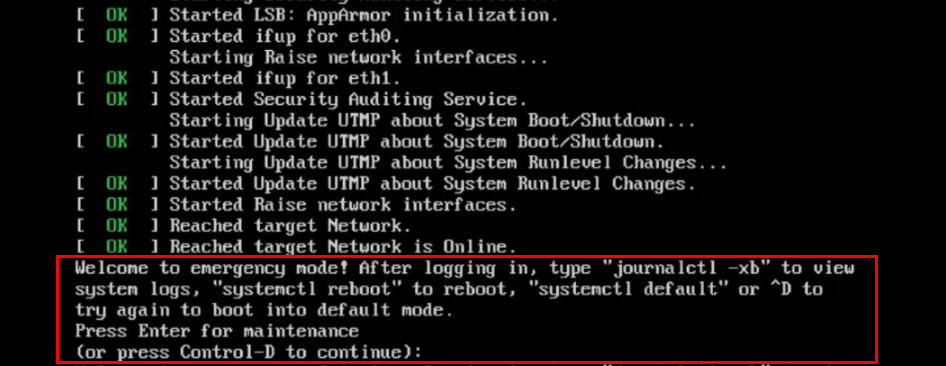
Welcome to emergency mode! After logging in, type "journalctl -xb" to view
system logs, "systemctl reboot" to reboot, "systemctl default" or ^D to
try again to boot into default mode.
Press Enter for maintenance
(or press Control-D to continue):
Cause
This issue is due to a file system issue that must be repaired.
Resolution
To resolve the file system issue on the node, perform the following:
If the root filesystem is clean, you can run fsck on the other filesystems using the same procedure above.
Run command journalctl -xb. These logs might indicate if there is a corrupted filesystem that needs repaired.
You can use commands lsblk and blkid to help link a uuid to its filesystem.
Here are some examples of errors that you might see in journalctl -xb:
/dev/sda6: Inodes that were part of a corrupted orphan linked list found.
/dev/sda6: UNEXPECTED INCONSISTENCY: RUN fsck MANUALLY.
Failed to start File System Check on /dev/disk/by-uuid/fd782a8-a70d-045513691c7e
If you are unable to repair the filesystem using fsck or if you have one Cloudlink node that is frequently getting stuck in emergency mode, you should remove that broken Cloudlink node from the cluster. Then you deploy a new Cloudlink node from OVA and join to the existing cluster.
If you can repair the file system, you should check the health of the cluster from the Cloudlink UI.
This is done in SYSTEM > Cluster and ensure incoming, and outgoing sync states are OK.
- You press Control-D to continue, but it remains in emergency mode.
- Press the ENTER key for maintenance.
- Run a file system check on the root ( / ) file system.
root@cloudlink:~#  lsblk    <------------------- Run this command to identify the / filesystem (typically sda10)
root@cloudlink:~#  fsck /dev/sda10  <-------- It complains that /dev/sda10 is still mounted
root@cloudlink:~#  umount /dev/sda10
root@cloudlink:~#  fsck /dev/sda10
- Press y to fix any errors that are found.
- Reboot the node.
If the root filesystem is clean, you can run fsck on the other filesystems using the same procedure above.
Run command journalctl -xb. These logs might indicate if there is a corrupted filesystem that needs repaired.
You can use commands lsblk and blkid to help link a uuid to its filesystem.
Here are some examples of errors that you might see in journalctl -xb:
/dev/sda6: Inodes that were part of a corrupted orphan linked list found.
/dev/sda6: UNEXPECTED INCONSISTENCY: RUN fsck MANUALLY.
Failed to start File System Check on /dev/disk/by-uuid/fd782a8-a70d-045513691c7e
If you are unable to repair the filesystem using fsck or if you have one Cloudlink node that is frequently getting stuck in emergency mode, you should remove that broken Cloudlink node from the cluster. Then you deploy a new Cloudlink node from OVA and join to the existing cluster.
If you can repair the file system, you should check the health of the cluster from the Cloudlink UI.
This is done in SYSTEM > Cluster and ensure incoming, and outgoing sync states are OK.
Produse afectate
CloudLinkProduse
CloudLink SecureVMProprietăți articol
Article Number: 000197726
Article Type: Solution
Ultima modificare: 13 mai 2026
Version: 6
Găsiți răspunsuri la întrebările dvs. de la alți utilizatori Dell
Servicii de asistență
Verificați dacă dispozitivul dvs. este acoperit de serviciile de asistență.