Driver Detection Not Available During Drivers Scan for Computers with SupportAssist and Dell Command Update Installed
Summary: Customers are unable to run Automated Drivers Scan and results in "Driver Detection Not Available" which is an issue with Dell Command | Update.
Acest articol se aplică pentru
Acest articol nu se aplică pentru
Acest articol nu este legat de un produs specific.
Acest articol nu acoperă toate versiunile de produs existente.
Symptoms
Affected Products:
- Dell Command | Update
When running Automated Drivers Scan, a customer gets a Driver Detection Not Available message which is due to a No Available Catalog error. This can occur when the SupportAssist and Dell Command | Update are installed on the computer.
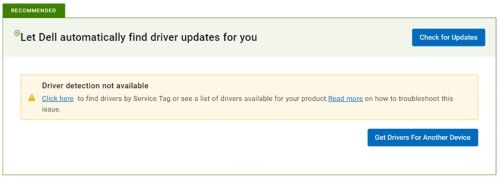
Figure 1: (English Only) Drive detection not available
Cause
Error is observed only when the below condition is fulfilled (all three conditions should be present):
- Applicable only if SupportAssist and Dell Command | Update are both installed on the machine (Open Control Panel from Start Menu > Click Programs > Search Dell SupportAssist).
- The computer has Dell Command | Update v4.5 or earlier and updating to v4.6 or later (Open Control Panel from Start Menu > Click Programs > Search Dell Command Update).
- Dell Command | Update must have an offline catalog that is configured (Open Dell Command | Update application > Settings (right top of the application) > General:
- The default Source Location (dell.com) is cleared.
- Location is configured to offline catalog.
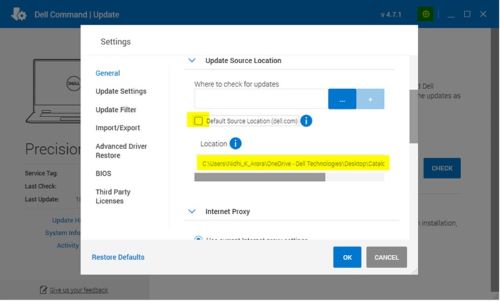
Figure 2: (English Only) Dell Command | Update Settings
Resolution
- Remove offline catalog location updated.
- Check Default Source Location (dell.com) and click OK.
- Update to the latest Dell Command | Update version.
Or
- Uninstall the existing Dell Command | Update version (which should be 4.5 or earlier).
- Install the latest Dell Command | Update version from Dell.com.
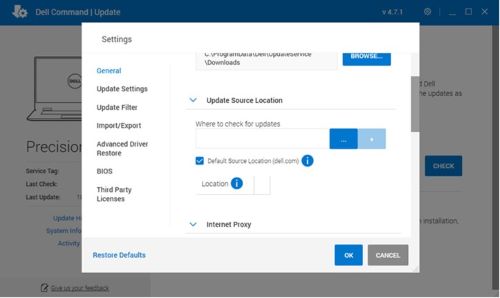
Figure 3: (English Only) Dell Command | Update Settings
Produse afectate
Dell Command | UpdateProprietăți articol
Article Number: 000207301
Article Type: Solution
Ultima modificare: 16 sept. 2025
Version: 5
Găsiți răspunsuri la întrebările dvs. de la alți utilizatori Dell
Servicii de asistență
Verificați dacă dispozitivul dvs. este acoperit de serviciile de asistență.