Data Domain: Reboot loop at "NVRAM driver load and initialization"
Summary: PowerProtect Data Domain systems have reported being stuck in a reboot loop. The NVRAM driver fails to load or initialize successfully resulting in a system reboot.
Acest articol se aplică pentru
Acest articol nu se aplică pentru
Acest articol nu este legat de un produs specific.
Acest articol nu acoperă toate versiunile de produs existente.
Instructions
Affected Systems:
- PowerProtect DD6400 | DD6900 | DD9400 | DD9900
- All DDOS versions
Symptoms:
- Unable to boot into DDOS
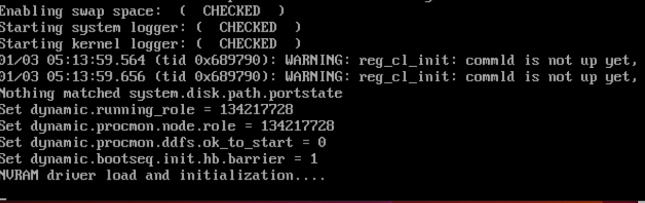
- Serial output (Virtual Console - iDRAC) shows Boot process restarts after "NVRAM driver load and initialization"
Cause:
- The DIMM located on the NVRAM card is not seated or installed correctly.
- OR
- The NVRAM card is not installed correctly or is faulty.
Required Action:
With the system powered off:
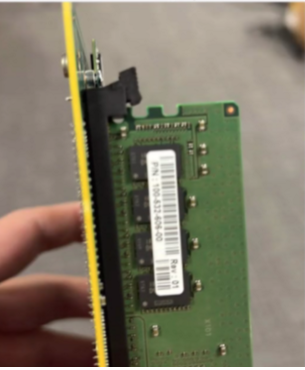
- Check and reseat the DIMM on the NVRAM card.
- Here is a image showing the NVRAM DIMM not clipped in correctly
- Ensure the NVRAM card or PCI riser are seated securely.
- Power up and retry booting the system.
- If symptoms persist, replace the NVRAM (Part Number: DGK85).
Produse afectate
Data Domain, DD6400 ApplianceProduse
Data Domain, Data Domain Deduplication Storage Systems, DD6900 Appliance, DD9400 Appliance, DD9900 ApplianceProprietăți articol
Article Number: 000208323
Article Type: How To
Ultima modificare: 29 sept. 2025
Version: 5
Găsiți răspunsuri la întrebările dvs. de la alți utilizatori Dell
Servicii de asistență
Verificați dacă dispozitivul dvs. este acoperit de serviciile de asistență.