Ubuntu Default Audio Input Is Muted after Installing the Operating System
Summary: This article provides information about Latitude 3340/3440/3540 Ubuntu’s default audio input is muted after installing the operating system.
Acest articol se aplică pentru
Acest articol nu se aplică pentru
Acest articol nu este legat de un produs specific.
Acest articol nu acoperă toate versiunile de produs existente.
Symptoms
Ubuntu’s Default Audio Input Is Muted
The first time the end user uses an audio input function (like a microphone) after installing the Ubuntu Operating System, there will be no audio input because the sound input volume is set to mute in settings.
Affected Platforms:
- Latitude 3340
- Latitude 3440
- Latitude 3540
Cause
The Capture Switch has changed to Dmic0 Capture Switch, and the ucm (use case manager) did not config it to default on, so it is off by default.
Resolution
Method 1
Adjust the audio input volume by System Settings → Sound → Input Volume.
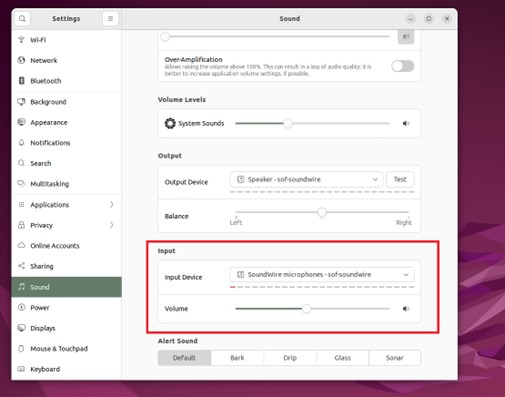
Figure 1 - Sound Settings
Method 2
Adjust the audio input volume by setting in the application (for example zoom).
The Fix
Upgrade Ubuntu when an online update is available.
Note: Both methods require network-connected
Method 1
- Open Terminal on Ubuntu
- Run the following commands:
sudo apt update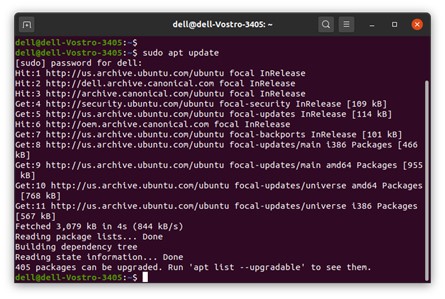
- Run the following commands:
sudo apt upgrade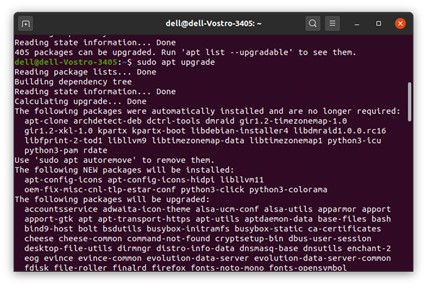
- Restart the Computer
Method 2
- The automatic system update notifications appear on the desktop once an online update is available. Or open Software Updater
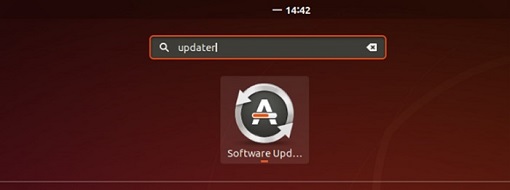
- Click Install Now to download and install updates.

- Restart the Computer
This solution is to set the Capture switch default on. Plan to Factory Install (FI) cut in May block.
Produse afectate
Latitude 3340, Latitude 3440Produse
Latitude 3540Proprietăți articol
Article Number: 000211167
Article Type: Solution
Ultima modificare: 16 apr. 2025
Version: 3
Găsiți răspunsuri la întrebările dvs. de la alți utilizatori Dell
Servicii de asistență
Verificați dacă dispozitivul dvs. este acoperit de serviciile de asistență.