OptiPlex 3000 Thin Client Windows IoT Default Admin Password
Summary: This article discusses the default password for the OptiPlex 3000 Thin Client Windows IoT admin account.
Acest articol se aplică pentru
Acest articol nu se aplică pentru
Acest articol nu este legat de un produs specific.
Acest articol nu acoperă toate versiunile de produs existente.
Instructions
OptiPlex 3000 Thin Client user signs out of the computer and needs a password to regain access to the computer. The admin needs the Windows IoT admin password to log in to the admin account.
The default password for the Admin account is Admin#<Service tag in capital letters> of the device. The default password for the User account is User#<Service tag in capital letters> of the device.
Reference the Windows 10 IoT Enterprise LTSC 2021 for OptiPlex 3000 Thin Client Administrator’s Guide:
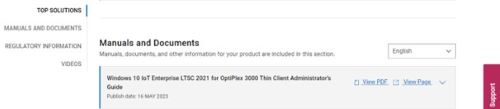
- Click Getting Started in the Table of Contents.
- Click Automatic and manual login.
Note: The default password can be used to sign in to the admin account if the password has not been changed.
Produse afectate
OptiPlex 3000 Thin ClientProprietăți articol
Article Number: 000214259
Article Type: How To
Ultima modificare: 18 mai 2026
Version: 8
Găsiți răspunsuri la întrebările dvs. de la alți utilizatori Dell
Servicii de asistență
Verificați dacă dispozitivul dvs. este acoperit de serviciile de asistență.