NetWorker: How to configure a distributed file system backup using multiple windows clients using filesystem-dynamic backup method.
Summary: How to configure a distributed file system backup using multiple windows clients using filesystem-dynamic backup method.
Acest articol se aplică pentru
Acest articol nu se aplică pentru
Acest articol nu este legat de un produs specific.
Acest articol nu acoperă toate versiunile de produs existente.
Instructions
Below are the steps to configure a Distributed Filesystem Backup using multiple windows clients using filesystem-dynamic backup method:
The same CIF share must be mapped to multiple windows system that must be backed up using filesystem-dynamic backup method.
Steps:
The account used for CIFS access must be added to the administrator group on the primary client and all worker clients as described below.
1. Go to "Add, edit, or remove other users" from the control panel.
2. Select the account used for CIFS access.
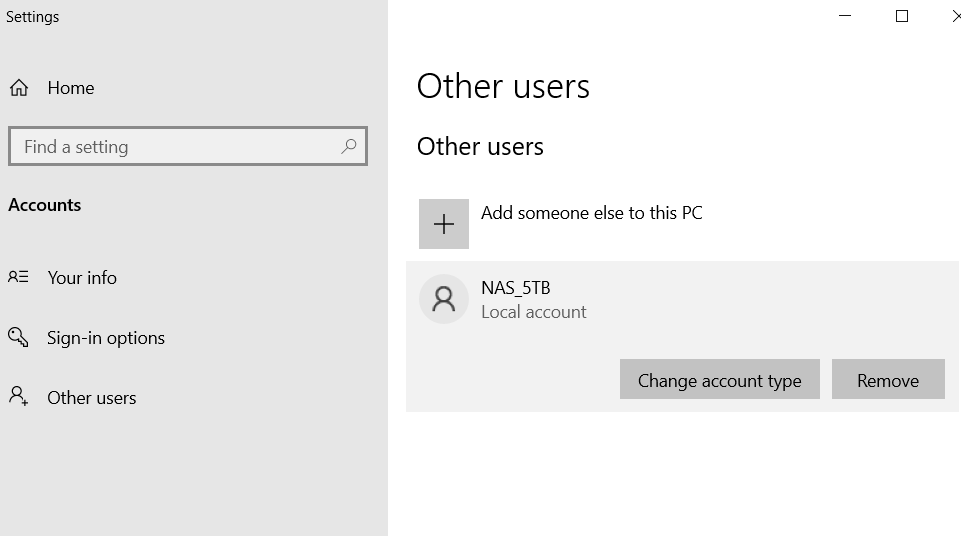
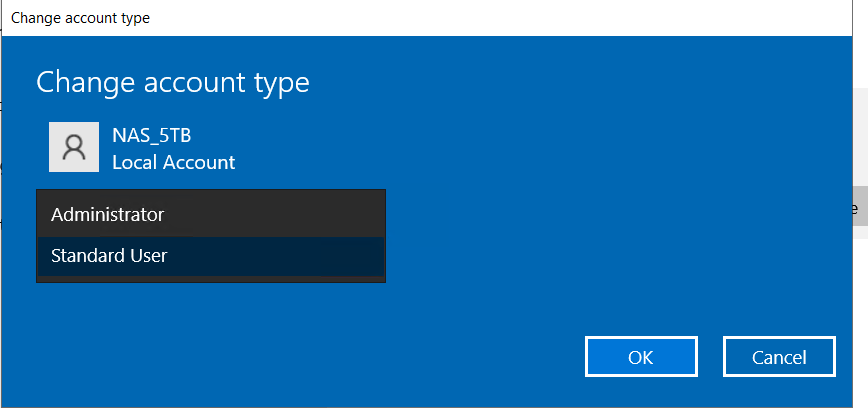
3. Go to change account type.
4. Select "administrator".
Proprietăți articol
Article Number: 000227054
Article Type: How To
Ultima modificare: 06 apr. 2026
Version: 4
Găsiți răspunsuri la întrebările dvs. de la alți utilizatori Dell
Servicii de asistență
Verificați dacă dispozitivul dvs. este acoperit de serviciile de asistență.