Data Domain: SDPM을 다시 초기화하고 삭제하는 방법 | Nvram
Summary: 이 문서에서는 BIOS에서 SDPM(Software Defined Persistent Memory) 설정을 삭제 및 재구성하고 시스템이 DDOS로 돌아간 후 초기화가 성공했는지 확인하는 방법에 대해 설명합니다.
Acest articol se aplică pentru
Acest articol nu se aplică pentru
Acest articol nu este legat de un produs specific.
Acest articol nu acoperă toate versiunile de produs existente.
Instructions
적용 대상:
- NVRAM(VOSS) 모듈 교체 후 DD9910, DD9410, DD6410 DD9910F 시스템
- VOSS 모듈에서 SDPM을 사용하는 PowerProtect Data Domain 시스템
- iDRAC 이벤트
SDPM7108 - Critical Diagnostic Event (Sanitize Required) - 지원되는 모든 소프트웨어(DDOS) 버전
필요한 조치:
SDPM을 다시 초기화합니다.
- 시스템을 재부팅합니다.
- 시스템 BIOS <F2> 액세스: 시스템 BIOS > 메모리 설정 > 영구 메모리
- 모든 NVDIMM 삭제를
Enabled
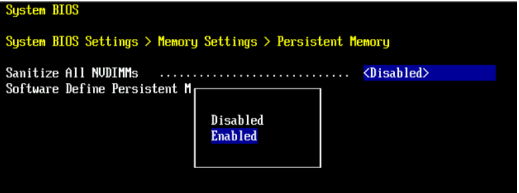
- SDPM 메모리 크기를 다음으로 설정
32 GB
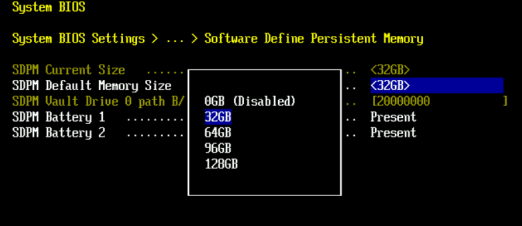
- SDPM 삭제를 확인하고 재부팅합니다.
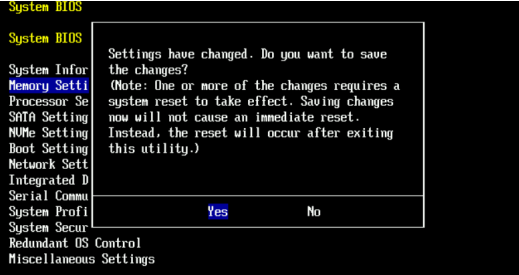
- 시스템이 DDOS로 재부팅되도록 허용
- NVRAM 장애 알림을 확인하고 파일 시스템이 활성화되어 있는지 확인하여 SDPM을 확인합니다.
-
# alerts show current
-- There should be no outstanding alert relating to the NVRAM subsystem.
Caution: It may take one to two minutes for the system to clear the NVRAM failure alert.

# system show nvram
Note: The battery must be at least 80% charged for the file system to start.

# filesys status
-- The Filesystem should be Enabled & Running
-
유효성 검사 목록:
다음 사항을 모두 확인합니다.
-
- SDPM 삭제가 완료되었습니다.
- 활성 NVRAM 관련 알림이 없습니다.
- NVRAM 상태가 정상적으로 보고됩니다.
- NVRAM 배터리 충전량이 80% 이상이어야 합니다.
- 파일 시스템을 설정할 수 없는 경우
- DD 시스템은 을(를) 실행 중입니다.
검증 단계가 하나라도 실패하면 지원 번들을 수집하고 Dell Data Protection 지원에 문의하십시오.
Additional Information
다음 작업은 iDRAC에서도 완료할 수 있습니다.
Configuration > BIOS Settings > Memory Settings > Persistent Memory- 다음을 설정합니다.
Sanitize All NVDIMMs수정 후:ENABLED>- 'SDPM Default Memory Size'가 <
32GB> 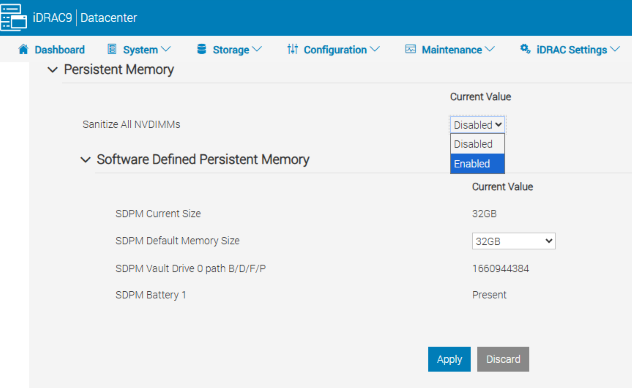
- 'SDPM Default Memory Size'가 <
- APPLY를 선택합니다. 그런 다음 "OK"를 클릭합니다.
- 'At Next Reboot'(페이지 하단)를 선택합니다.
- 다음을 설정합니다.
- DD 유닛 재부팅을 진행합니다(예: DD-CLI 사용:
#system reboot)
참고 자료:
Data Domain: SDPM을 진단하고 해결하는 방법 | NVRAM 알림
Data Domain: NVRAM 하드웨어 장애 알림 | EVT-NVRAM-00201
iDRAC(v7.x) 오류 및 이벤트 메시지 참조 가이드
Produse afectate
Data Domain, DD6410 Appliance, DD9410 Appliance, DD9910 Appliance, DD9910F ApplianceProduse
Data Domain Deduplication Storage SystemsProprietăți articol
Article Number: 000283787
Article Type: How To
Ultima modificare: 27 iul. 2026
Version: 2
Găsiți răspunsuri la întrebările dvs. de la alți utilizatori Dell
Servicii de asistență
Verificați dacă dispozitivul dvs. este acoperit de serviciile de asistență.