NVP vProxy: VM Backup Fails to Download VM's .vmx file HTTP 404 Not Found
Сводка: vProxy is unable to backup one or more virtual machines. vProxy does not have access to download the .vmx files from the vCenter.
Симптомы
NetWorker VMware Protection (NVP) vProxy is unable to backup one or more Virtual Machines (VM).
The VM backup session logs show:
YYYY/MM?DD HH:mm:SS ERROR: [@(#) Build number: 288] No contents return in download of "[DATASTORE_NAME] FOLDER/VM_NAME.vmx". HTTP status: "404 Not Found"
YYYY/MM?DD HH:mm:SS ERROR: [@(#) Build number: 288] Failed to download config file "[DATASTORE_NAME] FOLDER/VM_NAME.vmx" using URL "https://vcenter_ip/folder/FOLDER/VM_NAME.vmx?dcPath=datacenter&dsName=DATASTORE_NAME".
YYYY/MM?DD HH:mm:SS INFO: [@(#) Build number: 288] Failed HTTP request took 62.645619ms
YYYY/MM?DD HH:mm:SS TRACE: [@(#) Build number: 288] HTTPRequest: &{GET https://VCENTER_NAME/folder/FOLDER/VM_NAME.vmx?dcPath=datacenter&dsName=DATASTORE_NAME HTTP/1.1 1 1 map[Cookie:[vmware_soap_session=ae40da8f99e1d1585ca2317216080d6c10b7bdaa] Content-Type:[text/plain]] <nil> 0 [] false vcenter_ip map[] map[] <nil> map[] <nil> <nil>}
YYYY/MM?DD HH:mm:SS ERROR: [@(#) Build number: 288] Failed to download VM config file "[DATASTORE_NAME] FOLDER/VM_NAME.vmx" into saveset file "vm-####-config-file-0.cfg".
YYYY/MM?DD HH:mm:SS ERROR: [@(#) Build number: ###] Failed to Initialize Backup Descriptor.
The backup session logs are available in the following locations:
- Linux NetWorker server:
/nsr/logs/policy/POLICY_NAME/WORKFLOW_NAME/ - Windows NetWorker server (Default):
C:\Program Files\EMC NetWorker\nsr\logs\policy\POLICY_NAME\WORKFLOW_NAME - vProxy appliance:
/opt/emc/vproxy/runtime/logs/recycle/vbackupd/DATE/
Причина
The backup failure is reporting HTTP error code 404 (not found), because it is unable to access or download the VM's .vmx file from the vCenter. This issue is occurring outside of NetWorker.
Разрешение
From a web browser, enter the .vmx URL from the backup log.
For example:
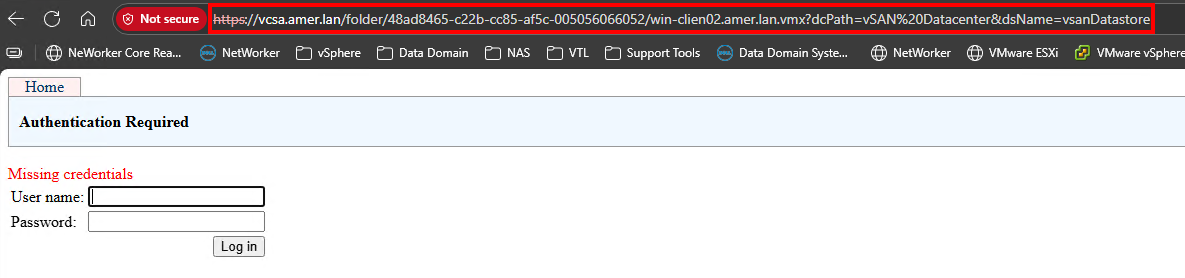
Enter the same credentials used to backup VMs in NetWorker.
If there are no issues accessing the file, it downloads in the browser:
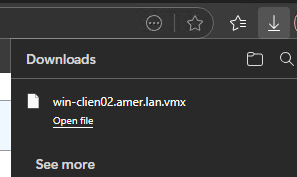
If the web browser also reports HTTP 404, the issue is occurring outside of vProxy or NetWorker. This issue must be investigated by the VMware administrator. If assistance is required, VMware support must be engaged.
Дополнительная информация
- NVP vProxy: VM Backup Fails to Download VM's .vmx file HTTP 500 Internal Server Error
- NetWorker NVP-vProxy: Backup error: Failed to download the VM configuration file. HTTP Status code: 500
- NetWorker NVP-vProxy: Backup error: Failed to download VM config file. HTTP Status code: 500
- NVP-vProxy: Image level restore failing with "Could not update vmx file's 'nvram' entry"